Artwork software: the key to faster, error-free packaging launches
Discover how artwork software streamlines packaging workflows, reduces errors, and speeds up product launches for brands.

2 min read
Ekaterina Skalatskaia
:
Published
Managing creative and packaging projects can be challenging without a clear system in place. In this article, we’ll explore how to implement an artwork approval workflow that streamlines the approval process, keeps all stakeholders aligned, and reduces errors. You’ll learn practical steps to assign responsibilities, set deadlines, and leverage tools like Cway to make feedback and approvals faster and more transparent. Whether you’re a brand manager, designer, or marketing professional, this guide will help you create an efficient workflow that ensures every project moves smoothly from concept to final production.
An approval process is the structured sequence of steps that artwork goes through before it’s finalized for production or publication. This typically involves multiple stakeholders, including designers, brand managers, marketing teams, and quality assurance.
Without a clear process, teams often face:
Confusion over version control
Delays due to unclear responsibilities
Last-minute errors that impact production timelines
A well-defined approval process establishes accountability, provides transparency, and ensures that all necessary checks are performed before final sign-off.
From Chaos to Control
Centralize feedback, track approvals, and streamline your workflow with Cway. Get started with a free consultation!
Implementing an artwork review system requires careful planning and collaboration. Here’s a practical step-by-step approach:
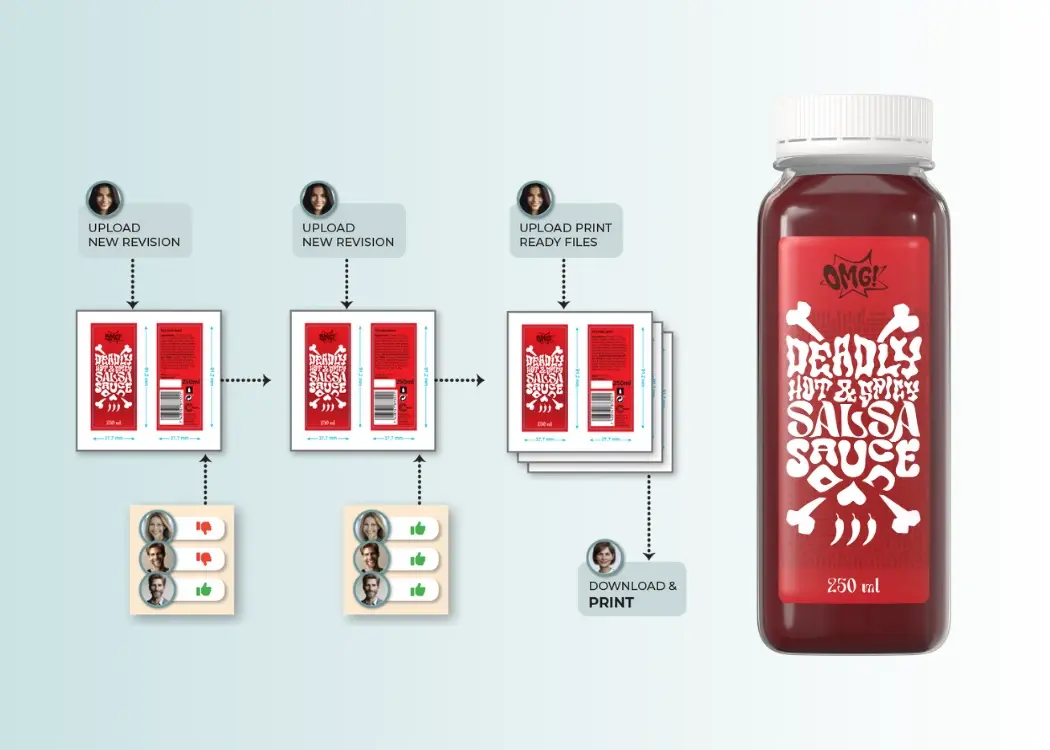
Map your current workflow – Identify each stage your artwork passes through, from initial creation to final approval.
Define roles and responsibilities – Specify who reviews, who approves, and who has the final sign-off authority.
Standardize review criteria – Create clear guidelines for what constitutes approval at each stage.
Select the right tools – Use workflow management software or platforms designed for artwork management to centralize feedback and versioning.
Automate repetitive tasks – Notifications, reminders, and status updates can reduce bottlenecks.
Train your team – Ensure everyone understands the process and tools to maintain consistency.
By following these steps, teams can reduce errors, prevent bottlenecks, and create a repeatable process that scales with their projects.
An effective approval system ensures artwork moves smoothly from concept to production with minimal friction. Key strategies include:
Centralized feedback – Collect all comments and approvals in a single platform to avoid lost or conflicting feedback.
Version control – Maintain a clear history of revisions so teams always know the latest approved version.
Automated notifications – Keep stakeholders informed at each stage to prevent delays.
Clear deadlines – Assign timeframes for reviews to maintain momentum without compromising quality.
Transparent audit trails – Track who approved what and when, ensuring accountability.
A strong approval system not only accelerates workflows but also enhances collaboration, reduces errors, and safeguards brand integrity.
Stay on Track with Every Approval
Discover methods to centralize feedback and prevent delays across teams.
Implementing a structured packaging approval workflow brings tangible benefits:
Faster time-to-market for products and campaigns
Reduced errors and rework
Clear accountability and ownership
Improved collaboration between creative, marketing, and production teams
Better compliance with brand standards and regulatory requirements
By investing in an efficient workflow, organizations save time, minimize costly mistakes, and maintain high-quality outputs.
Even with the best intentions, workflows can fail. Watch out for:
Miscommunication – Ensure all stakeholders understand the process and expectations.
Version confusion – Always use a centralized system for feedback and approvals.
Bottlenecks – Identify stages where approvals often get delayed and streamline them.
Lack of accountability – Clearly define who is responsible at each step to prevent inaction.
Avoiding these pitfalls ensures your workflow remains efficient, transparent, and effective.
A well-implemented packaging artwork review process transforms the way creative and packaging teams operate. By mapping processes, defining responsibilities, and leveraging the right tools, teams can streamline approvals, improve collaboration, and deliver error-free artwork faster.
Tools like Cway provide centralized platforms for managing artwork, automating approvals, and tracking progress—all crucial for teams aiming to maintain high-quality standards while accelerating production timelines.
Discover how artwork software streamlines packaging workflows, reduces errors, and speeds up product launches for brands.
Email approval slows down packaging designs. Explore better alternatives like online proofing and design project management tools for faster...
Improve your packaging approval with layer-specific annotation and online proofing. Discover Cway’s techniques to speed up your creative review...