
 Ekaterina Skalatskaia
Faster reviews, smarter workflows: what’s new in Cway
 Ekaterina Skalatskaia : August 22, 2025 at 10:30 AM
Explore Cway’s latest artwork approval improvements and workflow updates to boost team collaboration and streamline design reviews
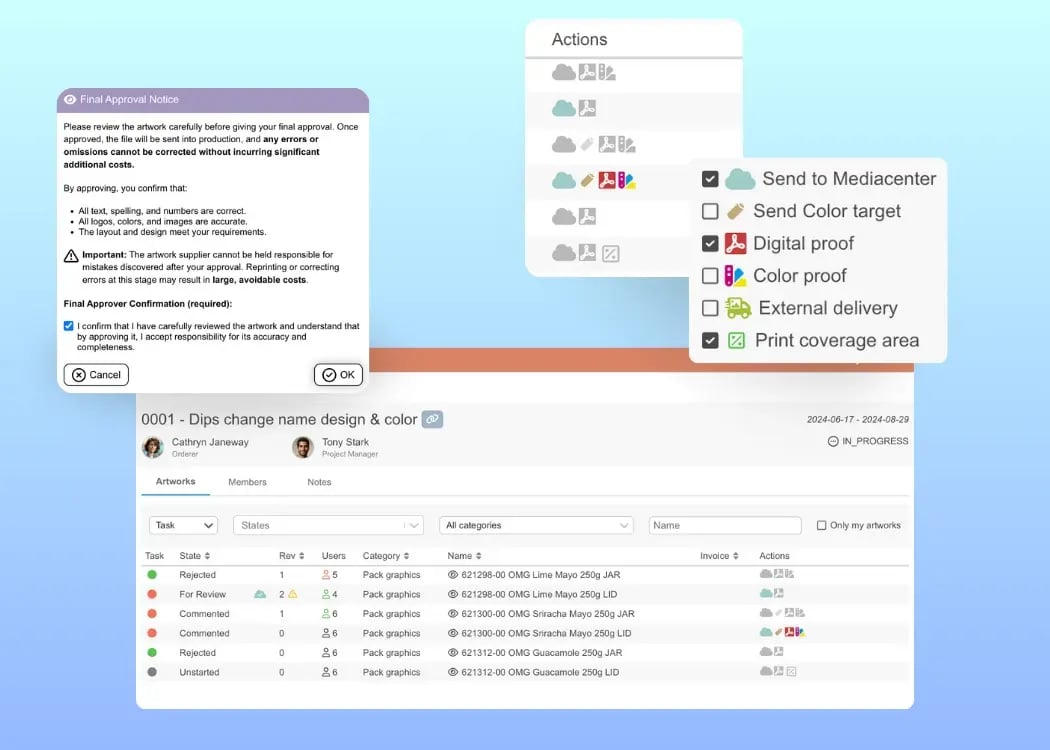
Managing artwork approvals and production steps just became even smoother. Our latest Cway update introduces smarter approval safeguards, clearer task visibility, and a more intuitive workflow. Here’s what’s new and why it matters:
Final approvals are critical — and once artwork is sent to production, even small errors can lead to expensive reprints. To help teams catch mistakes early, we’ve introduced two new approval-stage warnings:
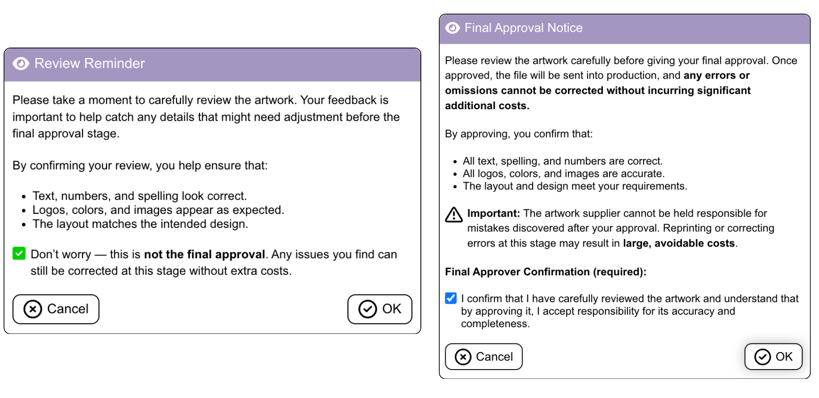
This change helps ensure all stakeholders carefully review designs before sending them to production, significantly reducing avoidable reprints or corrections.
You can now sort and filter artworks by the colored Task circles, which help you quickly identify progress and priority.
🔴 Red – You have a task pending. Action is required on your part.
🟢 Green – No action required on your behalf. The artwork is complete or approved.
🔵 Blue – The artwork has been delivered and downloaded by the repro or printer.
⚫ Grey – The artwork has not been started yet.
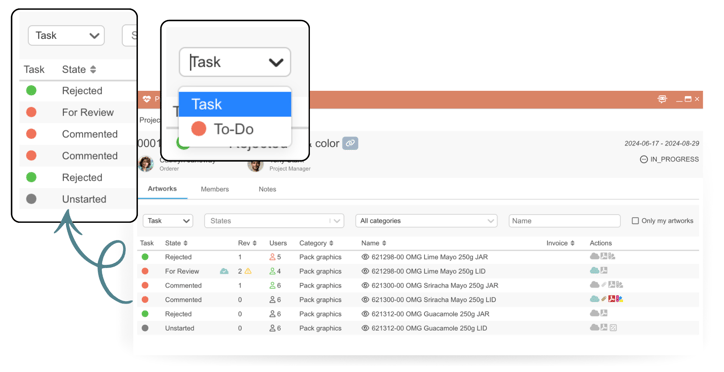
This makes it simple to see at a glance which artworks need attention.
The section that previously listed “Tasks” (for example: Send to Media Center, Digital proof, External delivery) has been renamed to “Actions.” The functionality remains the same — you can still assign which actions are needed for each artwork and mark them as complete.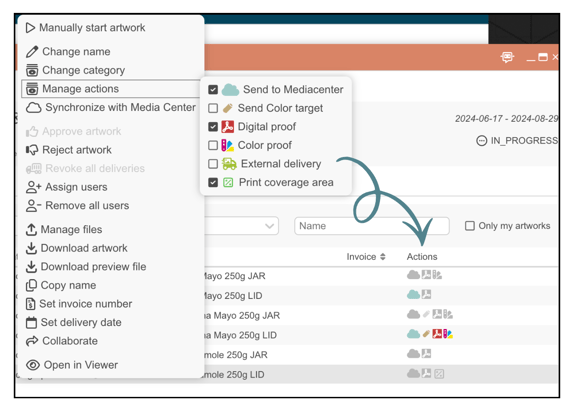
The rename helps avoid confusion, since the colored circles are now called Tasks, and Actions refer to the specific workflow steps required on an artwork.
A few updates make everyday work faster and smoother:
Improved Compare Tool – fewer page reloads, smoother navigation between artwork versions.
Multiple artwork commenting – add feedback on several artworks in one go from the Media Center.
While most of this release focuses on visible interface and workflow updates, we’ve also implemented several important backend and technical improvements to strengthen overall platform performance and security.
These updates include optimizations in how Cway handles subscriptions, project updates, and background rendering — the core systems that keep everything running smoothly behind the scenes.
You might not notice these improvements directly, but they make a big difference:
Faster data synchronization across Viewer, Media Center, and Artwork tabs
More reliable user subscriptions and notifications
Smoother performance during heavy project activity
Improved stability for real-time collaboration features
In addition, several key technical upgrades make the platform even more robust:
Apollo GraphQL library update to v4 for improved performance and data management
Enhanced npm security measures to protect against potential dependency attacks
Better subscription handling in Viewer, ensuring consistent updates and fewer sync errors
Together, these backend and technical enhancements ensure that Cway continues to deliver a faster, safer, and more scalable experience — even as your teams and artwork libraries grow.
 Ekaterina Skalatskaia : August 22, 2025 at 10:30 AM
Explore Cway’s latest artwork approval improvements and workflow updates to boost team collaboration and streamline design reviews
 Ekaterina Skalatskaia : December 20, 2024 at 9:09 AM
Simplify artwork sharing with Cway's Collaborate Now. Share securely and review easily without logins. Enhance your artwork approval process.
 Ekaterina Skalatskaia : March 17, 2025 at 3:14 PM
Discover how Cway scalable, secure, and user-friendly software redefines artwork management. Cway boosts productivity and innovation.