6 min read

Best tools for content review and approval in 2026

Best tools for content review and approval in 2026
Top Content Review and Approval Software Tools in 2026 | Comparison
9:58

Content review and approval software helps teams manage feedback, approvals, and version control across creative, marketing, and packaging workflows. When multiple stakeholders are involved, unclear feedback and manual approval steps quickly become bottlenecks.

In this guide, we compare the best content review and approval software tools in 2026. You’ll see how each platform works, key features to look for, pros and cons, and which tools are best suited for creative teams, brand owners, and packaging-heavy workflows.


Why Teams Use Content Review and Approval Software

Brands today manage a mix of packaging assets, marketing content, digital designs, and websites. With multiple stakeholders, approvals often become bottlenecks.

That’s where approval workflow software solutions come in — automating tasks, clarifying feedback, and helping teams stay productive.

These tools are essential for:

  • Consistent brand presentation

  • Faster content delivery

  • Regulatory compliance

  • Better team alignment


Smarter artwork approvals start here

Discover Cway® – your all-in-one design and content approval platform.


Key Features Every Content Review and Approval Software Should Include

Choosing the right content review and approval software isn’t just about ticking boxes — it’s about making your team’s life easier, faster, and less stressful. The best platforms aren’t only powerful; they’re intuitive, scalable, and built to handle the real-world chaos of branding, packaging, and creative workflows.

Here’s what to look for — with real-life use cases to show why each feature matters:

1. Review workflow customization

No two teams approve content the same way. A packaging project for a global food brand might need input from legal, marketing, and regional managers — in that specific order. A beauty brand launching a seasonal campaign may prioritize speed over complexity.

Look for tools that let you build custom workflows, assign specific roles, and move assets through your organization’s exact review process. Cway® software, for instance, lets you create conditional flows based on asset type, region, or reviewer role — so your French compliance lead doesn’t get bogged down approving a U.S.-only SKU.

2. Approval workflow templates

Templates are your secret weapon for scaling reviews. Instead of building a new approval route from scratch every time, save your standard processes as reusable templates.

Example: A brand launching dozens of SKUs per quarter can build packaging approval templates that automatically include artwork, legal, and brand checkpoints — no more forgotten steps, no more reinventing the wheel.

3. Version control & audit trails

We’ve all been there — “Which file is the final-final version?”
Without proper version control, feedback gets lost, mistakes resurface, and your “approved” assets might actually be outdated.

The best tools track every comment, revision, and approval status — creating a transparent audit trail for accountability and compliance.

4. Commenting and markup tools

Vague feedback kills productivity. Instead of endless Slack messages like “Can you move this text up a bit?”, your team needs pinpoint comments and markup directly on the content.

Whether it’s annotating a dieline, highlighting a typo on a brochure, or suggesting layout tweaks for a product page — visual feedback matters.

5. Automated notifications & escalation paths

Deadlines don’t chase themselves. Look for platforms that automatically notify reviewers when it's their turn and escalate overdue approvals.

Imagine this: your marketing manager misses a review window, so the system automatically pings them — and if they don’t act, it alerts the team lead. That’s workflow momentum you can count on.

6. Website feedback tools for web-based content

Approving a landing page or campaign site? You don’t want screenshots and email threads — you want to comment directly on the live site.

Website feedback tools let teams leave sticky notes on web pages, suggest edits in real-time, and track those suggestions through to resolution. For example, during a product launch, your UX lead can flag a broken CTA, while your copywriter suggests a tagline tweak — all without leaving the browser.

7. Secure, cloud-based access

Cloud access enables global teams and external partners to collaborate securely. Look for role-based permissions, secure sharing, and access tracking.


Streamline your packaging approvals like Fria Bröd

Discover the best content review and approval tools — and how Fria Bröd cut time-to-market using Cway® software.


Best Content Review and Approval Software Tools in 2026

Here’s a curated list of powerful tools that improve your team’s review process:

1. Cway® software – the all-in-one creative approval platform

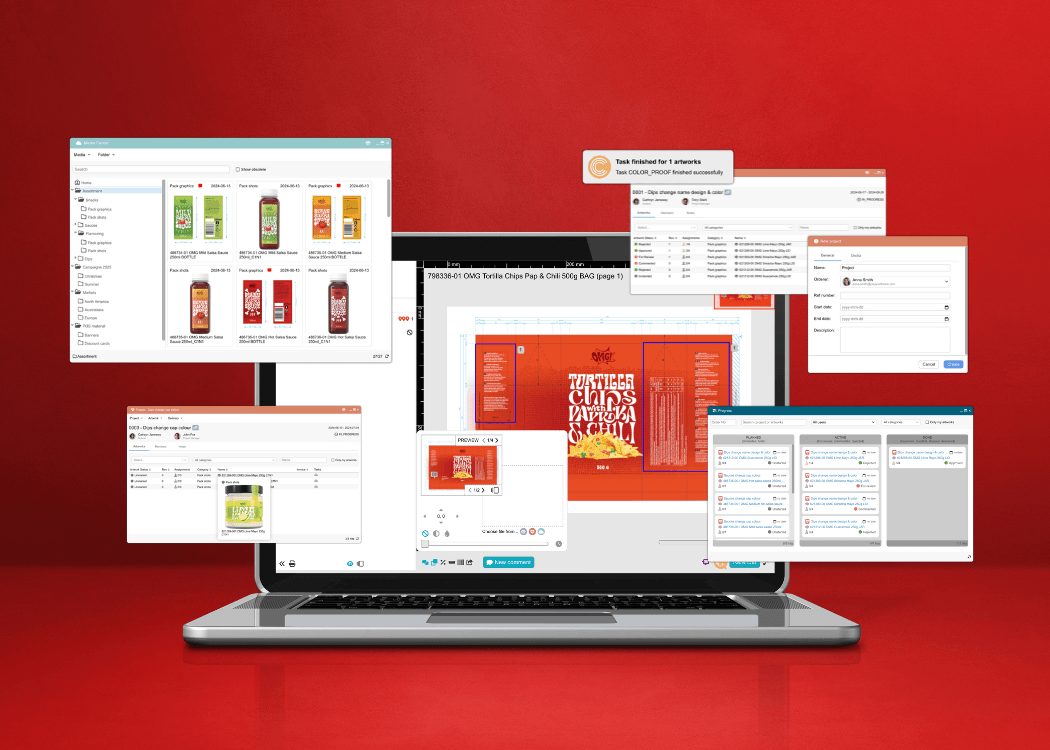
Cway® software is a content review and approval platform designed for teams managing complex creative and packaging workflows. It combines structured approval workflows, visual version comparison, and centralized asset management in one system.

Why teams love Cway®:

  • Drag-and-drop approval workflows – Customize review routes effortlessly for any content type.

  • Approval workflow templates – Reuse standard flows to save time and reduce human error.

  • Centralized digital asset management – Keep everything (finals, versions, feedback) in one place.

  • Precision markup tools – Annotate directly on packaging dielines, PDFs, or ad creatives.

  • Automated reminders & escalation – Never chase stakeholders again.

  • Real-time approval tracking – Instantly see who’s approved, pending, or flagged.

  • Secure cloud-based access – Share review links with partners without sacrificing control.

Best for:
Packaging-heavy industries, global brand teams, compliance-focused reviews, marketing asset rollouts

Browse case studies of Cway® in real brand workflows.

2. Filestage

Filestage is a strong choice for teams handling video, social, and branded content. It’s built for ease-of-use, so your marketing managers and freelancers can jump in without a learning curve.

Highlights:

  • Clean interface with visual feedback tools

  • Multiple file formats supported (PDFs, videos, images)

  • Custom approval stages and deadlines

Best for:
Agencies and marketing teams focused on campaigns, ads, and digital assets.


3. Ziflow

Ziflow is a scalable solution designed for agencies and creative teams juggling hundreds of deliverables. It connects well with other tools like Slack, Asana, and Adobe Creative Cloud.

Highlights:

  • Extensive file format support

  • Collaborative review & version control

  • Custom workflow automation

Best for:
Creative agencies, in-house studios, multimedia-heavy teams.


4. Workfront by Adobe

Workfront is a heavy-duty platform for enterprise-level teams already using Adobe products. It offers full project lifecycle management, from request intake to final asset approval.

Highlights:

  • Tight Adobe integration (Photoshop, Illustrator, etc.)

  • Custom dashboards and reporting

  • Complex cross-department workflow control

Best for:
Large organizations with structured processes and a wide tech stack.


5. GoVisually

GoVisually is lightweight and built with designers in mind. It focuses on simple feedback cycles for digital creatives without unnecessary extras.

Highlights:

  • Drag-and-drop uploads

  • Visual comment threads

  • Client-friendly UI

Best for:
Freelancers, small design teams, and client feedback loops.


6. Marker.io

Marker.io is ideal for website and app teams who want feedback right where the content lives — on the actual site. It’s a sleek, browser-based tool that simplifies QA and UX reviews.

Highlights:

  • Add comments directly on live websites

  • Integrates with tools like Trello, Jira, ClickUp

  • Captures browser data for tech teams

Best for:
UX/UI teams, developers, QA testers, and web designers.


7. Approval Studio

Approval Studio combines visual review with lightweight task tracking. It’s aimed at creative production teams who want simple project visibility alongside artwork proofing.

Highlights:

  • Side-by-side version comparison

  • Task assignment and tracking

  • Approval status reports

Best for:
Small to mid-size teams balancing project management with creative approvals.

Quick Comparison Table of Content Review and Approval Software

Tool

Best For

Standout Feature

Cway®

Packaging, marketing, compliance

Complete creative approval ecosystem

Filestage

Marketing media feedback

User-friendly for non-technical stakeholders

Ziflow

Creative video agencies

Robust video integrations

Workfront

Enterprises using Adobe

End-to-end project control

GoVisually

Designers & freelancers

Minimalist and intuitive

Marker.io

Web & product teams

Live website annotation

Approval Studio

Creative production + task teams

Proofing + task management combo


Get the ultimate handbook on artwork approval workflows from briefing to print.


Final Thoughts

Choosing the right content review and approval software depends on your workflow complexity, collaboration needs, and industry requirements. While some tools focus on lightweight creative feedback, others are built to support structured approvals, compliance, and packaging workflows.

For teams handling high volumes of content and packaging assets, platforms like Cway® provide greater control, visibility, and scalability.


FAQ


Speed up creative work with smart design approval software

Speed up creative work with smart design approval software

Streamline design approvals, enhance feedback loops, and get to market faster with Cway®—your all-in-one platform for artwork approval process.

View Full Article
How to build a compliant and scalable approval workflow

How to build a compliant and scalable approval workflow

Creating packaging isn’t just about great design—it’s about building an approval workflow that ensures every step, from concept to shelf, is aligned,...

View Full Article
Core features of online proofing software every brand needs

Core features of online proofing software every brand needs

Looking to upgrade your review and approval process in 2026? In this article, we explore the top features of online proofing software that packaging,...

View Full Article