Artwork Approvals & Proofing
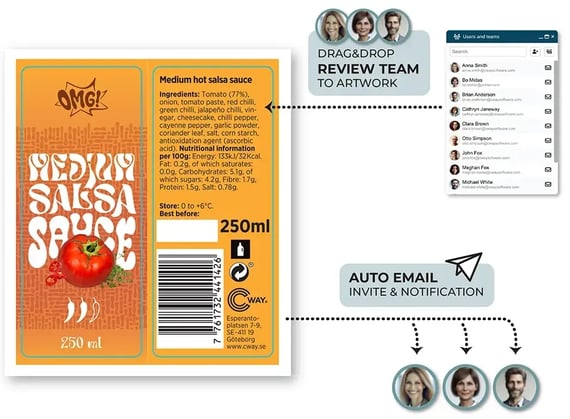
Review, mark up and approve packaging artwork with one clear decision-maker. Reviewers comment, the orderer decides, and your designer gets one answer instead of conflicting feedback.
Brand, regulatory, agencies and printers work in one secure space, and every approval is tied to the exact revision that was signed off.
Clear approvals. One answer. The right revision.
.
Artwork approval software that gets it right the first time.
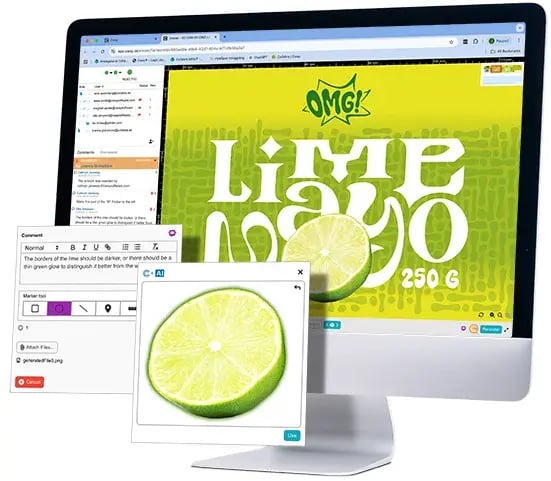
Packaging artwork goes wrong when feedback is scattered, approvers disagree and nobody is sure which file was signed off. Cway gives every review a clear owner, keeps markup on the artwork itself and records exactly which revision each person approved.
Reduce your approvals from weeks to days.

Trusted by product and packaging teams
“When you’ve made a change to a tortilla artwork — something that used to take at least 10 minutes to review, plus a headache — it now takes ten seconds, because you can clearly see the change and that only the change has been made. No downloading or coordination needed either. We save hours during a single project.”
Susanna Gustafsson
Portfolio assistant, Paulig Group
CWAY® PLATFORM
Designed for Faster, Clearer Artwork Approvals
Review and approve artwork in real-time, ensuring accurate, time-saving, and hassle-free reviews.
ONE DECISION-MAKER, NO CONFLICTING FEEDBACK
Approvals without chaos
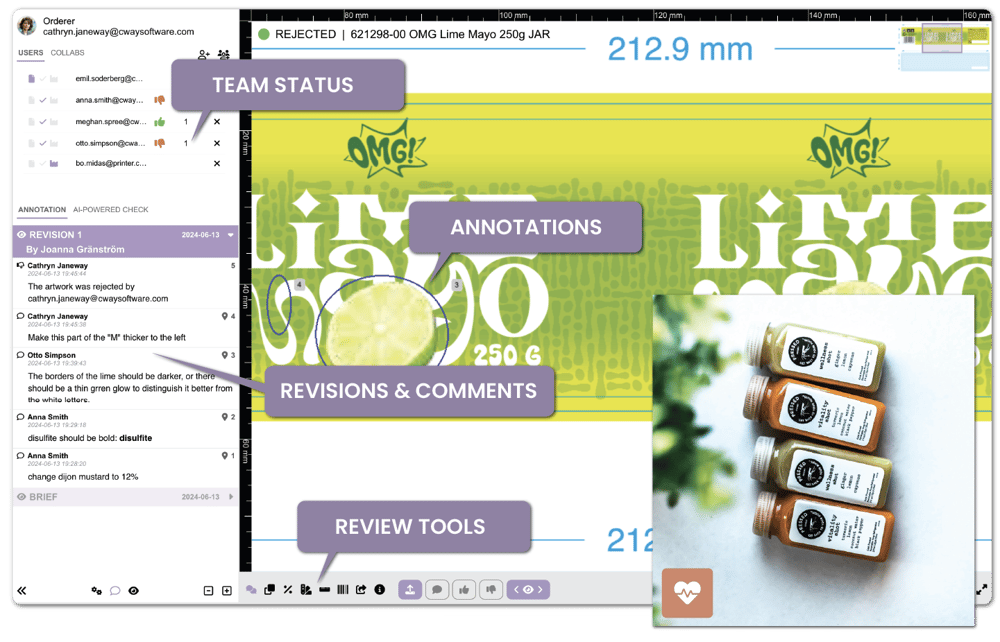
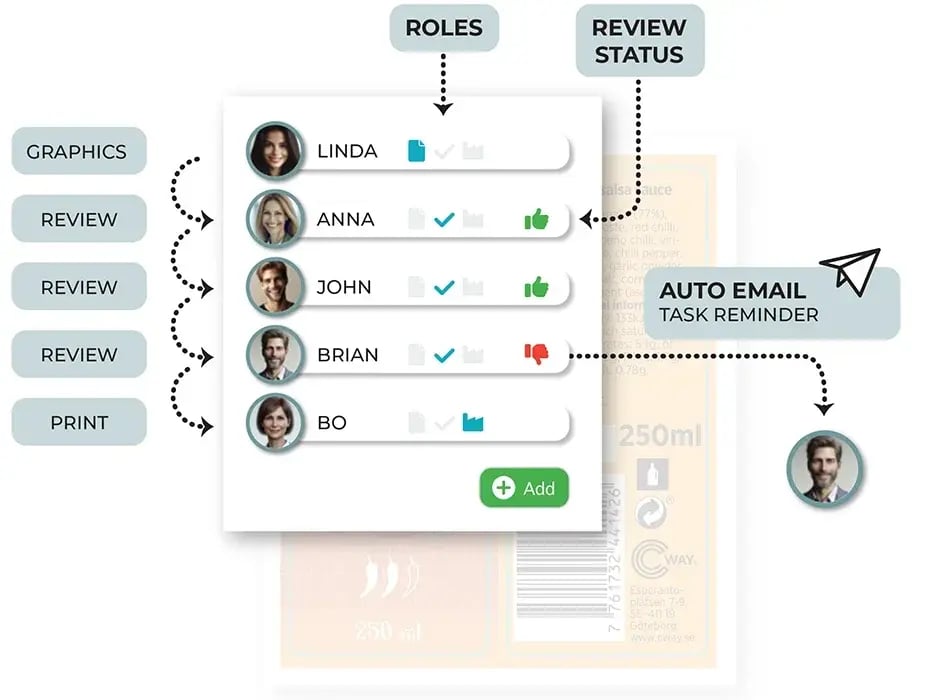
Reviewers from brand, marketing, regulatory and quality comment. The orderer decides what goes to the designer.
- Conflicting feedback is resolved before the designer sees it
- Team approvals: everyone approves, or one person decides for the team
- Every new revision answers one clear brief
No more guessing whose comment wins.
ELIMINATE MANUAL WORK
Maintain artwork approval control with audit trails
Every approval and rejection is tied to the exact revision it applies to.
- Know exactly which revision was approved, by whom and when
- Every change to projects, artwork, files and products is kept as a permanent event
- Clear evidence for internal audits, retail partners and recall checks
Built for accountability from first review to final release. Audit trails for compliance →
FEEDBACK MADE SIMPLE
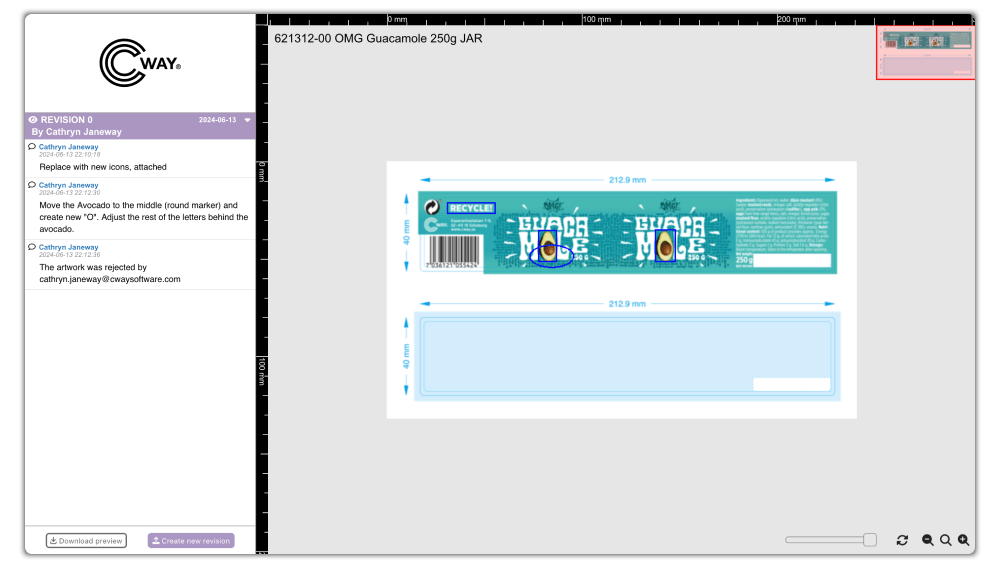
Precise artwork annotations
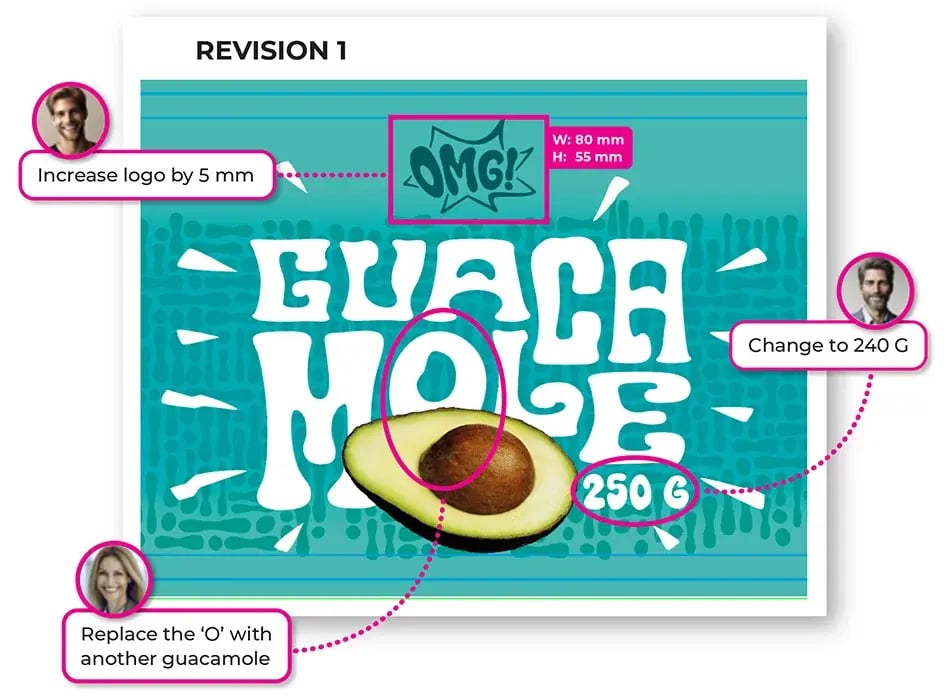
Pin comments, draw shapes and measure directly on the artwork, exactly where the change is needed.
- Markup stays in place, even when the proof is re-rendered
- Invalidate a wrong comment without deleting it, and restore it later
- Every comment stays linked to the right revision
Clear feedback the designer can act on, every time.
SPOT EVERY CHANGE
Reduce approval errors with version comparison
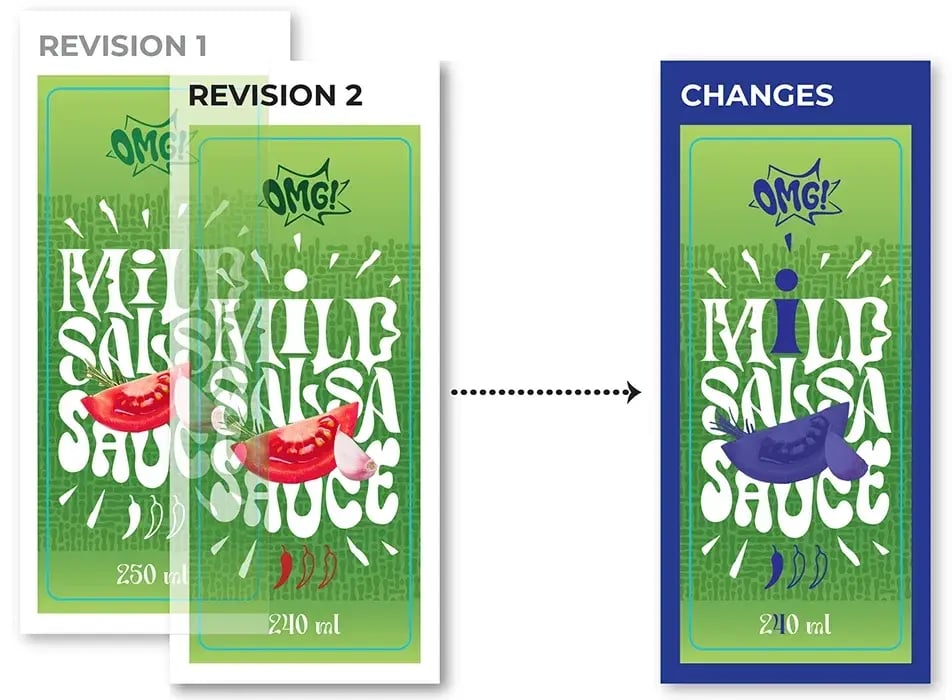
Compare previous and new versions to ensure every requested update has been made—correctly.
-
Instantly highlight changes between versions
-
Verify corrections before approval
-
Reduce costly errors and last-minute rework
Confidence comes from knowing exactly what changed.
PRINT-READY CHECKS
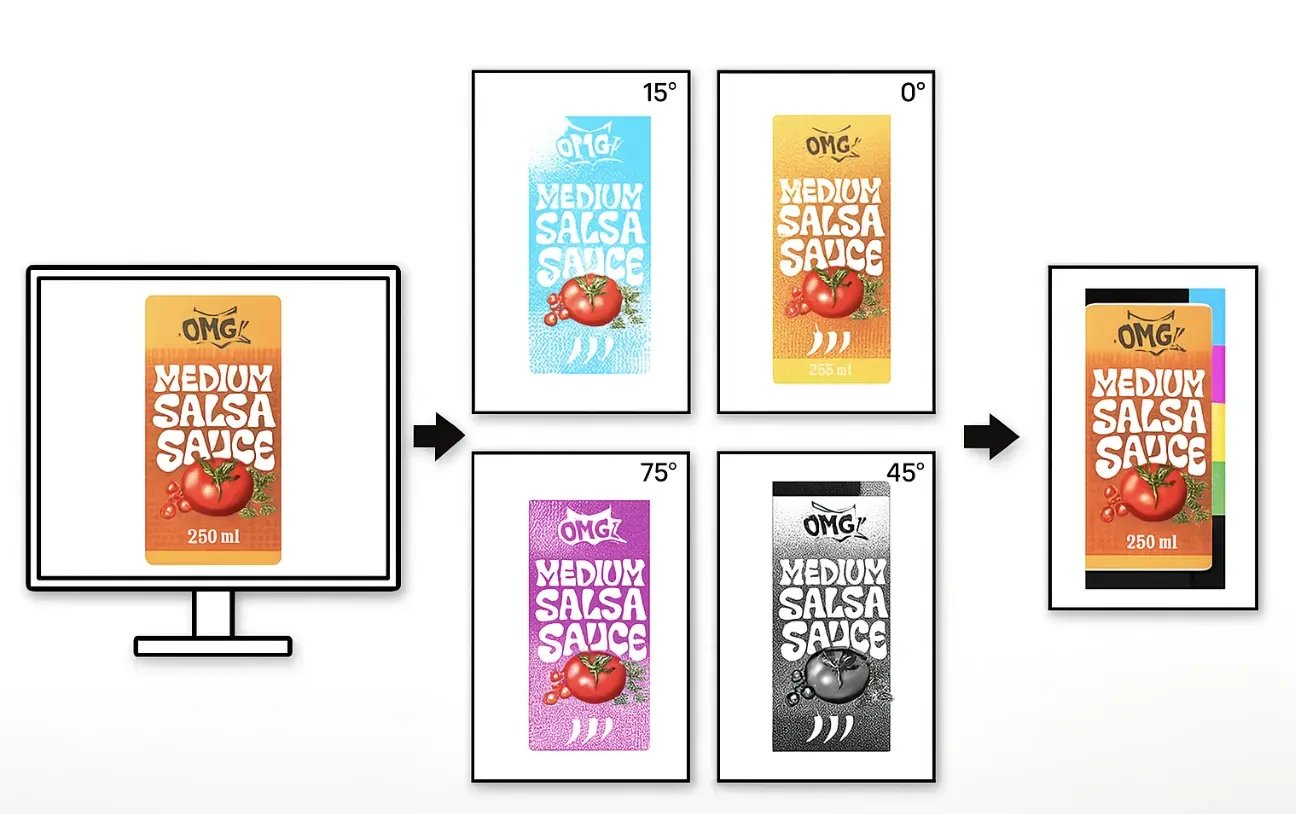
Proofing tools built for print
Check what matters for print before the artwork is approved.
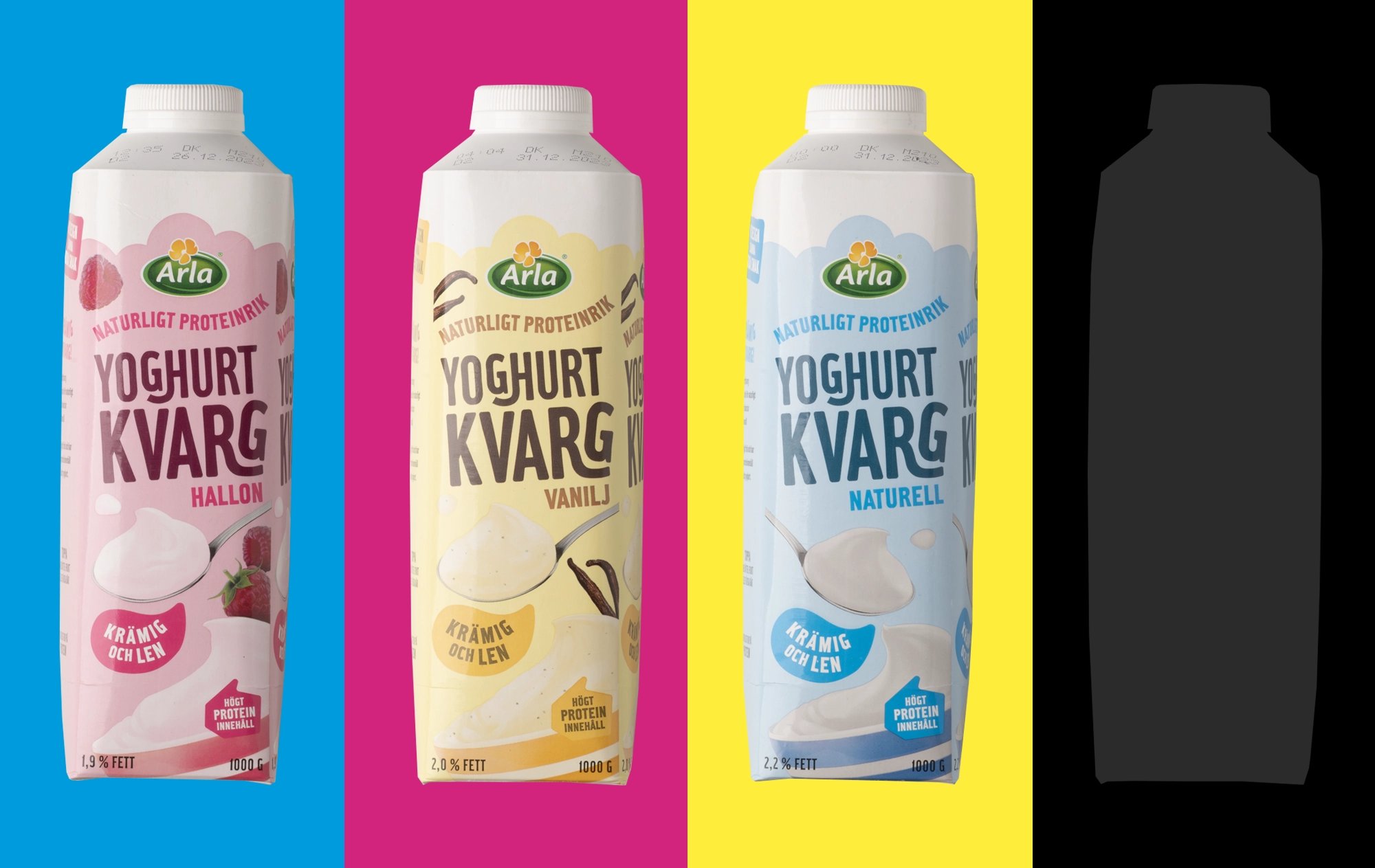
- Inspect each process and spot ink on its own with colour separations
- Measure ink coverage against a target and approve it as a tracked step
- See real size in mm and inches and DPI on every page, with low resolution flagged
Print-ready checks inside the approval, not after it.
EXTERNAL SUPPLIERS
Agencies and printers join without a login
External suppliers work on the artwork through a secure link, with no Cway account.
- View and download artwork straight from the link
- Upload new revisions without email attachments
- No accounts to create and no passwords to manage
Your suppliers in the loop, without the admin.
PROOF OF DELIVERY
Approved means delivered, not just sent
The approval chain doesn't stop at sign-off. It ends when the printer has the file.
- The printer fills in their own print spec sheet from an emailed link
- No account needed on the printer's side
- Artwork is marked Delivered only when the printer has actually downloaded it
Know the printer has the approved file.
The benefits of Cway® artwork approval software
Rapid approvals
Cut approval cycles from weeks to days. Real-time collaboration, instant feedback and structured workflows eliminate delays.
Version control
No more confusion over the latest version. All versions are tracked, and previous versions are available for comparison.
Selective re-approval
One clean feedback round. The orderer has the final say, and only the approvers a change affects need to look again.
Auto notifications
Never miss a deadline. You get auto reminders and updates when action is required.
Tech for speed
Experience next-level technology delivering one of the market’s quickest preview renderings, and visual clarity.
Any file format
Whether it's a PDF, PNG, or other formats, upload and review files in the format that works best for your team.
Faster approvals, fewer mistakes, total control
Don’t let slow approvals delay your production. With the Cway® Viewer, you can reduce approval cycles, improve accuracy, ensure packaging compliance, and bring products to market faster.
Book a strategy call
FAQ
-
What is the artwork approval process?
The artwork approval process is how packaging artwork is reviewed, corrected and signed off before it goes to print. Brand, marketing, regulatory and quality teams check that the artwork is accurate, on brand and legally compliant, and the designer updates it until every approver signs off.
In Cway, the orderer turns all reviewers' feedback into one clear answer for the designer, so conflicting comments never reach them. When a new revision comes in, only the approvers it affects need to look again, and every approval is tied to the exact revision that was signed off.
-
Who has the final say when reviewers disagree?
The orderer does. Reviewers add comments, and the orderer decides which feedback goes to the designer, so the designer works from one clear answer instead of conflicting requests.
-
Do all approvers need to re-approve after a small change?
No. With selective re-approval, you send a new revision only to the approvers it affects. Legal doesn't need to approve a colour tweak again.
-
Can agencies and printers work in Cway without an account?
Yes. Suppliers can view, download and upload revisions through a secure link, without creating an account.
-
How do I prove which version of the artwork was approved?
Every approval in Cway is tied to the exact revision, with who approved it and when, so you can always show which file was signed off.
-
Can Cway handle approvals for many SKUs at once?
Yes. Bulk actions let you approve, reject, bundle and deliver hundreds of SKUs in one go, and each approver has one live inbox with everything waiting on them.

Artwork Approval Workflows: The Complete Guide
Learn how leading packaging teams reduce errors, speed up approvals, and stay compliant.
DISCOVER THE POWER OF AN ALL-IN-ONE SOLUTION
Ready to improve your artwork approval process?
Start your timesave today - get in touch!