4 min read

Artwork Flow or Cway? Best packaging artwork software reviewed

Artwork Flow or Cway? Best packaging artwork software reviewed
Cway vs Artwork Flow: best artwork management software in 2026
7:51

As packaging projects grow more complex, choosing the right artwork management software can save countless hours and prevent costly design errors.

Two leading contenders — Cway and Artwork Flow — both promise to simplify your artwork approvals and creative workflows.

But which one actually delivers the most value? Here’s a side-by-side comparison to help you decide.

Finding the Best Label and Artwork Management Software for Your Team

Finding the right label and artwork management software is key to keeping packaging projects efficient, compliant, and on-brand. The best systems simplify packaging artwork development, speed up approvals, and reduce costly version errors through artwork workflow automation.

Modern label and artwork management software applications bring together design teams, marketers, and suppliers in one place — improving visibility, accelerating time to market, and ensuring every label or artwork is accurate and approved before print.

Below, we compare two leading solutions — Cway and Artwork Flow — to help you decide which fits your creative and packaging needs best.


Overall Ratings and User Feedback


cway-vs-artwork-flow-ratings-comparison-2026


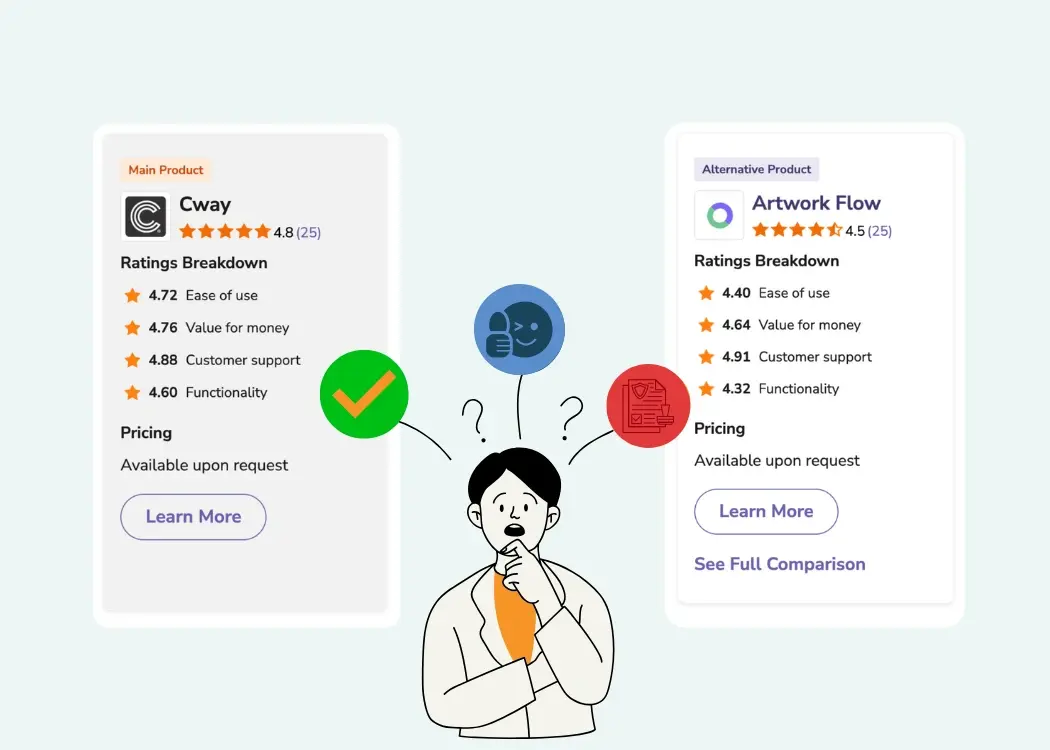
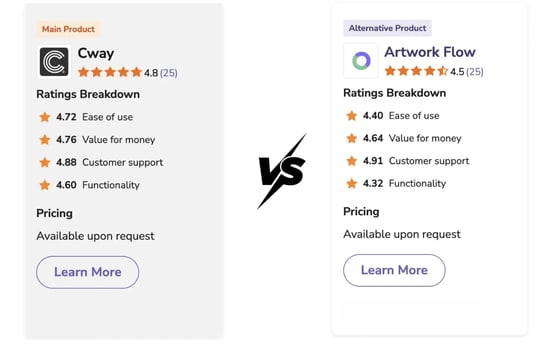
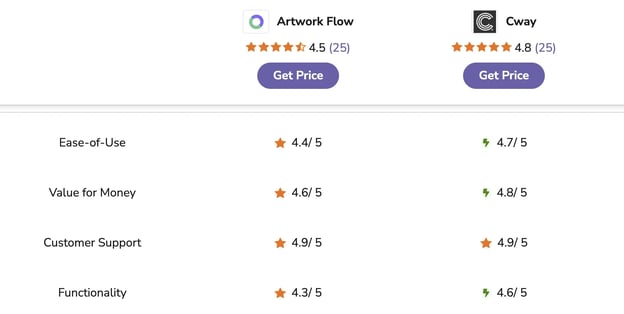
Both Cway and Artwork Flow are highly rated label and artwork management software options, but Cway comes out slightly ahead. Users give Cway an average score of 4.8 out of 5, praising its ease of use, powerful features, and value for money. Artwork Flow scores a solid 4.5 out of 5, earning top marks for customer support and fast implementation, though a few users mention it could offer more advanced functionality.

In short, Cway is seen as the more complete, enterprise-ready solution — ideal for packaging teams managing complex artwork workflows — while Artwork Flow fits smaller creative teams looking for an easy, intuitive approval platform.

Feature Comparison: What Each Platform Offers

Feature

Cway

Artwork Flow

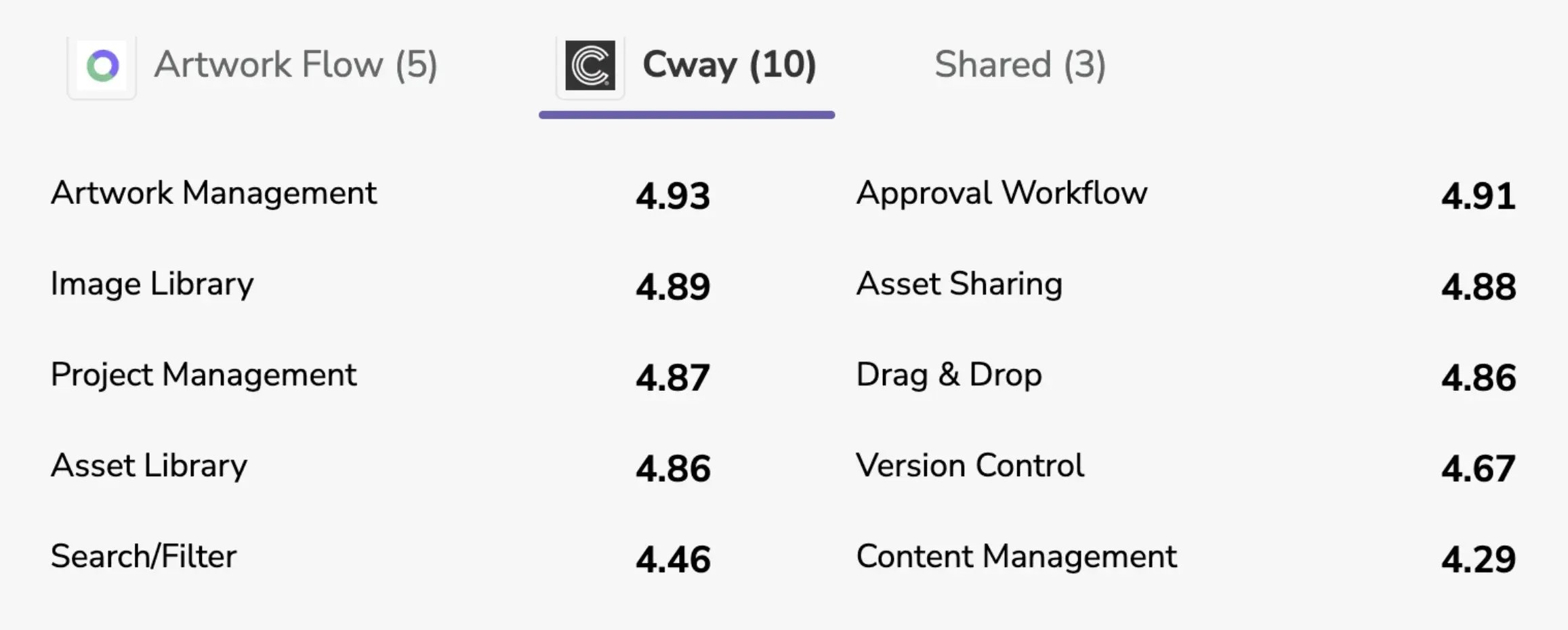
Version Control

4.67

4.43

Asset Library

4.86

4.00

Project Management

4.87

4.00

Artwork Management

4.93

Approval Workflow

4.91

Image Library

4.89

Asset Sharing

4.88

Drag & Drop

4.86

Search / Filter

4.46

Content Management

4.29


Cway provides a broader suite of features that cover the full packaging artwork lifecycle.
Artwork Flow, on the other hand, shines in proofing and collaboration but offers fewer enterprise-grade tools.

artwork-management-software-feature-comparison-table

Proofing, Version Control & Automation

  • Artwork Flow:
    Offers strong proofing tools — compare versions side by side, annotate directly on artwork, and leverage AI for dimension and color checks.

  • Cway:
    Provides the same ability to compare versions side by side and annotate directly on artwork, while also focusing on robust approval workflows and compliance-ready version control. This makes it especially well-suited for regulated industries like food, pharma, and consumer goods, where precision and traceability are critical.

If you manage packaging with complex approval chains, Cway’s structured workflow automation gives it an edge.

Brand Asset Library & Search Tools

  • Cway: Centralized media archive with logical structure and Quick Share function praised by users.

  • Artwork Flow: Adds smart AI-based tagging and predictive search for easy retrieval.

Both streamline asset access, but Cway’s archive and metadata management make it better suited for large-scale organizations.

Integrations and Ecosystem

  • Artwork Flow: Connects with popular tools like Google Drive, Slack, Dropbox, Asana, and Monday.com.

  • Cway: Provides open API access and custom integrations for enterprise DAM or ERP systems.

If you use off-the-shelf marketing tools, Artwork Flow’s integrations are convenient.
If you need tailored connections or data governance, Cway’s API-driven model fits better.

Scalability & Enterprise Fit

  • Cway: Built for packaging artwork and large brand operations, supporting version traceability, compliance, and multi-market workflows.

  • Artwork Flow: Great for smaller creative teams; enterprise plan available with SSO, analytics, and workflow customization.

Support and Implementation

Both tools score 4.9/5 for customer support.

  • Cway reviewers highlight responsive onboarding and simplicity.

  • Artwork Flow users praise quick support and a friendly user experience.

Pros and Cons Summary


Cway Software

Artwork Flow

Strengths

Rich features, strong compliance, scalable workflows

Smart proofing, AI tagging, intuitive design

Weaknesses

Pricing info limited, fewer listed integrations

Smaller feature set, some UX quirks

Best for

Enterprise packaging & artwork teams

Small–mid creative teams & agencies


Both Cway and Artwork Flow make artwork approvals faster and more organized, but they shine in slightly different ways. Cway is praised for its powerful feature set, intuitive interface, and scalability, making it a great fit for packaging, food, and consumer goods brands that need reliable artwork workflow automation and compliance tracking. Users value its structured approval routes, strong version control, and secure asset management. On the other hand, Artwork Flow points for being simple to set up and easy to use, offering AI-powered proofing, version comparison, and integrations with popular tools like Slack and Google Drive. While it’s ideal for smaller creative teams, some users note it lacks a few advanced enterprise functions found in Cway. In short, Cway is best for complex, multi-brand packaging projects, while Artwork Flow suits agile teams that need a straightforward and collaborative artwork approval process.

How to Choose the Right Artwork Management Tool

Before choosing an artwork management and approval software, take a step back to look at how your team actually works — from the initial creative brief to the final print-ready file. Mapping this journey helps you identify where delays, manual tasks, or versioning issues occur. By understanding your current process, it becomes easier to see where artwork workflow automation can save time, reduce human error, and improve collaboration between design, marketing, and packaging teams.

As you explore different artwork management systems, focus on the elements that truly influence efficiency and scalability.

  • Volume and complexity of artworks: Teams managing hundreds of SKUs, multiple variants, or regional packaging versions will benefit from structured workflows, version control, and central asset storage.

  • Approval chain length: The more stakeholders involved — from designers to legal teams — the more important automated routing and approval tracking become.

  • Compliance and audit requirements: In regulated industries, look for tools with full version history, change tracking, and digital sign-offs to support audit readiness.

  • Team size and budget: Smaller creative teams may prioritize simplicity and fast onboarding, while larger organizations should seek enterprise-grade platforms with scalability and integration options.

By weighing these factors, you’ll be able to choose a label and artwork management software that not only meets your current needs but also grows with your packaging and creative operations over time.


Final Verdict

cway-vs-artwork-flow-final-verdict-graphic


Both Cway and Artwork Flow improve how creative and packaging teams manage artwork — but they’re built for different needs.

  • Cway: The best fit for brands managing packaging at scale, where precision, traceability, and structured approvals are critical.

  • Artwork Flow: A great choice for marketing or design teams seeking an easy, AI-enhanced proofing tool.

No matter which you choose, you’ll gain faster approvals, fewer errors, and better creative collaboration.


See Cway in Action — Book a Free Demo

If you’d like to explore how Cway can simplify your artwork workflow automation, speed up approvals, and keep every project on track, you don’t have to take our word for it — see it yourself.


Book a free, no-pressure demo and discover how Cway helps creative and packaging teams save time, stay compliant, and deliver accurate artworks faster.


Side-by-side packaging artwork comparison—simplified with Cway®

Side-by-side packaging artwork comparison—simplified with Cway®

Ever tried approving packaging artwork by email? It's a game of "Which version are we on again?" followed by "Oops, that wasn’t the final one"—and...

View Full Article
How automated artwork management strengthens brand compliance

How automated artwork management strengthens brand compliance

Endless email chains, delayed approvals, and costly reworks — if this sounds familiar, it’s time to consider automated artwork management. This...

View Full Article
How to streamline your artwork workflow from start to finish

How to streamline your artwork workflow from start to finish

In this article, we’ll explore how to improve your artwork workflow—from managing assets to approving designs faster. Discover how Cway® platform can...

View Full Article