
Artwork Lifecycle Management
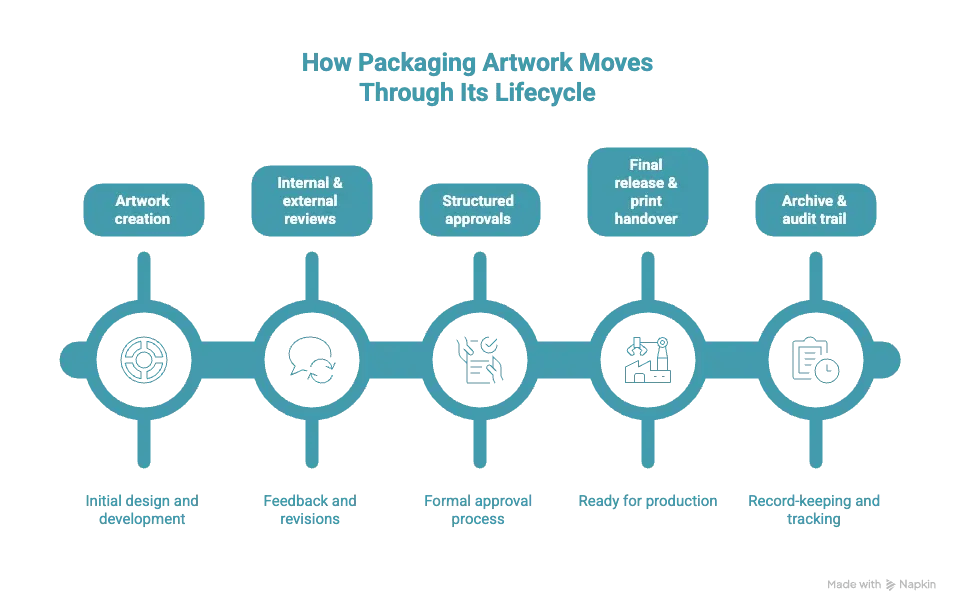
Artwork Lifecycle Management is the end-to-end process of controlling artwork from creation to final release and archive, ensuring version accuracy, approval governance, and compliance throughout the lifecycle.
FREE DOWNLOAD
A Practical Artwork Lifecycle Management Guide
Everything you need to understand, structure, and scale your artwork lifecycle processes.
Download the Guide



Why Artwork Lifecycle Management Is More Than Approval Tools
Approval tools are often the first solution teams adopt when artwork workflows start to feel chaotic. There are many top tools to manage digital artwork approval workflows that help collect comments, compare versions, and capture a final sign-off.
But Artwork Lifecycle Management is not just about approvals — and that’s where the difference begins.
Approvals solve a moment, not the process
Approval tools are designed to answer a very specific question:
“Is this version approved?”
They work well when the goal is to review a file, leave feedback, and approve or reject it. For isolated tasks, this is enough.
However, artwork does not exist only at the approval stage. It goes through multiple steps before and after approval — and those steps are just as important.
Why approval tools are not enough
When teams try to rely on approval tools as a full artwork management platform, important gaps quickly appear.
Approval tools usually do not:
-
define how artwork enters the process in the first place,
-
control what happens after approval,
-
manage transitions between stages,
-
adapt workflows to different products, markets, or regulations,
-
maintain a complete, long-term decision history.
In packaging, approvals are rarely linear. A single artwork may go through several review and approval cycles, involving brand, regulatory, quality, and local market teams — often in different sequences. Approval tools are not built to coordinate this complexity across the full lifecycle.
What ALM adds on top of approvals
Artwork Lifecycle Management looks at the entire journey of artwork, not just the approval step.
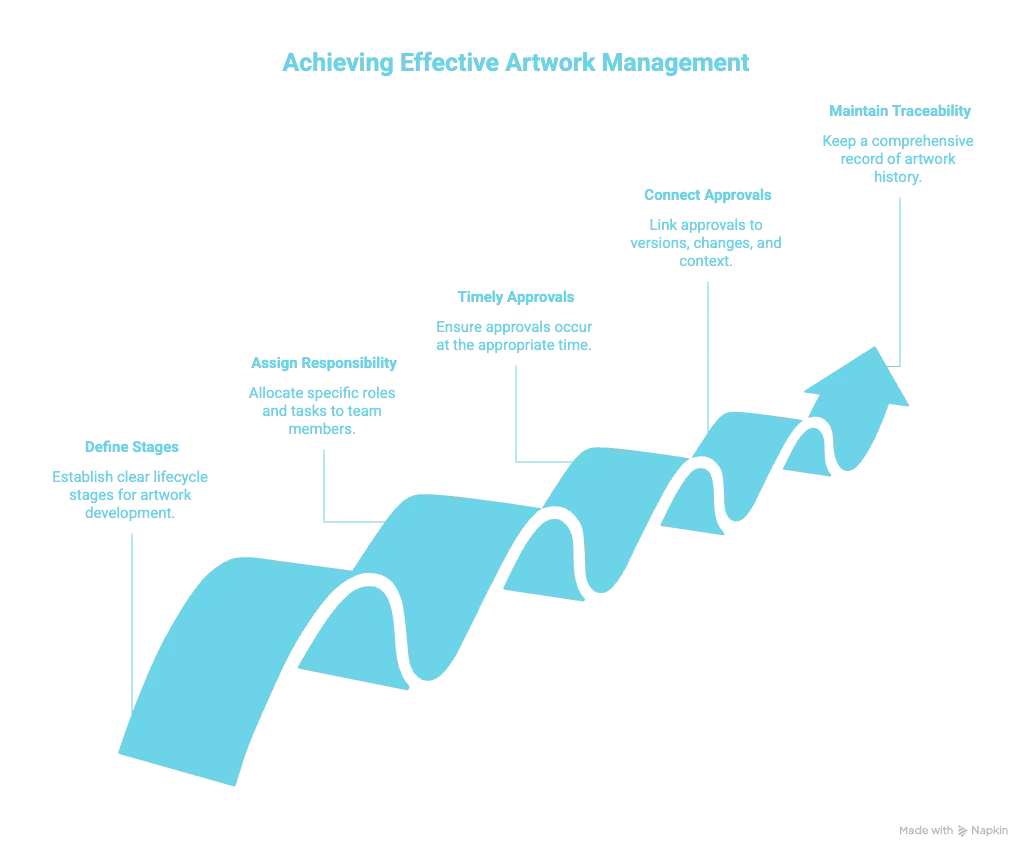
It provides structure by:
-
defining clear lifecycle stages,
-
assigning responsibility at each stage,
-
ensuring approvals happen at the right time — not too early or too late,
-
connecting approvals to versions, changes, and context,
-
keeping everything traceable over time.
Instead of treating approval as the end goal, ALM treats it as one controlled checkpoint within a larger, structured process.
The key difference in simple terms
Approval tools help teams approve files.
Artwork Lifecycle Management helps teams control how artwork moves, changes, and gets approved — end to end.
That’s why approval tools alone cannot replace ALM. They solve an important task, but they don’t provide the coordination, visibility, and control that complex artwork workflows require.
Why Digital Asset Management Can’t Replace Artwork Lifecycle Management
Digital Asset Management (DAM) systems are built to store, organize, and share files. As artwork management software, they help teams find the right assets, control access, and reuse content across campaigns, products, and markets.
But managing files is not the same as managing how artwork evolves.
DAM systems are not designed to control the artwork lifecycle. They usually don’t define how artwork moves from creation to review and approval, how workflows adapt to different products, markets, or regulations, or how decisions are tracked over time. In other words, DAM focuses on where files live — not on what happens to them as they change.
This limitation becomes clear in packaging. A single artwork file may go through multiple iterations, review cycles, and regulatory checks before it is approved for production. While DAM can store every version, it doesn’t manage the process behind those versions. It doesn’t coordinate stages, approvals, or responsibilities, and it doesn’t maintain a complete, long-term decision history that explains why changes were made.
Artwork Lifecycle Management addresses this gap. It focuses on structure and control, defining clear stages, ownership, and decision points throughout the lifecycle. Instead of just storing files, ALM ensures that artwork is reviewed, approved, released, and archived in a controlled and traceable way. This is why the most efficient platforms for artwork lifecycle management go beyond traditional content management software and focus on process, not just storage.
In practice, DAM and ALM often work together. DAM supports asset storage and reuse, while Artwork Lifecycle Management ensures that packaging artwork moves through a structured, compliant lifecycle — from first concept to final release and beyond.
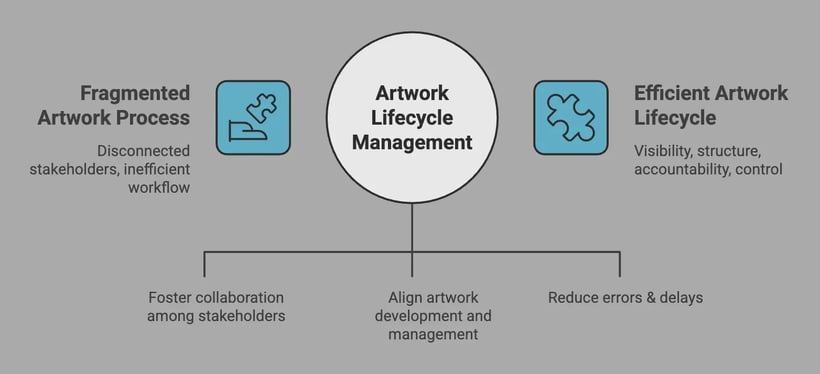
The infographic above highlights the key difference between fragmented artwork processes and a structured artwork lifecycle. When artwork is managed across disconnected tools and teams, visibility is lost, decisions become unclear, and errors multiply.
Artwork Lifecycle Management brings structure to this complexity. By connecting people, processes, and decisions into a single lifecycle, teams gain control over how artwork moves, changes, and gets approved — from creation to release and beyond.
This shift from isolated tasks to lifecycle coordination is what enables faster collaboration, clearer ownership, and reduced risk across packaging and regulated workflows.
Why Packaging Is the Most Demanding Artwork Use Case
Packaging artwork is one of the most complex and high-risk types of artwork companies manage. Unlike marketing visuals, packaging artwork is directly tied to the physical product and must be accurate, compliant, and ready for production at all times.
One packaging artwork file often contains far more than design elements. It includes ingredients, legal text, nutritional tables, barcodes, symbols, claims, and multiple languages. A small change — for example, updating an ingredient or regulatory statement — can trigger a full review cycle across multiple teams and markets.
This is why many teams struggle to manage packaging artwork files using generic tools. Packaging artwork is rarely static. It constantly changes due to:
-
regulatory updates,
-
product reformulations,
-
market and language variations,
-
supplier and printer requirements,
-
brand updates across portfolios.
Each change increases the risk of errors, outdated versions, or missing approvals.
Packaging workflows also involve an unusually high number of stakeholders. Marketing, regulatory, quality, legal, supply chain, external agencies, and printers all need to review or approve artwork at different stages. Coordinating this manually quickly becomes unmanageable without specialized support.
That’s where Packaging Artwork Management Software becomes essential. These solutions are designed to handle the complexity of packaging-specific workflows, ensuring that changes are reviewed in the right order, approvals are traceable, and only the correct versions move forward to production.
Unlike generic file tools, label and artwork management software supports the full lifecycle of packaging artwork — from creation and review to final release and audit-ready archiving. This makes packaging not just a demanding use case, but one that clearly shows why structured artwork lifecycle management is necessary.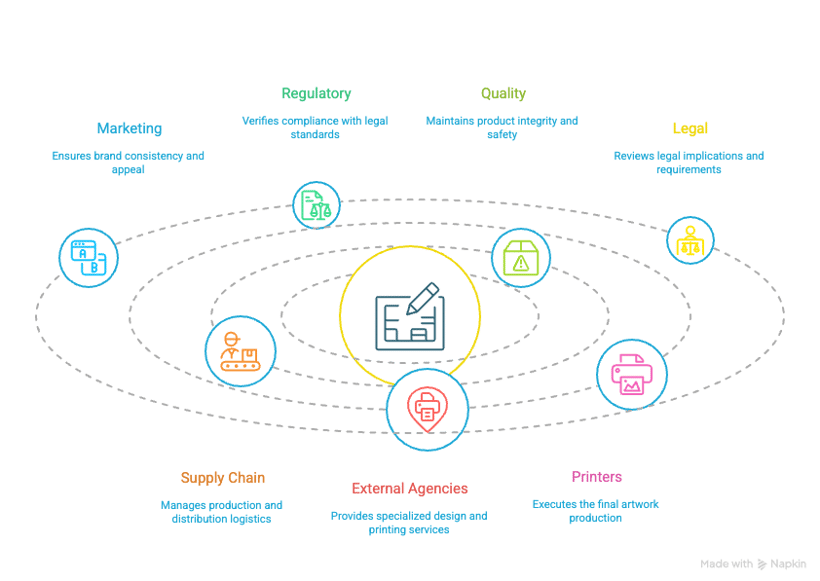
Who Needs Artwork Lifecycle Management
Artwork lifecycle management is not limited to one role or team. It supports everyone involved in creating, reviewing, approving, and releasing artwork.
Packaging managers
Use ALM to coordinate artwork across multiple SKUs, markets, and timelines, while keeping control over versions and approvals.
Brand and marketing teams
Rely on ALM to ensure brand consistency and visibility as artwork moves between internal teams and external partners.
Regulatory and QA teams
Use ALM to review and approve artwork against compliance requirements and maintain a clear audit trail.
Agencies and print partners
Benefit from clear expectations, approved files, and fewer last-minute changes or misunderstandings.
By defining ownership and process at each stage, ALM helps all stakeholders work together more efficiently.
For teams managing complex packaging workflows, this overview of the best workflow tools for packaging and labeling artwork highlights solutions built specifically for artwork reviews, approvals, and lifecycle control.
Artwork Lifecycle Management in Regulated Industries
In regulated industries, artwork is more than a design task — it is part of a controlled and auditable process. Labels, claims, ingredients, and legal information must be accurate, approved, and traceable at all times.
Artwork Lifecycle Management helps regulated teams manage artwork changes in a structured way, reducing risk and ensuring compliance across markets.
Food & Beverage
Packaging artwork must reflect correct ingredients, allergens, and nutritional information. For FMCG teams working at high speed, keeping packaging artwork files organised is critical for maintaining efficiency and avoiding costly errors. This also requires a focus on packaging artwork process improvement for FMCG teams, especially when managing frequent updates across multiple products and markets.
Pharma
Strict regulatory requirements demand clear approval ownership and full audit trails. ALM ensures that every artwork decision is documented and reviewable.
Cosmetics
Claims, languages, and regulations change often. In the cosmetics industry, packaging artwork workflows are especially complex due to frequent redesigns, seasonal releases, and strict brand standards, so many teams benefit from exploring cosmetic packaging artwork solutions tailored to these unique challenges.
Private Label
High volumes of SKUs and short timelines increase the risk of errors. ALM brings structure and consistency across multiple products and partners. Effective artwork and labeling workflows play a key role in supply chain optimization, as shown by how labeling software supports supply chain optimization across production and distribution teams.
How Software Supports Artwork Lifecycle Management
Managing artwork lifecycle manually becomes increasingly difficult as volumes grow and more teams get involved. Emails, shared folders, and spreadsheets may work at first, but they don’t scale — and they don’t provide the control or traceability that complex artwork workflows require.
Software designed for Artwork Lifecycle Management helps teams move from manual coordination to a structured, repeatable process. Instead of tracking artwork status in multiple places, teams get a single system that shows where each artwork is in its lifecycle, who is responsible, and what needs to happen next.
At a practical level, ALM software supports teams by:
-
maintaining a complete audit trail,
-
ensuring only approved artwork moves to production.
For teams looking to go deeper, there are dedicated resources that explore this in more detail. If you want to understand how automation can reduce manual work and errors, you can read about the top tools to automate artwork lifecycle tasks, which focus on streamlining reviews, approvals, and release steps.
If your main challenge is scale — for example, managing large packaging portfolios across markets and languages — this guide to the best software for managing packaging artwork at scale looks at platforms built to handle high volumes and complex workflows.
And if your priority is controlling versions and avoiding mistakes in production, this article on the top-rated tools for managing packaging artwork files provides a practical overview of solutions designed specifically for packaging teams.
Common Artwork Lifecycle Mistakes
Many artwork issues are not caused by design quality, but by missing or unclear lifecycle control. When the artwork process is not clearly defined, the same problems appear again and again.
Email-driven workflows
Relying on email for reviews and approvals leads to lost feedback, unclear decisions, and long approval cycles.
Wrong or outdated files
Without lifecycle control, teams often work on incorrect versions, resulting in rework or production errors.
Unclear ownership
When responsibilities are not defined by stage, decisions are delayed or missed entirely.
Missing audit trails
In regulated environments, the lack of documented approvals and version history creates compliance risk.
Last-minute fixes
Without a structured lifecycle, issues surface late in the process — when changes are expensive and time-critical.
If you want to explore this topic in more detail, this article explains how teams can avoid common packaging artwork errors in practice.
Up to 60–70% of packaging artwork errors happen after the first review stage, when changes are applied manually across versions.
Artwork complexity continues to increase — more SKUs, more stakeholders, more regulations, and tighter timelines. Without a clearly defined lifecycle, artwork processes become fragmented, reactive, and difficult to control.
Artwork Lifecycle Management provides the structure teams need to manage artwork consistently across creation, review, approval, release, and archive. By combining lifecycle thinking with dedicated artwork management software, organizations can reduce errors, improve compliance readiness, and regain visibility across their entire artwork process — especially in demanding packaging environments.