4 min read

Brand Studio 360: Where Assets Meet Workflow

Brand Studio 360: Where Assets Meet Workflow
Brand Studio: A DAM Built for Packaging Workflows
5:50

Media Center is now Brand Studio 360.

The new name reflects what this space truly represents: a central environment where brand assets connect directly to projects, collaboration, and execution.

Brand Studio 360 is not just file storage.
It’s not just a DAM.

It’s a fully integrated asset environment built around artwork workflows.

Why FMCG Teams Need a DAM Embedded in Their Workflow

For FMCG brands and packaging teams, digital asset management is no longer just about storing files.

It’s about speed to market.
It’s about version control.
It’s about compliance.
It’s about eliminating costly artwork mistakes.

Yet many organizations still rely on traditional DAM systems that operate separately from their artwork and packaging workflows. The result? Silos, duplicated files, approval confusion, and delayed launches.

Traditional DAM is often a “180° solution.”
It covers storage, tagging, sorting, and retrieval.

But it stops there.

It manages assets — without being connected to the projects where those assets are actually created, reviewed, and approved.

Today, high-performing FMCG teams need a 360° approach.

A system that not only stores and organizes assets, but connects them directly to projects, artwork workflows, approvals, and execution.

That’s the difference between DAM and Brand Studio 360.

DAM (180°):
• Store
• Search
• Organize
• Retrieve

Brand Studio 360 (360°):
• Store & organize assets
• Connect assets directly to projects
• Control artwork versions in real time
• Manage approvals within the workflow
• Ensure compliance before launch
• Eliminate silos between teams

The “360” represents a complete loop — from asset creation to packaging execution and back again.

No disconnected libraries.
No duplicate uploads.
No approval confusion.

Just one connected ecosystem.

That’s exactly what Brand Studio 360 delivers.


The Reality of Packaging and Artwork Workflows

Packaging development is one of the most complex operational processes inside FMCG organizations.

A single SKU can involve:

  • Multiple design iterations
  • Regulatory reviews
  • Marketing approvals
  • Printer coordination
  • External agencies
  • Frequent version updates
  • Tight launch deadlines

In this environment, simply storing files in a structured library is not enough.

When your DAM is disconnected from your project workflow:

  • Teams manually move files between systems
  • Versions become unclear
  • “Final_final_v3” files appear
  • External stakeholders lack controlled access
  • Audit trails are incomplete
  • Launch timelines slip

As discussed in our article What Is Digital Asset Management? A Complete Guide for FMCG Brands, DAM systems are designed to centralize, organize, and protect digital assets. But for packaging teams, organization alone does not solve workflow complexity.

What’s needed is integration.

DAM for FMCG: How Brand Studio Integrates Assets and Workflow

1. From Static Storage to Active Workflow

In many organizations, DAM functions as a digital archive:

  • Assets are uploaded
  • Organized with tags and metadata
  • Retrieved when needed

But packaging artwork is not static content. It is dynamic, versioned, regulated, and constantly evolving.

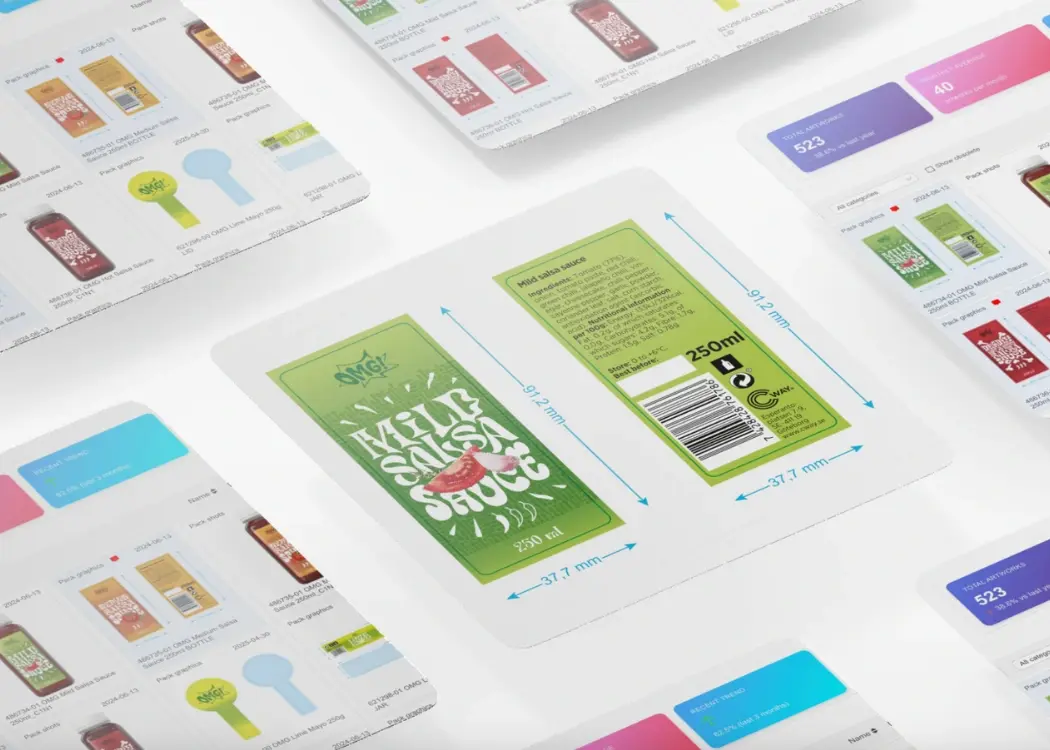
Brand Studio 360 App transforms DAM from passive storage into an active part of the workflow by allowing teams to:

  • Select assets and instantly initiate projects
  • Attach documentation before project launch
  • Build structured briefs directly from stored artwork
  • Move seamlessly from asset library to execution

This eliminates system switching, manual uploads, and duplication.

Assets don’t just sit in folders — they move through real production workflows.

2. Continuous Synchronization Across the Artwork Lifecycle

One of the biggest challenges in FMCG artwork management is maintaining alignment between:

  • The “master” file in storage
  • The working file in an active project
  • The approved version sent to print

Brand Studio ensures that artwork remains synchronized throughout its lifecycle.

With one-click sync between projects and the central asset repository, teams avoid:

  • Version confusion
  • Duplicate file storage
  • Accidental use of outdated artwork

Every update remains transparent and traceable.

3. Built-In Version Control and Audit Transparency

For FMCG brands, especially those operating in regulated markets, version control is not optional — it is critical.

Brand Studio provides:

  • True version control with clear version progression
  • Full audit logs showing who changed what and when
  • Complete traceability across internal and external collaboration

This reduces compliance risk, protects brand integrity, and provides documentation when needed.

4. Secure Collaboration Without Breaking the Workflow

FMCG packaging workflows often include:

  • External design agencies
  • Printers and prepress teams
  • Regulatory consultants
  • Regional market stakeholders

Brand Studio enables collaboration directly within the DAM environment through:

  • Granular permission settings
  • View-only or comment-only access
  • Controlled download rights
  • The ability to revoke access while preserving activity history

This ensures collaboration happens inside the workflow — not outside it via email attachments or shared drives.

5. DAM That Understands Packaging Complexity

Brand Studio includes all core DAM capabilities:

  • Structured organization
  • Tags and metadata
  • Advanced filtering
  • Powerful search
  • Centralized asset storage

But what differentiates it for FMCG teams is that these capabilities are embedded within artwork management processes.

It is not a DAM layered onto a packaging tool.
It is a DAM built around packaging workflows.

The Strategic Advantage for FMCG Teams

As packaging complexity increases and product cycles accelerate, disconnected systems become a bottleneck.

The future belongs to integrated platforms where:

  • Assets
  • Projects
  • Approvals
  • Collaboration
  • Compliance
  • Version control

all operate together.

Brand Studio represents that evolution.

When digital asset management is integrated directly into workflow:

  • Time-to-market improves
  • Approval cycles accelerate
  • Errors decrease
  • Version confusion disappears
  • Compliance risk is reduced
  • Teams operate with greater clarity and control

For FMCG organizations managing hundreds or thousands of SKUs, this integration is not just operationally helpful — it is strategically necessary.

Brand Studio 360 delivers a new standard for DAM in FMCG — uniting assets and workflow into one seamless system. It ensures that digital assets are not just stored, but actively managed, controlled, and fully integrated into the packaging lifecycle.


FAQ

Cway® Media Center: a smarter digital asset management system

Cway® Media Center: a smarter digital asset management system

Juggling design files across emails, drives, and cloud folders wastes time, causes version confusion, and slows down creative projects. That’s where...

View Full Article
Media Center App: the complete digital asset management solution

Media Center App: the complete digital asset management solution

Struggling to keep track of artwork files, marketing visuals, and packaging updates? You’re not alone. Disconnected tools and scattered folders waste...

View Full Article
How to streamline creative projects with a design management tool

How to streamline creative projects with a design management tool

In this article, we’ll explore how a design project management tool helps creative teams and brand managers stay organized, deliver faster, and...

View Full Article