
 Ekaterina Skalatskaia
1 min read
Cway updates March 2025
 Ekaterina Skalatskaia : March 7, 2025 at 9:55 AM
At Cway, we’re always looking for ways to refine our products to provide the best possible experience for our users. With our latest update, we...
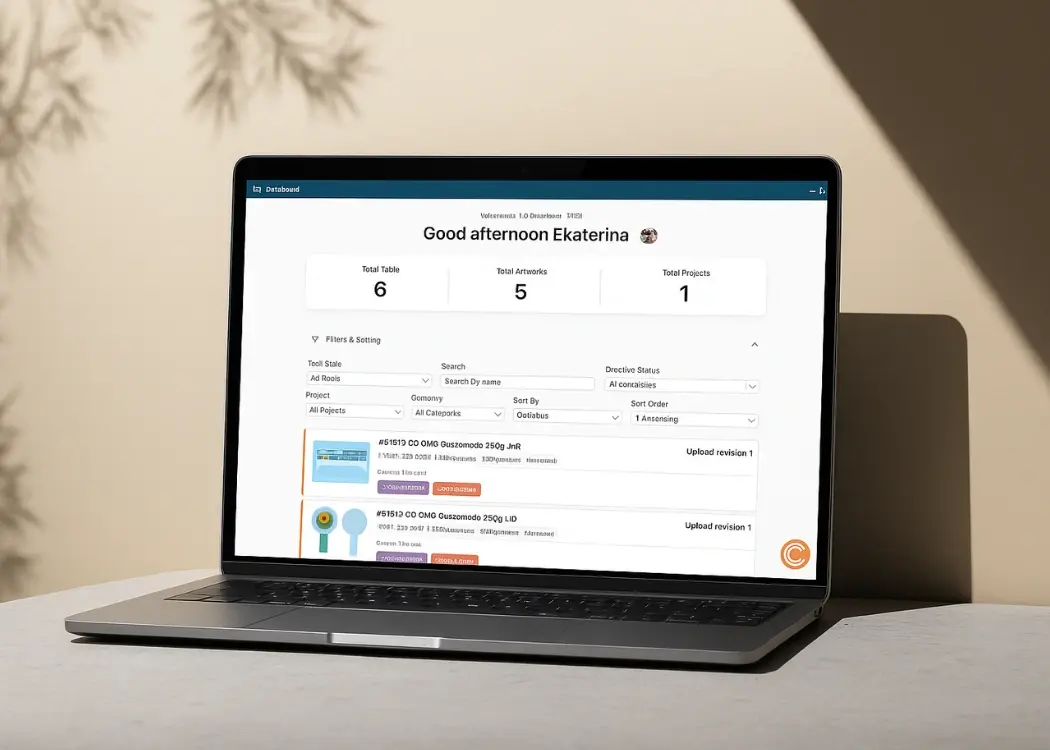
The new Cway Dashboard replaces the old table-based layout with a clean, task-oriented interface that helps you stay organized and make decisions faster. Whether you’re reviewing packaging designs, approving artwork revisions, or tracking project progress, the new dashboard gives you a clear overview of everything that needs your attention.
It’s now easier than ever to manage:
Packaging artwork tasks
Approval workflows
Design revisions
Cross-team collaboration
Deadlines and overdue items

At the top of the dashboard, you’ll now find a set of clear metrics to help you understand your workload at a glance:
Total Tasks
Total Artworks
Total Projects
For packaging teams handling multiple SKUs, markets, or design variations, these insights offer fast visibility into the health of your artwork pipeline.
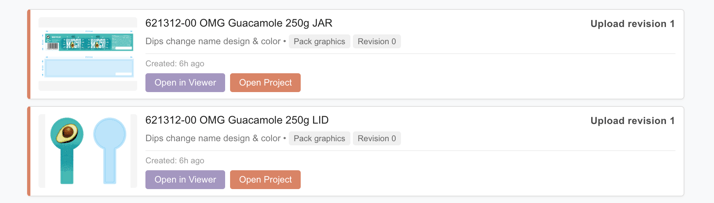
Instead of scanning long tables, each artwork is now presented as a modern visual card, including:
A preview image of the artwork
Project name and category
Revision number
Creation date
Deadline or overdue status
Quick actions like Open in Viewer or Open Project
Approval actions directly from the dashboard
This improves clarity and reduces the time spent searching for the right file — a major advantage for teams dealing with high artwork volumes.
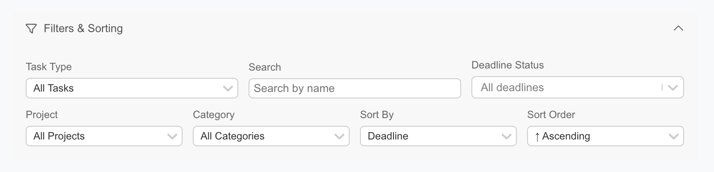
One of the most significant improvements is the new filters & sorting system, designed specifically to support packaging workflow complexity.
You can now filter tasks by:
Task type (review, approval, comment)
Project
Category
Deadline status
Search by artwork name
You can also sort tasks by:
Deadline
Category
Project
Ascending or descending order
These improvements allow users to quickly prioritize urgent approvals, group tasks by project, or focus on a specific artwork category — ideal for fast-moving packaging production cycles.
Every enhancement in this release is meant to support your artwork lifecycle management workflow.
The new dashboard:
Reduces time spent navigating the system
Helps prevent missed deadlines
Improves collaboration between designers, marketers, and packaging teams
Supports a more structured and error-free approval process
With clearer information and smarter task handling, teams can deliver packaging designs to market faster and with fewer revisions.
Modern brands need reliable tools to manage packaging artwork at scale.
The redesigned Cway Dashboard gives you:
Better visibility into active tasks
More control over sorting and prioritization
Faster access to artwork previews and actions
A more intuitive experience, especially for users managing multiple SKUs and markets
This update strengthens Cway as a leading artwork management solution for packaging and creative teams looking to modernize their workflows.
The new dashboard is just the beginning.
We are continuing to expand Cway’s capabilities to support advanced reporting, artwork analytics, and enhanced collaboration features — giving you even more power to manage the full digital asset lifecycle.

1 min read
Ekaterina Skalatskaia : March 7, 2025 at 9:55 AM
At Cway, we’re always looking for ways to refine our products to provide the best possible experience for our users. With our latest update, we...
1 min read
Ekaterina Skalatskaia : December 18, 2025 at 7:32 AM
We’re excited to introduce three major updates that make Cway even more powerful, intuitive, and aligned with the real workflows of creative,...
1 min read
Ekaterina Skalatskaia : November 22, 2024 at 7:57 AM
We’re excited to roll out powerful enhancements to the Compare tool—designed to make your workflow even smoother and more efficient. With this latest...