Compare the best online proofing software for packaging teams
Choosing the best online proofing software for packaging visuals is key to faster approvals and fewer mistakes. In this article, we’ll explore top...
At first glance, packaging artwork projects may look similar to any other business project. They have deadlines, stakeholders, approvals, and deliverables. That is why many organizations initially consider using generic project management platforms such as Asana, Monday.com, or Trello to manage packaging workflows.
However, packaging operations introduce challenges that standard project tools were never designed to handle. Artwork approvals require version control, regulatory checkpoints, audit trails, visual proofing, and structured review processes that go far beyond task tracking. As SKU counts grow and compliance requirements become more demanding, relying on generic project management software often creates additional manual work, visibility gaps, and approval bottlenecks.
In this article, we'll compare packaging workflow software and generic project management tools, explore the key differences between the two approaches, and explain why many FMCG organizations are moving toward purpose-built platforms such as Cway to gain greater control over artwork approvals, compliance, and packaging operations.
If you manage packaging artwork, you've probably wondered whether a standard project management tool could handle your approval workflows. After all, platforms like Asana, Monday.com, and Trello help millions of teams stay organized.
But packaging operations aren't standard. Your workflows involve regulatory checkpoints, multi-market variants, version tracking across hundreds of SKUs, and audit requirements that generic tools simply weren't designed to handle. Cway packaging artwork management software addresses these exact challenges with purpose-built functionality.
This article breaks down the real differences between packaging workflow software and generic project management tools. You'll learn which features matter most for audit-ready approvals and how to choose the right platform for your team.
Standard projects have tasks, deadlines, and deliverables. Packaging workflows have all of those, plus regulatory requirements, compliance gates, multi-language variants, and the constant risk of costly reprints if something goes wrong.
When you're managing packaging artwork, a missed detail isn't just a project delay—it's a potential recall, a compliance violation, or thousands of dollars in wasted print runs. Generic project tools treat every task equally. They don't understand that your barcode verification step is more critical than updating a status field.
Regulatory teams need to prove exactly who approved what, when, and why. They need to show the complete history of every change to every artwork file. Generic project management tools track task completion, but they don't capture the granular approval data that auditors require.
Cway automatically logs every action, comment, and approval decision with timestamps and user attribution. This means you can pull a complete audit history for any artwork file in seconds, not hours of digging through project boards and notification logs.
Managing versions in packaging isn't about tracking document edits—it's about comparing visual differences across complex artwork files. You need side-by-side comparison tools that highlight exactly what changed between version 12 and version 13 of a label.
Project management tools store files as attachments. They don't render multi-layer PDFs, support Illustrator files natively, or offer pixel-level comparison. When your team downloads the wrong version, you don't find out until it's on the production line.
Generic project tools let you assign tasks and set due dates. You can create custom fields and build automation rules. But they don't enforce sequential approval stages or prevent unauthorized edits during the review process.
Cway structures approvals around your actual workflow—routing artwork through regulatory, legal, brand, and quality checkpoints in the right order. Role-based permissions ensure that only authorized reviewers can approve or reject at each stage, and the system blocks progression until required approvals are complete.
Both tool categories support team communication. Project platforms offer comments, @mentions, and file attachments. This works well for general coordination but falls short when you need to pinpoint exactly which element on page 3 of a 12-page booklet needs revision.
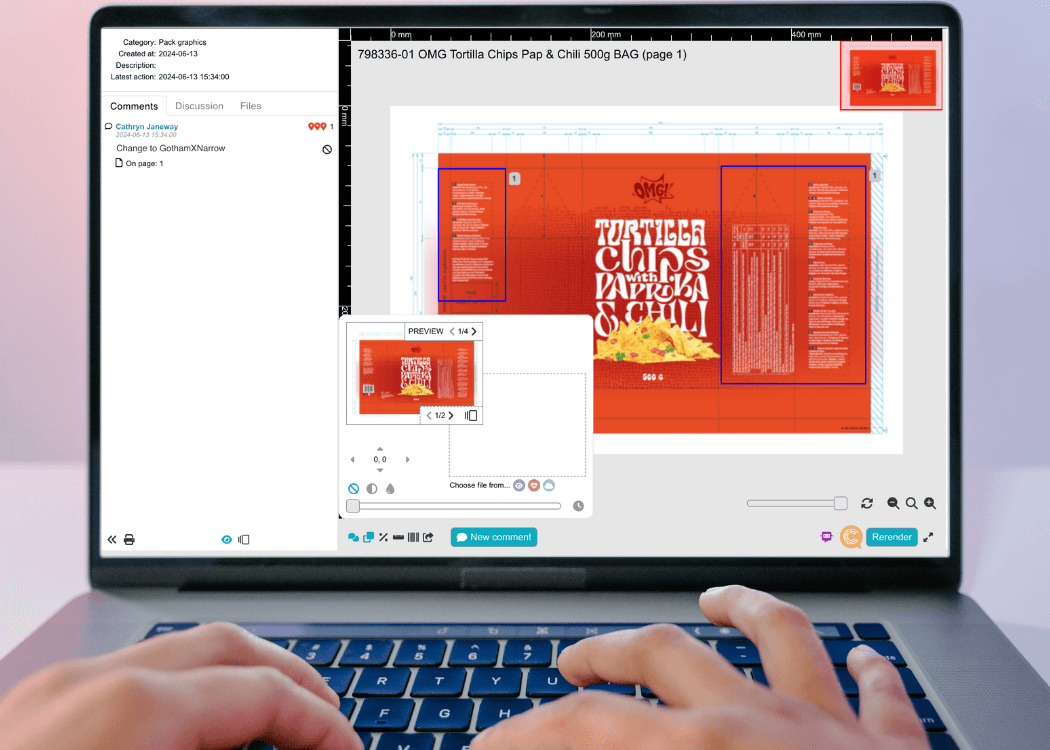
Packaging workflow software like Cway includes visual annotation tools built into the proofing interface. Reviewers mark up artwork directly, and designers see exactly where changes are needed without translating written feedback into visual context.
If you work in food, pharma, or cosmetics, compliance isn't optional. You need to demonstrate that your artwork processes meet regulatory standards, that changes are controlled, and that approved files are locked against unauthorized modification.
Generic project tools don't include compliance gates, GS1 barcode verification, or regulatory review workflows. These features exist in Cway because the platform was built specifically for industries where packaging compliance determines market access.
Your designers work in Adobe Creative Suite. Your product data lives in ERP or PLM systems. Your approved assets need to flow to printers and production partners. The right packaging platform connects these systems without requiring manual file transfers.
While project management tools integrate with common business applications, they typically lack native support for creative file formats and print production workflows. Cway renders PDFs, Illustrator, and Photoshop files directly in the browser and integrates with production systems to close the loop from design to print.
Not every team needs specialized packaging software. If your operation involves a handful of SKUs with minimal regulatory requirements, a generic project tool might cover your needs at lower complexity.
These platforms work well when your primary challenge is task coordination rather than artwork control. If your team mostly needs to track who's working on what and when things are due, project management tools handle that efficiently.
However, the moment you add compliance requirements, high SKU counts, or multi-market coordination, you'll likely outgrow generic tools faster than expected. The cost of one packaging error often exceeds a year of specialized software.
Consider dedicated packaging workflow software when your team faces any of these situations: regulatory audits requiring documented approval histories, multiple markets with localized artwork variants, high SKU counts making version tracking critical, or compliance requirements that generic tools can't enforce.
Cway handles these complexities by design. The platform tracks versions across large portfolios, and maintains audit-ready records without extra administrative work from your team.
If your current process involves piecing together information from multiple systems to answer auditor questions, you're likely a candidate for a purpose-built solution. The time spent on manual tracking and workarounds adds up quickly.
Start by mapping your current approval process. Document every step, every reviewer, and every handoff point. Note where delays typically occur and where errors slip through. This map becomes your evaluation criteria.
Ask vendors to demonstrate how their platform handles your specific workflow—not a generic demo. Watch how the system manages version comparison, enforces approval sequences, and generates audit reports. Test the annotation tools yourself to see if reviewers can communicate clearly.
Integration capability matters more than feature lists. The right platform connects with your existing creative tools, asset repositories, and production systems. Ask about API access and pre-built integrations with the systems your team already uses.
Cway was built from the ground up for packaging complexity. The platform handles what generic tools can't: enforced approval sequences, visual comparison tools, regulatory workflows, and complete audit trails that satisfy even pharmaceutical-level scrutiny.
Your team gets structured workflows instead of improvised task lists. Cway automates the administrative burden of tracking versions, logging approvals, and maintaining compliance records. This frees your packaging managers to focus on quality and speed rather than documentation.
The platform scales with your operation. Whether you're managing 50 SKUs or 5,000, Cway maintains performance and organization without the workarounds that generic project tools require at higher volumes.
Packaging workflow software manages the entire artwork lifecycle from initial design through approval and print production. It includes specialized features like version comparison, compliance tracking, and audit trails that generic project tools don't offer. Cway gives you these capabilities in a single platform built specifically for packaging operations.
You can use generic project tools for basic packaging coordination, but they lack critical features for regulated industries. Without built-in audit trails, version control for visual assets, and compliance workflows, you'll spend significant time on manual workarounds and risk errors reaching production.
Look for automatic logging of every approval, rejection, and comment with timestamps and user attribution. You should be able to generate complete file histories instantly. Cway records every action automatically, making audit preparation straightforward rather than stressful.
Purpose-built platforms catch errors earlier in the process through visual proofing tools and structured review stages. Cway's annotation features ensure reviewers communicate precisely, and approval gates prevent files from advancing until required checks pass. This reduces costly late-stage corrections.
Specialized software understands packaging complexity by design. While generic tools require workarounds for version control, compliance tracking, and audit requirements, platforms like Cway include these features natively. You spend less time configuring tools and more time managing actual packaging work.
Consider your regulatory requirements, SKU count, and error costs. If audits, compliance gates, or multi-market coordination are part of your process, specialized software typically pays for itself quickly. Cway helps packaging teams evaluate their needs with structured discovery conversations.
Choosing the best online proofing software for packaging visuals is key to faster approvals and fewer mistakes. In this article, we’ll explore top...
When it comes to managing packaging design, standard document systems simply don’t keep up. In today’s global, fast-moving markets, teams need ...
Creating packaging isn’t just about great design—it’s about building an approval workflow that ensures every step, from concept to shelf, is aligned,...