
The mute project function allows you to silence notifications from specific projects. By muting a project, you ensure that it will not send any email updates to you or your team, helping reduce inbox clutter and letting you focus only on what matters.
How to Mute Projects
You can mute projects from two places:
1. From the Project List View
-
Go to Projects.
-
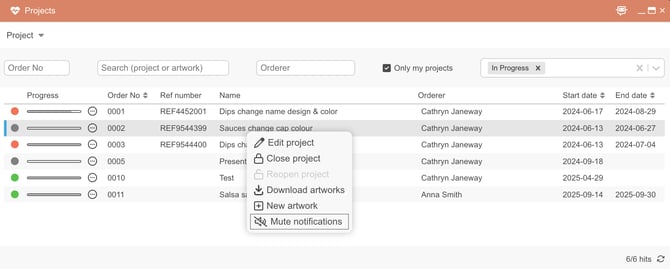
Right-click on the project you want to mute.
-
Select Mute notifications.
-
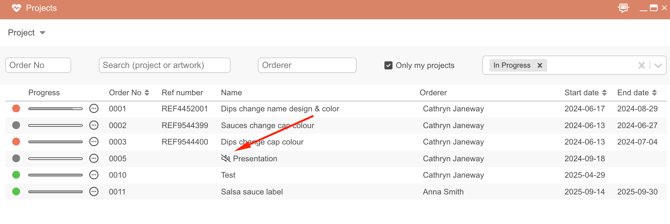
The project will show a mute icon in the list, so you can quickly see which projects are muted.
2. From Inside a Project
-
Open the project.
-
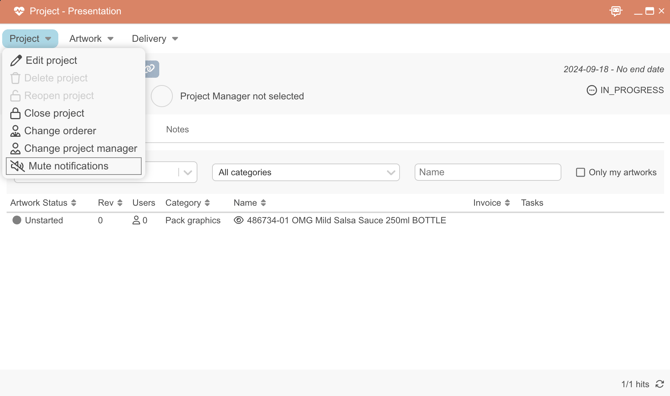
Click the Project menu at the top.
-
Select Mute notifications.
How to Unmute a Project
-
Follow the same steps as above (either in the list or inside the project).
-
Select Unmute notifications.
-
Emails will resume for that project.
FAQ
Q: Can I mute multiple projects at once?
A: Yes! In the Projects view, you can mute notifications for several projects by selecting them from the list and applying the Mute notifications action.
Q: How do I know if a project is muted?
A: Muted projects will display a mute symbol in the project list.