
The Color Separation tool in Cway Viewer allows you to view and verify each ink layer used in your packaging PDF artwork — including process (CMYK) and spot colors (Pantone or special inks).
This feature helps you ensure print accuracy, detect missing separations, and confirm that artwork files are ready for production.
When to Use Color Separation
Use this tool whenever you need to:
-
Check which inks are used in a packaging artwork.
-
Verify that brand and spot colors are correctly defined.
-
Ensure overprints, varnishes, or white layers are visible and named correctly.
-
Review print separations without leaving Cway Viewer or exporting to external prepress software.
Step-by-Step: How to View Color Separations
1. Open your packaging PDF
-
Upload or open your packaging artwork in Cway Viewer.
-
The file loads in the main viewing area, ready for inspection.
2. Open the Color Separation panel
-
Click the Color Separation icon in the bottom toolbar.
-
A side panel will appear listing all inks detected in the file.
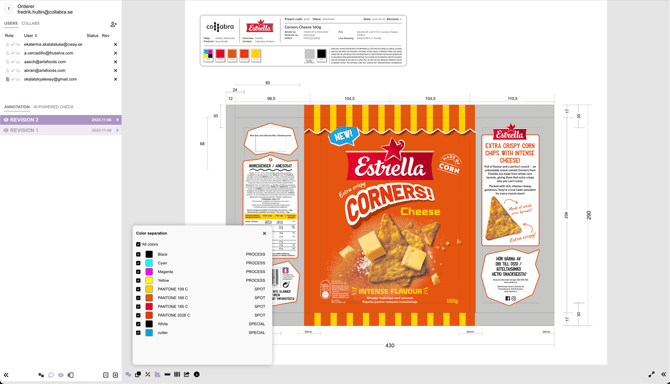
3. Toggle color layers on or off
-
Each listed color (e.g., Cyan, Magenta, Yellow, Black, Pantone 185 C, White) can be turned on or off using the checkboxes.
-
As you toggle colors, the artwork preview updates instantly, showing only the selected separations.
💡 Tip: This makes it easy to isolate a single color channel or compare how multiple inks overlap.
4. Analyze your separations
-
Confirm that all required colors are included and correctly named.
-
Look for duplicates or missing separations that may cause print issues.
-
Check special layers like white, varnish, or cutter to ensure they appear correctly.
5. Close the panel when done
-
Once reviewed, simply close the panel or reselect the Color Separation icon to return to the standard artwork view.
Supported File Types
The Color Separation tool works with PDF files containing embedded print color data.