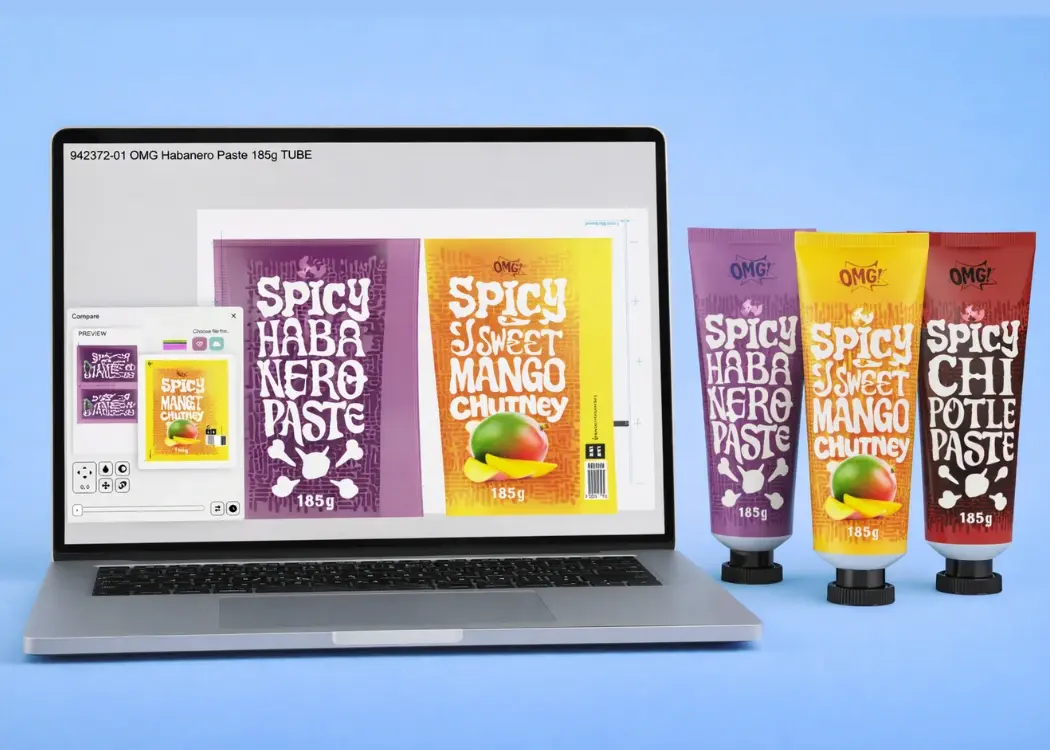
3 min read

Best tools for markup and annotations in packaging proofs (2026)

Best tools for markup and annotations in packaging proofs (2026)
Best Tools for Markup & Annotations in Packaging Proofs (2026)
6:30

When packaging teams prepare artwork proofs—whether for food, cosmetics, or medical devices—they rely heavily on markup and annotation tools to identify mistakes, clarify instructions, and communicate changes clearly. Unlike general design review tools, packaging annotations require precision, compliance, and version accuracy. A missing comma, an incorrect allergen, or a misplaced symbol can lead to costly reprints and regulatory issues.

This guide compares the best markup and annotation tools for packaging proofs in 2026, explains what features matter, and shows how to choose a solution that fits your packaging workflow.

Why Packaging Annotations Are Different from Creative Markups

Generic online proofing tools (used for social media content or brand assets) are not built for packaging. Packaging proof annotation requires:

  • Pinpoint accuracy on small print

  • Dieline-aware commenting

  • Layer awareness for technical specs

  • Barcode readability checks

  • Legal/regulatory text precision

  • Multi-language coordination

  • Version-to-version comparison

Packaging artwork is not “just a design”—it’s a regulated product identity document.

This makes the choice of annotation tools critical.

Key Features to Look for in Packaging Annotation Tools

To work efficiently, packaging teams need annotation tools that support:

1. Pixel-accurate zoom & compare

Packaging details are small.
Teams must zoom in 800–3200% without losing clarity.

2. Comment threads on exact regions

Comments must attach to:

  • text blocks

  • dielines

  • barcodes

  • icons

  • ingredient panels

Not just general areas.

3. Version-to-version visual comparison

Detect:

  • color shifts

  • missing text

  • moved icons

  • new claims

  • regulatory updates

With pixel-level overlays.

4. Support for packaging file formats

Essential:

  • PDF/X

  • AI

  • EPS

  • TIFF

  • High-resolution print-ready files

5. Approval workflow integration

Annotations should connect to:

  • legal

  • marketing

  • regulatory

  • packaging

  • QA

  • external vendors

6. Full audit trail

Packaging → requires traceability:

  • who commented

  • who approved

  • what changed

  • timestamp

7. Cloud access for global teams

Vendors, designers, printers → all must collaborate.

The Best Markup & Annotation Tools for Packaging Proofs (2026)

Below are the strongest players, evaluated specifically through a packaging lens, not general creative review.

1. Cway® — Best Packaging-Specific Annotation & Proofing Tool

Cway is designed specifically for packaging teams, making it the most accurate and focused annotation solution in this list.

Top Features

Why It Wins

Cway is packaging-first, not generic proofing.
It understands the complexities of:

  • allergens

  • multi-language packs

  • regulated industries

  • print-ready technical files

  • SKU/version proliferation

Best For

FMCG, cosmetics, pharma, printers, agencies working with packaging.

2. Filestage — Best for Simple, Fast Client Reviews

Filestage is a lightweight online proofing tool that supports basic markup on PDFs, images, and videos.

Pros

  • Very easy for external reviewers

  • Clean, intuitive UI

  • Clear approval status indicators

Cons

  • No packaging-specific features

  • No barcode or dieline awareness

  • No version-compare for precision changes

Best for marketing teams, not packaging operations.

3. Ziflow — Best for Enterprise Creative Workflows

Ziflow is a powerful creative review platform.

Pros

  • Strong annotation tools

  • Workflow automations

  • Integrates with Adobe & DAMs

Cons

  • Optimized for marketing/creative assets

  • Not print- or packaging-specific

  • No packaging compliance angle

Suitable for teams with mixed content types.

4. Approval Studio — Best Budget-Friendly Packaging Tool

More packaging-focused than Filestage, but less advanced than enterprise platforms.

Pros

  • Supports dielines

  • Audit trails

  • Good collaboration

Cons

  • Limited version compare

  • Less visual polish

  • Less automation

Good for small packaging teams needing structure.

5. Esko WebCenter — Best for Large Enterprise Packaging Pipelines

An industry heavyweight widely used by global brands and printers.

Pros

  • Packaging-native

  • Full workflow from concept to prepress

  • Regulatory features

  • Integrates with Esko prepress tools

Cons

  • Complex setup

  • Requires training

  • Expensive

  • Heavy UI

Best for very large organizations.

Comparison Table: Best Markup & Annotation Tools for Packaging

Tool

Annotation Quality

Packaging-Specific

Version Compare

Workflow Automation

Best For

Cway®

⭐⭐⭐⭐⭐

⭐⭐⭐⭐⭐

⭐⭐⭐⭐⭐

⭐⭐⭐⭐⭐

Packaging teams

Filestage

⭐⭐⭐⭐

⭐⭐

⭐⭐

Marketing teams

Ziflow

⭐⭐⭐⭐

⭐⭐

⭐⭐⭐

⭐⭐⭐⭐

Mixed teams

Approval Studio

⭐⭐⭐

⭐⭐⭐

⭐⭐

⭐⭐

Small packaging

Esko WebCenter

⭐⭐⭐⭐⭐

⭐⭐⭐⭐⭐

⭐⭐⭐

⭐⭐⭐⭐⭐

Enterprise


How to Choose the Right Annotation Tool for Packaging Proofs

Choose a tool based on:

The complexity of your artwork

Multi-language? Regulatory? High SKU volume?

Your internal workflow

Do you manage legal, regulatory, packaging, QA approvals?

Your team size

Dozens of SKUs? Hundreds? Across markets?

Needed integrations

Do you need DAM, project management, or print vendor access?

Versioning requirements

Do you compare files weekly? Monthly? Across multiple teams?

If packaging accuracy is critical → choose a packaging-specific tool.

Why Cway Is the Top Choice for Packaging Markup & Annotations

Cway uniquely combines:

  • packaging-specific annotations

  • version comparison

  • structured tasks

  • automated workflows

  • full artwork lifecycle coverage

  • Media Center

  • compliance checks

This makes it ideal for teams who need:

  • error-free packaging

  • regulatory precision

  • clear audit trails

  • multi-market collaboration

Conclusion

Markup and annotation tools are essential for packaging artwork because they reduce errors, streamline communication, and accelerate approvals. While several tools offer annotation features, only a few are truly built for packaging.

If your workflow depends on accuracy, compliance, and repeatable processes, packaging-specific platforms like Cway® provide the most reliable and efficient path.


From concept to production success with packaging design collaboration

From concept to production success with packaging design collaboration

Launching a new product is exciting—but it’s also a high-stakes operation. Behind every successful product line is a delicate dance between...

View Full Article
Top annotation tools to streamline packaging design review

Top annotation tools to streamline packaging design review

Packaging design involves many moving parts—and teams. Designers, managers, and compliance departments often work in different programs, leading to...

View Full Article
How to choose the best label and packaging proofing software

How to choose the best label and packaging proofing software

In this article, you’ll learn how to choose the best label and packaging proofing software for your team. We’ll cover what features matter most, why...

View Full Article