5 min read

What are GS1 standards and why do they matter for packaging artwork?

What are GS1 standards and why do they matter for packaging artwork?
GS1 standards for packaging artwork (2026): checklist + barcode rules
8:02

When packaging artwork goes to print, GS1 compliance is one of the easiest places to make an expensive mistake. Barcode size, quiet zones, contrast, and correct GTIN formatting affect scanability — and even small layout changes can break a code.

In this guide, you’ll find the most practical GS1 standards for packaging artwork (EAN/UPC, GTIN, barcode placement), the most common mistakes, and a step-by-step checklist you can use in every approval round.

What Are GS1 Standards?

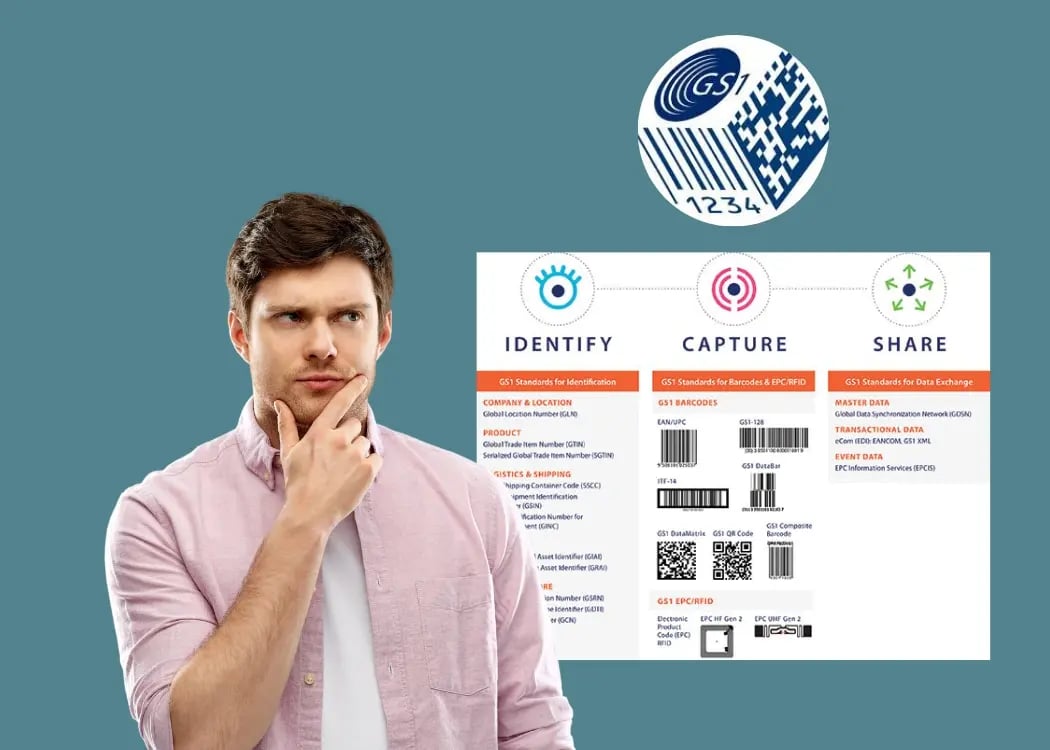
GS1 is a global organization that develops and maintains standards for supply chains across industries. The most familiar of these standards is the GS1 barcode, but GS1 governs much more than that—including identifiers for trade items, logistics units, locations, and digital data exchange.

In the context of FMCG and retail, GS1 standards provide a common language for everyone involved in the production and distribution of products. These standards ensure that when a product is scanned, tracked, or stored, it’s handled accurately and efficiently—regardless of where it was made or who sells it.


Need a repeatable GS1 approval step for every SKU?

See how teams build barcode and GTIN checks into packaging approvals.


GS1 packaging artwork checklist

Use this checklist before sending packaging artwork to prepress or final approval:

Barcode & scanability

  • Barcode type matches packaging level (EAN-13/UPC-A for retail units, ITF-14/GS1-128 for cases).

  • Magnification and dimensions are within spec for the chosen symbol size.

  • Quiet zones are clear (no text, lines, folds, or background patterns).

  • Sufficient contrast (avoid red/orange backgrounds; use dark bars on light background).

  • Placed on a flat, scannable area — not across seams, curves, or closures.

  • No varnish/foil/embossing or glossy finishes that reduce readability (unless tested).

Data & identifiers

  • Correct GTIN is assigned to the exact SKU/variant (size, flavor, language version, multipack).

  • Human-readable numbers match the encoded GTIN.

  • If using a 2D code (GS1 Digital Link), the destination data is correct and maintained.

Artwork control

  • The barcode file is linked to the right version (no copy-paste from old SKUs).

  • Final proof is verified with a barcode verifier / print test (recommended).

  • Approval history documents who checked GS1 elements and when.


Key GS1 standards for packaging artwork (what designers need to know)

For packaging artwork teams, GS1 usually comes down to three core things: the right identifier (GTIN), the right barcode symbol (EAN/UPC/ITF/GS1-128), and print-safe placement — including size, quiet zones, and contrast.

If any of these elements are wrong, even a visually perfect package can fail at checkout or in the warehouse.

Below is a practical breakdown of the GS1 standards that matter most during packaging design and artwork approval.


1. GS1 General Specifications (barcode size, placement, print rules)

This is the core document that outlines how GS1 barcodes and identifiers must be used on packaging. It includes everything from barcode placement and size to color and quiet zones.

Key Points:

  • Minimum barcode size (EAN/UPC): 80% magnification

  • Maximum size: 200% magnification

  • Quiet zones (white space): Minimum 2.5mm on both sides of barcode

  • Barcode placement: Should be on the lower right of the back of the package, ideally on a flat surface to ensure reliable scanning

  • Print contrast: Barcode should be printed in black on white background or a high-contrast equivalent

2. GTIN (Global Trade Item Number)

A GTIN is a unique number assigned to every product and packaging variation. It’s what the barcode represents and must be printed clearly and correctly embedded in the artwork.

Common GTIN Formats:

  • GTIN-13: Common in retail, especially Europe

  • GTIN-14: Used for outer cartons or logistics units

  • GTIN-12: Common in North America (UPC codes)

Correct GTIN usage ensures that each product and variant is uniquely identifiable in global supply chains and is critical for accurate data sharing.

3. Barcode types by packaging level

Different packaging levels require different types of barcodes:

Packaging Level

Barcode Type

Description

Retail unit

EAN-13 / UPC-A

Standard barcode scanned at checkout

Carton / Case

ITF-14 or GS1-128

For logistics and warehouse scanning

Pallet

GS1-128 with SSCC

Serialized shipping container codeđź“– Explore barcode types: https://www.gs1.org/barcodes


4. GS1 barcode symbols for packaging

Different GS1 symbols are designed for different scanning environments:

  • EAN-13 / UPC-A – Retail checkout scanning

  • ITF-14 – Outer cases and secondary packaging

  • GS1-128 – Logistics units, pallets, and advanced supply chain use cases

Choosing the correct symbol ensures scanners can read the code reliably, whether on a store shelf, in a warehouse, or during transport.

5. GS1 Digital Link and 2D barcodes

GS1 Digital Link is an evolution of GS1 standards that enables 2D barcodes (such as QR codes) to carry GTINs combined with web URLs.

Key benefits for packaging:

  • Connects consumers to product data, sustainability info, recalls, or traceability

  • Reduces the need for multiple codes on pack

  • Fully compatible with GS1 identifiers

While adoption is growing, Digital Link still requires the same discipline around data accuracy and placement as traditional barcodes.

6. Packaging Hierarchy and Data Consistency

GS1 also enforces standards around how items are structured across packaging hierarchies—from single units to cases and pallets. Every level must have the right GTIN and associated barcode. 


Common GS1 barcode mistakes (and how to avoid them)

Even teams with strong processes run into the same GS1 issues:

  1. Quiet zones get violated (text, icons, dielines, patterns too close).

  2. Barcode is placed on a curve or seam → scanning fails in production.

  3. Low contrast combinations (red/orange backgrounds, metallic inks, gradients).

  4. Wrong barcode type for the packaging level (retail vs case vs pallet).

  5. GTIN mismatch (numbers in artwork don’t match the product master data).

  6. Finishes applied over the code (gloss varnish/foil) without validation.

  7. Resizing during layout without checking magnification and proportions.

Tip: Treat barcode placement and GTIN accuracy as their own approval gate — not “something to check at the end.”


The Challenge: Managing GS1 Compliance in Complex Packaging Projects

In real-world packaging design, it’s not unusual to manage:

  • Dozens or hundreds of SKUs

  • Multiple product lines with varied pack formats

  • Multilingual copy

  • Regional and regulatory variations

Ensuring GS1 compliance across all these variables is time-consuming and error-prone—especially when managed with generic tools like spreadsheets or static PDFs.

Packaging and artwork teams often struggle to:

  • Track which GTIN is assigned to which SKU

  • Ensure the correct barcode version is used

  • Coordinate barcode placement with designers and printers

  • Verify that the final design meets print specifications for scannability


How Cway® Supports GS1-Compliant Artwork Workflows

Cway® simplifies the process of managing GS1 standards in packaging projects by combining project management, file collaboration, and visual review tools in one powerful platform.

Centralized Artwork Management

All packaging artworks are stored and versioned in Cway’s Media Center App, ensuring that barcode data and artwork files are always aligned. This avoids mix-ups between versions or regions.

Integrated Viewer with Barcode Control

Cway’s powerful Viewer allows users to:

  • Review barcode placement directly on the artwork

  • Compare multiple versions side-by-side

  • Leave comments for corrections or updates—right on the file

This visual feedback loop ensures that GS1-related elements like GTINs and barcodes are never overlooked during reviews.

Role-Based Collaboration

Multiple stakeholders—regulatory, marketing, design, supply chain—can work together in one structured system. Cway lets you define approval flows that include GS1 checks as part of the process.


GS1 Is More Than Just a Barcode

In today's fast-moving, global packaging landscape, GS1 standards ensure consistency, traceability, and efficiency—from factory floor to store shelf. But compliance doesn't happen automatically—it must be built into your packaging workflow from the start.

With Cway®, teams can manage GS1 standards as part of their daily packaging operations—without losing time, control, or visibility.


FAQ


BarTender Cloud vs Cway: key differences for packaging teams

BarTender Cloud vs Cway: key differences for packaging teams

BarTender Cloud is a popular SaaS platform for label design, barcode printing, and automated labeling workflows. But in many organizations,...

View Full Article
Why packaging artwork errors still happen — and how to avoid them

Why packaging artwork errors still happen — and how to avoid them

Packaging artwork errors are like typos in a legal contract: small, but potentially devastating. A misplaced word, a misaligned barcode, or a...

View Full Article
Packaging teams need more than Trello — here’s why

Packaging teams need more than Trello — here’s why

Trello is great—until your packaging project gets real.If you’ve ever tried managing a packaging design workflow with Trello or other...

View Full Article