6 min read

You're probably automating in the wrong order

You're probably automating in the wrong order
Packaging Artwork Automation: Are You Doing It Wrong?
12:03

Most packaging teams automate in the wrong order: they start with design speed and end with compliance controls. The result is faster errors, not fewer. This guide covers what to automate first in artwork management — and what to leave under human control — across FMCG, cosmetics, and retail.

What to Automate in Packaging Artwork Management (And What Not To)

Packaging teams that invest in automation usually see results — faster file transfers, fewer missed notifications, cleaner asset libraries. And then six months later they are still dealing with the same problems: wrong versions going to print, compliance sign-offs happening after the fact, no clear record of who approved what.

The tools are not the problem. The order is.

Most teams automate what is visible — design generation, file delivery, status updates — and leave untouched the parts of the workflow where errors actually happen and where the cost of getting it wrong is highest. This article explains what to automate first, what to automate later, and what should stay under human control entirely.

The examples draw from FMCG, cosmetics, and retail packaging — industries where artwork errors range from costly to legally serious, and where the volume of variants, markets, and stakeholders makes process discipline non-negotiable.

Why Teams Automate in the Wrong Order

The pattern is consistent across industries. When a packaging team first looks at automation, they reach for the tools that promise the most visible speed gains: AI-assisted design, automated file conversion, notification bots that ping reviewers when something is waiting.

These tools are easy to evaluate, easy to demo, and deliver results that are easy to measure. Turnaround time on initial design drops. Files arrive faster. Everyone feels more productive.

What does not change: the revision cycle. The back-and-forth between brand, regulatory, legal, and external agencies. The moment a print supplier downloads a file that was superseded two days ago. The audit request that takes three days to answer because approvals were captured in email threads.

These problems are harder to see, harder to demo, and harder to assign a number to — so they get automated last, if at all. That is the wrong order.

What Not to Automate First

AI-Generated Artwork

AI design tools are genuinely useful for packaging — generating initial concepts, adapting layouts across formats, resizing artwork for different markets. The risk is not the technology. The risk is plugging AI generation into a workflow that does not yet have controlled handoff points.

When AI can generate ten variants in the time it used to take to produce one, the approval process becomes the bottleneck — and if that process is not structured, speed makes things worse, not better. More variants mean more versions to track, more opportunities for the wrong file to move forward, and more confusion about which version is current.

Automate AI generation after you have automated version control and compliance gates. Not before.

Notifications Without Blockers

Automated notifications — "your file is ready for review", "approval pending for 48 hours" — are useful. But notifications without blockers are just noise with extra steps.

A notification tells someone they should do something. A compliance gate means the workflow cannot continue until they do. The difference matters most under deadline pressure, which is exactly when reviewers skip steps and approvals get rubber-stamped.

Cosmetics brands launching seasonal collections across multiple markets know this well: when speed is the priority, notification-only systems create the illusion of control while the actual approval chain collapses.

Auto-Approval Rules

Some teams automate approval for low-risk changes — a price update, a barcode correction, a market-specific legal line. The logic seems sound: if the change is minor and pre-defined, why route it through a full approval chain?

The problem is that "minor" is not a stable category in regulated packaging environments. A price change on a cosmetics product in France may trigger a separate legal requirement. A barcode correction that touches the label layout may need structural sign-off. Auto-approval rules that seemed reasonable when written become liabilities when regulations change or when a product line extends into a new market.

Keep human gates on anything that touches label content, legal claims, or regulatory fields — regardless of how minor the change appears.

What to Automate First

Version Control

This is the highest-ROI automation in packaging artwork management and the one most teams implement last.

The core problem it solves: in a workflow managed through email and shared drives, there is no reliable way to know which version of a file is current. Designers work on v3 while an agency comments on v2. A print supplier downloads a file the day before a correction is approved. A retailer receives artwork that was superseded three weeks ago.

Automating version control means the system — not the team — maintains a single source of truth. Every upload creates a new version. Previous versions are locked, not deleted. Status is visible at a glance: draft, in review, approved, superseded. External partners access files through controlled links that always point to the current approved version.

For retail packaging teams managing hundreds of SKUs across private label and branded ranges, this alone eliminates a category of errors that no amount of careful emailing can prevent.

Compliance Gates

Automate the checkpoints before you automate the speed.

A compliance gate is a hard stop in the workflow: artwork cannot move to the next stage until a required approval is recorded. Not a reminder. Not a flag. A block.

The configuration matters as much as the feature. Effective compliance gates are set up to reflect the actual risk profile of different change types and markets. A fragrance reformulation at a cosmetics brand triggers a different gate sequence than a pack size extension. A label update for the German market may require regulatory sign-off that the UK version does not.

FMCG brands with EU distribution typically need gates that reflect FIC requirements, GS1 data accuracy, and market-specific legal claims — all potentially different per SKU. The automation here is not removing human judgement. It is ensuring human judgement happens in the right sequence, every time, with a record.

External Partner Access

Agencies, printers, and retailers are part of almost every packaging approval chain — and they are almost always the weakest link in version control.

The standard workaround is to email files, which creates uncontrolled copies that live outside any approval system. The person who receives the file has no way of knowing if it has been updated since it was sent.

Automating external access means partners access files through the platform — not through email attachments. They see the current approved version. They cannot download a superseded file. Their access is logged. When they provide feedback or sign off, it is captured in the system alongside internal approvals.

For cosmetics brands working with contract manufacturers across multiple countries, this closes a gap that manual processes cannot reliably manage at scale.

Audit Trail Capture

Every action in the artwork approval process should be logged automatically: who viewed a file, who commented, who approved, who rejected and why, when each version was uploaded, when access was granted to external partners.

This is not primarily about compliance audits, though it serves that purpose. It is about operational visibility. When a print error occurs — and it will — the team needs to be able to reconstruct exactly what happened without relying on memory or inbox searches.

Audit trail automation requires nothing from the team once it is configured. It runs in the background, captures everything, and produces a report on demand. The cost of not having it only becomes visible when something goes wrong.

Why the Order of Automation Matters More Than the Tools You Choose

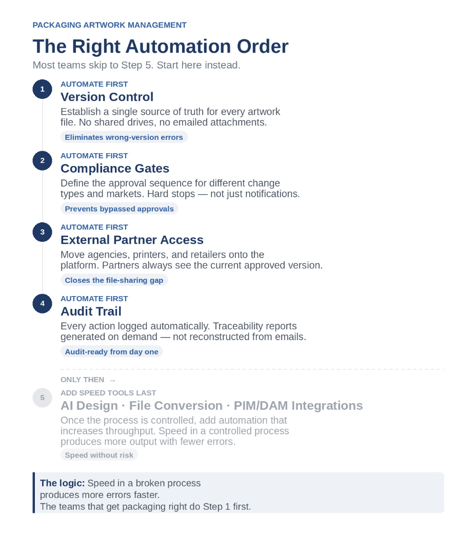
the right automation order for packaging artwork managementThe instinct to automate design first makes sense — it is where the time pressure is most visible and where the ROI is easiest to demonstrate to leadership. A tool that cuts initial artwork production from three days to three hours is a compelling purchase. The problem surfaces six months later, when the team is still managing the same revision cycles, the same version confusion with external agencies, and the same scramble to reconstruct an approval trail when something goes wrong at the printer.

In regulated packaging categories — food, cosmetics, retail private label — the cost of a wrong version reaching production is not measured in wasted design hours. It is measured in recall costs, compliance investigations, and delayed launches across multiple markets. A cosmetics brand running a seasonal collection across eight European markets with three external agencies is not slowed down by slow design. It is slowed down by not knowing which version an agency is working from, and whether the file the printer downloaded last Tuesday was superseded on Wednesday.

The sequence matters because speed amplifies whatever process it runs on. Automation applied to a broken approval chain does not fix the chain — it moves more files through it faster, which means more opportunities for the wrong version to reach the wrong person at the wrong stage. The teams that scale packaging operations without scaling errors are not the ones with the most sophisticated design tools. They are the ones who treated version control, compliance gates, and audit trails as infrastructure — and built the rest of the workflow on top of that foundation.

Getting the order right is not the cautious approach. In most cases, it is the faster one.

What This Looks Like Across Industries

FMCG: A food brand managing 200+ SKUs across EU markets needs compliance gates that reflect FIC requirements and market-specific regulatory variation. Version control is critical when the same base artwork is adapted for eight countries simultaneously. The priority is traceability — being able to show which version was approved, by whom, before any file went to a printer.

Cosmetics: A cosmetics brand launching a seasonal collection works with external agencies on tight timelines. The risk is version confusion at speed — an agency working on an outdated brief, a printer downloading a file before final legal sign-off. Automating external partner access and version control directly addresses this. AI design tools come later, once the handoff points are controlled.

Retail: A retailer managing private label packaging across dozens of suppliers deals with volume and consistency. Compliance gates ensure that every supplier-submitted artwork goes through the same review sequence regardless of who is managing the project. Audit trail automation makes supplier accountability visible and documentable.

The Bottom Line

Automation is not the problem. 

The tools that are easiest to buy and demo — AI generation, notification systems, file delivery automation — are not the tools that fix the underlying problems in packaging artwork management. Those problems live in version control, compliance gates, external access, and audit trails.

Get those right first. Then add speed.

If you want to see what a correctly sequenced packaging artwork workflow looks like in practice — including compliance gate configuration and external partner access — Cway offers a structured demo built around your specific approval chain.


Artwork management for FMCG brands: why generic tools don't cut it

Artwork management for FMCG brands: why generic tools don't cut it

If you work in a fast-moving consumer goods company, you already know that packaging is not a side project. It's a compliance requirement, a brand...

View Full Article
How to simplify artwork tracking in complex packaging projects

How to simplify artwork tracking in complex packaging projects

When you're managing a packaging design project, especially across different product lines, regions, and teams, things can quickly spiral out of...

View Full Article
Packaging artwork management software vs. generic tools

Packaging artwork management software vs. generic tools

When it comes to managing packaging design, standard document systems simply don’t keep up. In today’s global, fast-moving markets, teams need ...

View Full Article