2 min read

New in Cway Viewer: color separation for packaging PDFs

New in Cway Viewer: color separation for packaging PDFs
How to check print colors with Cway Viewer’s color separation tool
4:03

In packaging design and prepress, color accuracy is everything. The tiniest deviation in hue or ink density can turn a vibrant shelf-ready product into a costly reprint. To help packaging teams review print colors with greater precision, Cway Viewer now includes a dedicated Color Separation feature — making it easier than ever to visualize and verify every ink used in a PDF artwork file.

What Is Color Separation?

Before diving into how the feature works, let’s revisit the concept. Color separation is the process of breaking down artwork into individual color components so that each can be printed separately. Most packaging designs use a mix of CMYK process inks and spot colors (such as Pantone shades), each requiring its own plate or cylinder.

If you’d like to understand this process in detail, including how separations ensure print consistency and brand accuracy, check out our full article on what color separation means in packaging design.

How the Color Separation Feature Works

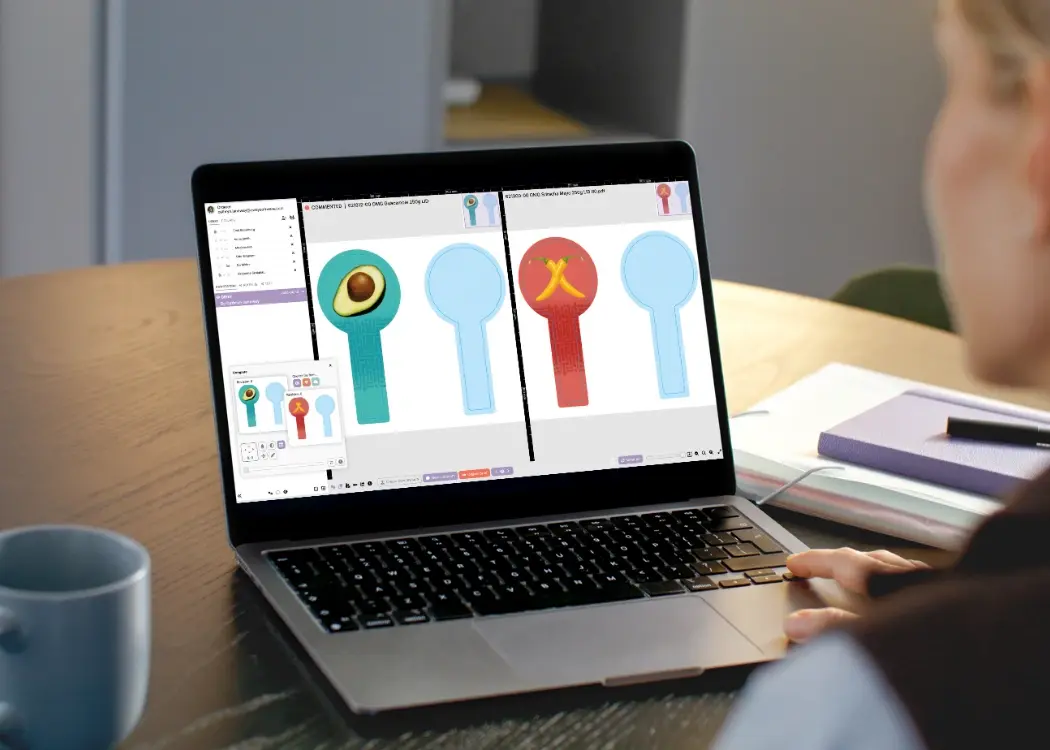
With the new update, users can now access Color Separation directly within Cway Viewer — no external software required.

Here’s how it works step by step:

  1. Open a packaging PDF in Cway Viewer.

  2. Click the Color Separation tool in the lower toolbar.

  3. A panel appears listing all inks detected in the file — including process colors (CMYK), spot colors (Pantone), and special layers like white, cutter, or varnish.

  4. Users can toggle each color on or off to isolate specific inks and instantly visualize their contribution to the final print.

  5. The preview updates in real time, letting you check alignment, overprints, and ink coverage directly on the artwork.

This simple yet powerful tool helps teams inspect how every ink layer interacts, verify that spot colors are correctly named, and ensure that nothing is missing before sending the file to print.


Why It’s a Game-Changer for Packaging Teams

  1. Faster Prepress Checks
    Instantly verify all separations without exporting files or switching between design and proofing software.

  2. Fewer Print Errors
    Identify issues like duplicate spot names or missing separations before production — reducing costly press delays and rework.

  3. Better Collaboration
    Designers, artwork coordinators, and print suppliers can view the same separations inside a shared file, improving communication and reducing confusion.

  4. Support for Complex Print Jobs
    Whether the artwork includes metallics, varnishes, or multiple Pantone layers, Cway Viewer displays every ink channel clearly — helping teams plan for different substrates and printing methods.

  5. Integrated with Version Control and Annotations
    Users can check separations across revisions and annotate directly on the PDF to flag issues for correction.

A Clearer View of Your Print Files

Traditional color separation checks often require specialized prepress software — making it difficult for non-technical users or external collaborators to verify colors. With Cway Viewer, this process becomes accessible to everyone involved in packaging design.

From the artwork designer to the brand manager, every stakeholder can now confidently review which inks are used, how they appear, and whether they align with the approved print specifications.

Designed for Precision and Collaboration

The Color Separation feature is part of Cway’s mission to make packaging artwork management more transparent, collaborative, and technically reliable. When combined with Cway’s built-in tools for version control and annotation, it helps teams move faster from artwork approval to print-ready production — without compromising on quality.

Try It Today

Color Separation is now live for all Cway Viewer users. Open any PDF artwork and activate the new panel to explore your file’s ink layers instantly.


Understanding color separation in packaging design

Understanding color separation in packaging design

In packaging design, color accuracy is more than an aesthetic choice — it’s a reflection of your brand’s identity and consistency. Whether you’re...

View Full Article
How to view PSD files in 2025 – the ultimate guide

How to view PSD files in 2025 – the ultimate guide

Need to view PSD files but don’t have Photoshop? You’re not alone. PSD (Photoshop Document) files are packed with layers, masks, and design elements...

View Full Article
Color Clash: The Packaging Mistakes You Didn’t Know You Were Making

Color Clash: The Packaging Mistakes You Didn’t Know You Were Making

Let’s face it—your packaging has about 0.6 seconds to make a good impression on a shopper. That’s not enough time to explain your sustainability...

View Full Article