How to Manage Packaging Artwork Files Efficiently
Packaging artwork files are one of the most critical assets in product development. Labels, cartons, flexible packaging, and regulatory information...
3 min read
William Janeway
:
March 16, 2026
Version confusion is one of the most common causes of delays in artwork approval.
Multiple PDF files. Email attachments. Feedback on outdated versions. Duplicate comments. Missed changes.
For teams managing packaging artwork management at scale, these small inefficiencies compound quickly — leading to longer approval cycles, compliance risk, and delayed time-to-market.
Integrating version comparison tools into your artwork management software can fundamentally change how efficiently your packaging artwork process runs.
Let’s explore how.
Artwork approval is rarely a simple “approve or reject” task.
In regulated industries, especially FMCG and consumer goods, packaging artwork approval involves:
Each revision introduces new changes — sometimes small, sometimes critical.
Without structured version control, teams struggle to:
When teams try to manage packaging artwork files manually in shared folders or project management tools, version confusion becomes inevitable.
The result?
Longer artwork approval cycles.
Repeated review rounds.
Increased compliance exposure.
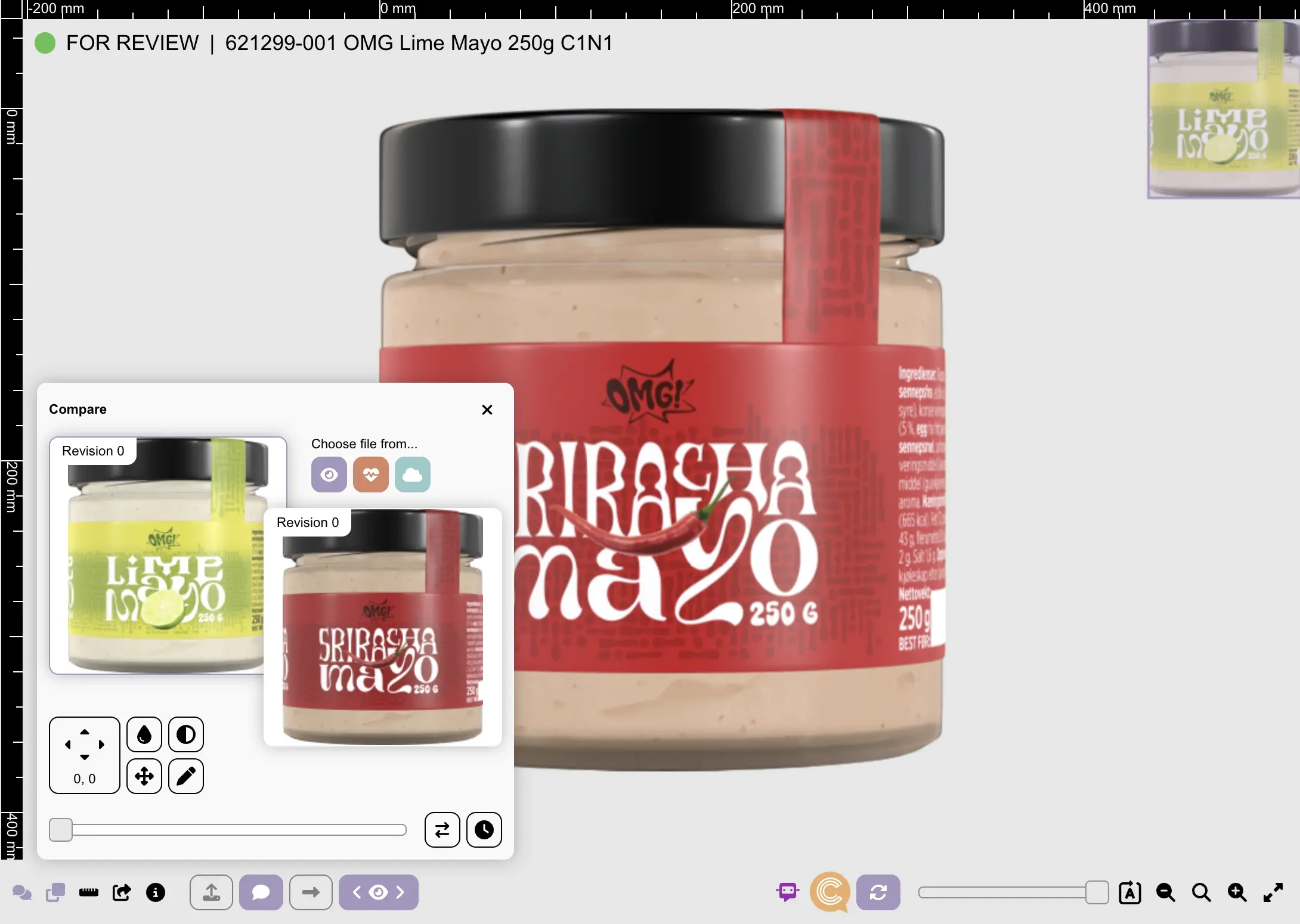
A version comparison tool automatically detects and highlights differences between two versions of a document or artwork file.
Within an artwork management system, version comparison typically includes:
Unlike manual file checking, version comparison eliminates guesswork.
It ensures reviewers focus only on what has changed — not on re-evaluating the entire document from scratch.
For packaging artwork management, this is critical.
In complex packaging environments, teams manage hundreds — sometimes thousands — of SKUs across multiple markets.
Each artwork revision may include:
Without version comparison, reviewers must manually compare files to confirm updates.
This slows down the entire packaging artwork process.
With automated version comparison integrated into a packaging artwork tool, teams can:
✔ Instantly identify differences between revisions
✔ Validate requested changes quickly
✔ Reduce redundant review rounds
✔ Accelerate packaging artwork approval
✔ Improve stakeholder alignment
Instead of asking, “Did this change get implemented?”, reviewers can immediately see confirmation.
This directly improves artwork approval efficiency.
Integrating version comparison into your artwork management software delivers measurable operational improvements:
Reviewers no longer re-check entire documents.
They validate changes only.
This can significantly reduce review time per revision.
Clear change visibility prevents miscommunication and repeated feedback.
Stakeholders focus on specific updates, improving first-time approval rates.
Structured version tracking ensures:
This is essential in packaging artwork management, where traceability is non-negotiable.
When marketing, regulatory, and legal teams all see the same highlighted changes, alignment improves.
Multi-stakeholder packaging artwork approval becomes structured — not chaotic.
Organisations that implement structured artwork management software with integrated version comparison typically report:
For large packaging portfolios, even a modest 15% reduction in approval time can translate into weeks saved annually across product launches.
Many teams still rely on manual comparison methods:
This approach introduces:
Here’s the difference:
|
Manual Review |
Version Comparison Tool |
|---|---|
|
Side-by-side PDF checking |
Automated difference detection |
|
High risk of missed changes |
Highlighted modifications |
|
No structured audit trail |
Version-linked approval logs |
|
Email-based comments |
Centralised artwork approval workflow |
|
Difficult to manage packaging artwork files |
Controlled repository & governance |
Manual comparison does not scale. Structured version comparison does.
Version comparison becomes essential when:
If your team struggles to manage packaging artwork files efficiently or frequently experiences approval delays, version control may be the bottleneck.
In these cases, a dedicated packaging artwork tool with built-in version comparison is no longer optional — it is foundational.
To fully improve artwork approval efficiency, version comparison should not exist in isolation.
It should be integrated into:
When embedded into a comprehensive artwork management system, version comparison becomes part of a governed process — not just a technical feature.
The result is:
Greater control.
Faster approvals.
Stronger compliance protection.
Improved time-to-market.
Version confusion is one of the most underestimated causes of delay in artwork approval.
As packaging complexity increases, manual comparison methods become a liability — not just an inconvenience.
Integrating version comparison tools into your artwork management software transforms the way teams:
The goal is not simply to detect changes.
The goal is to reduce risk, improve visibility, and accelerate operational efficiency.
For packaging teams operating in compliance-heavy environments, version comparison is not just a productivity feature — it is a strategic safeguard.
Packaging artwork files are one of the most critical assets in product development. Labels, cartons, flexible packaging, and regulatory information...
If you're part of a team that creates packaging—whether it’s for yoghurt tubs, medicine boxes, or shampoo bottles—you know how tricky it can be to...
In complex packaging projects, artwork doesn’t move in a straight line. A single label or carton design may pass through marketing, regulatory,...