4 min read
Introducing Lightbox: no more re-uploading packaging artwork
Ekaterina Skalatskaia
:
June 22, 2026
Packaging designers spend a surprising amount of time not designing.
Between downloading files from a DAM or project management system, re-uploading revised versions, renaming files to avoid overwriting someone else's work, and tracking down which version is actually current — the logistics can easily consume an hour or more out of every working day. Multiply that across a team working on dozens of SKUs simultaneously, and the numbers get uncomfortable fast.
This isn't a workflow problem unique to one company or one industry. It's structural: the tools designers use to create artwork (Illustrator, Photoshop, InDesign) and the systems teams use to manage it (approval platforms, DAMs, artwork management systems) were never really designed to talk to each other. The result is a manual handoff that happens multiple times per revision cycle, on every artwork, indefinitely.
Lightbox is Cway's answer to that gap.
The Loop Nobody Talks About
Ask a packaging coordinator what slows down artwork cycles and they'll usually point to approval delays, stakeholder feedback, or regulatory review. Rarely do they mention the file logistics layer — because it's so routine it's become invisible.
But the loop is real and it looks like this:
- Designer opens the artwork management system in a browser
- Finds the right file and downloads it
- Opens it locally in Illustrator
- Makes edits, saves
- Goes back to the browser
- Navigates back to the right project and artwork
- Uploads the revised file
- Renames it to indicate it's the latest version
- Repeat for the next revision
Nine steps. For every single revision. On every single artwork.
The inefficiency is obvious in isolation. In practice, it's normalized — teams adapt around it, build habits to compensate, and accept it as the cost of working with external systems. But normalization doesn't make it less expensive. It just makes it harder to see.
What Goes Wrong When Files Live in Two Places
Beyond the time cost, the download-edit-upload pattern creates a structural reliability problem: for the duration of every edit session, the artwork exists in two places simultaneously — on the server and on the designer's local machine. Those two copies can diverge.
Version conflicts. If two designers download the same file and edit it concurrently, the second upload overwrites the first. There's no warning, no merge, no record of what was lost. This happens more often than teams admit, especially when communication about who's working on what relies on Slack messages or verbal check-ins.
Orphaned files. Local copies accumulate on designers' machines long after check-in. 621298-00_Lime_Mayo_FINAL_v2_USE_THIS.ai sits in a Downloads folder for months. If someone finds it and uses it as a starting point, they're working from stale source material.
Missing upload steps. A designer finishes edits, closes Illustrator, and moves on to the next task. The revised file never makes it back to the system. The project record shows the old version. No one notices until the next reviewer opens it.
None of these are catastrophic on their own. But in combination, across a team managing hundreds of packaging SKUs, they add up to a significant and measurable drag on artwork cycle times.
What a Desktop-Native Workflow Actually Means
The phrase "desktop-native" gets used loosely in software marketing, so it's worth being specific about what it means in the context of artwork management.
A desktop-native workflow means the connection between the management system and the designer's local environment is handled by software — not by the designer manually. Files move from server to local and back according to a defined protocol, with versioning and locking managed automatically. The designer's job is to design. The tool handles the rest.
In practice this looks like:
- Open an app on your Mac or Windows machine
- Select the project and artwork you're working on
- Click check out — files arrive in a structured local folder, ready to open
- Work in Illustrator, Photoshop, or whatever tool you use
- Click check in when done — the system detects what changed, uploads the diff, creates a new revision
The artwork management system always has an accurate, current record. The designer never touches a browser to manage files.
How Lightbox Works
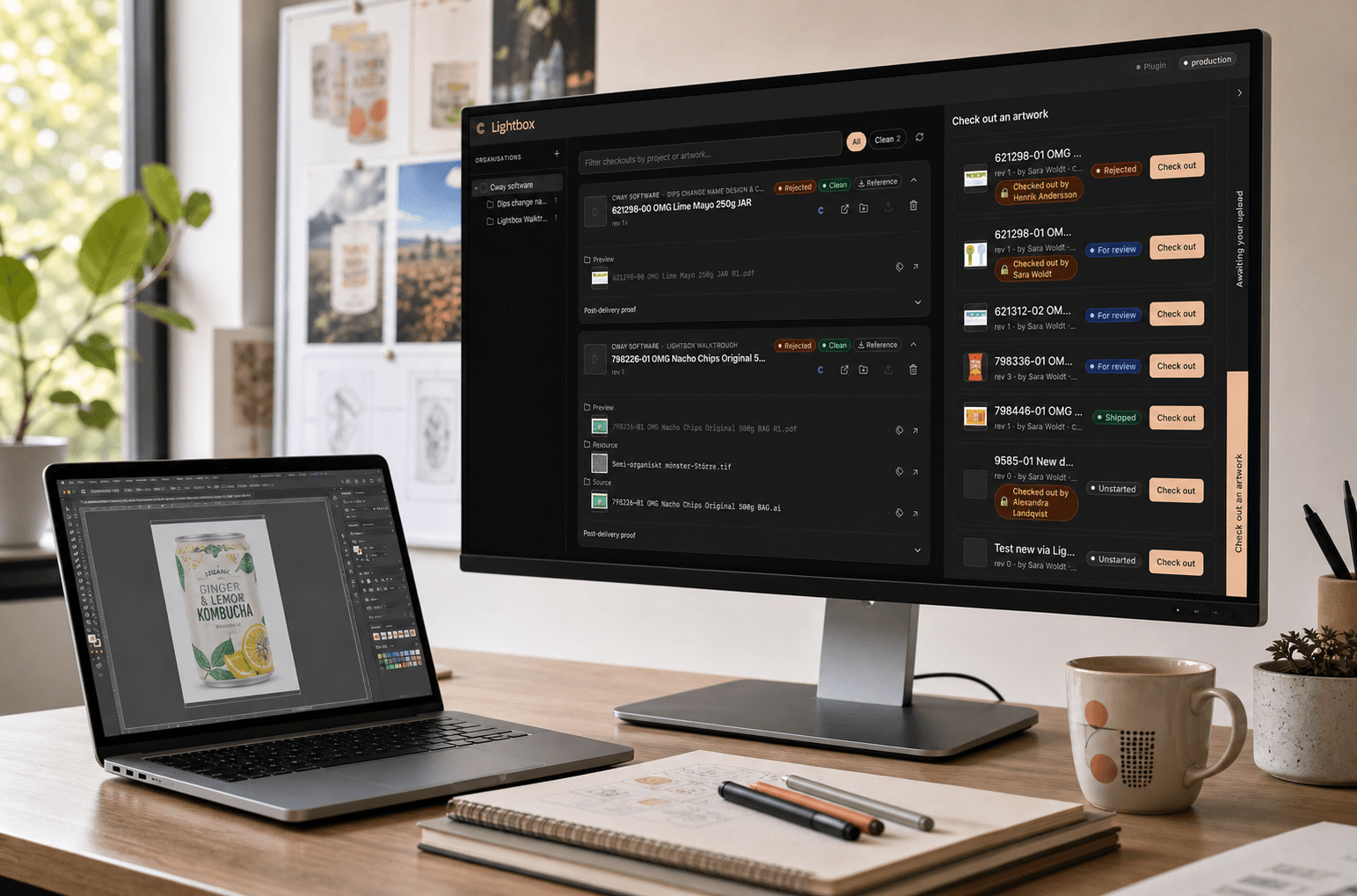
Lightbox is a native macOS and Windows desktop client for Cway that implements exactly this workflow.
Checkout pulls source files, resources, and delivery assets into a clean local folder structure (~/Cway/<project>/<artwork>/). The moment a designer checks out an artwork, it's locked in Cway — server-side, not just a flag in a spreadsheet. Other team members can see who has it and when it was checked out.
Editing happens entirely in the designer's existing tools. Lightbox doesn't install a plugin, doesn't wrap Illustrator, doesn't require any changes to how designers work. The files are just there, in a folder, ready to open.
Check-in is a single action. Lightbox diffs the local folder against what was checked out, uploads only what changed, and creates a new versioned revision in Cway. The lock is released. The previous version is preserved on disk as a read-only archive. The project record is updated automatically.
The entire file logistics layer — which previously required nine manual steps — is reduced to two clicks and a folder.
The Locking Mechanism Matters More Than It Sounds
File locking tends to get mentioned as a minor feature in software overviews. In packaging workflows, it's actually one of the more important structural safeguards available.
When a designer checks out an artwork in Lightbox, Cway records the lock server-side. If another team member attempts to check out the same file, they see a clear notification: who has it, when it was checked out. They can choose to wait or, in cases where it's urgent, take the lock — with an explicit warning that doing so may overwrite unsaved local changes.
This is meaningfully different from informal coordination (a Slack message saying "I'm working on the mayo label") because it's enforced at the system level, visible to everyone, and logged. It doesn't rely on communication habits holding up under deadline pressure.
Who Lightbox Is Built For
Lightbox is designed for packaging and FMCG teams that already use Cway and manage meaningful volumes of artwork — typically teams where multiple designers are working concurrently on different SKUs, where revision cycles are frequent, and where the cost of a version conflict or a missed upload is real.
It's particularly relevant for teams where designers work in Illustrator or Photoshop as their primary tools and have adapted around browser-based file management out of necessity rather than preference.
It is not a replacement for Cway's web interface — approvers, coordinators, and stakeholders continue to work in the browser. Lightbox is specifically for the design-side file workflow: the part that happens between "artwork is assigned" and "revised file is ready for review."
The Broader Point
The download-edit-upload loop is one of those workflow inefficiencies that persists not because teams don't notice it, but because fixing it requires a tool that didn't previously exist in this category. Artwork management systems have historically been built around the approval workflow — the review, annotation, and sign-off layer. The design-side file workflow was left to manual process.
Lightbox closes that gap. It's a small but concrete change to how packaging design teams interact with Cway — and for teams doing high-volume artwork work, the cumulative effect on cycle times is significant.
Lightbox is available to Cway customers. If your team manages packaging artwork in Cway and wants to eliminate the browser-based file loop learn more and request access →