5 min read

How to replace Bynder or Widen with Cway in 7 steps (2026)

How to replace Bynder or Widen with Cway in 7 steps (2026)
9:26

Switching from a general-purpose DAM to a packaging-focused platform can feel overwhelming. Your current files are everywhere, workflows are in place, and nobody wants to disrupt launches. But Cway makes this migration straightforward for packaging and artwork operations.

This guide walks you through exactly how to move from Bynder or Widen to Cway without losing momentum on your multi-market packaging compliance and approval workflows. By the end, you'll have a clear, step-by-step path to a platform built specifically for packaging complexity.

Quick Guide: How to Replace Bynder or Widen with Cway in 7 Easy Steps

  1. Audit your current DAM usage and assets — Document which files, metadata, and workflows you're currently using.
  2. Define your packaging-specific workflow requirements — Map out your approval stages, compliance gates, and stakeholder sequences.
  3. Plan your asset migration strategy — Decide which assets to migrate and how to clean up metadata.
  4. Set up teams, approvers, and project collaboration in Cway — Organize packaging reviews, assign stakeholders, and centralize approval visibility.
  5. Migrate assets and metadata to Cway — Transfer files while preserving version history and audit trails.
  6. Onboard internal teams and external partners — Train reviewers and give agencies controlled access.
  7. Run parallel operations and validate — Test workflows before fully switching over.

How to Switch from Bynder or Widen to Cway for Packaging Artwork

1. Audit your current DAM usage and assets

Start by documenting what you currently have in Bynder or Widen. Pull a complete asset list including file types, metadata fields, and folder structures. Identify which assets are actively used versus archived.

Pay attention to your current approval workflows. Who reviews what? In what order? Where do delays typically occur? This baseline helps you configure Cway to address your actual pain points.

Don't forget to note integrations with other systems—PIM, ERP, or design tools. Understanding these connections early prevents surprises during migration.

2. Define your packaging-specific workflow requirements

Generic DAMs treat all files the same. Packaging operations need something different: structured approval stages that enforce compliance gates at specific points in your workflow.

Map out your ideal approval sequence. Most packaging teams need stages like: brief approval, design review, regulatory check, legal sign-off, and printer release. Define who owns each stage and what triggers the next one.

Consider your multi-market complexity. Do different regions need different approval paths? Does regulatory review happen before or after marketing sign-off? 

3. Plan your asset migration strategy

Not every file in your current DAM needs to move to Cway. Take this opportunity to clean house. Active packaging artworks and their approved versions should migrate. Old campaign assets that belong in a marketing DAM may not.

Create a metadata mapping document. Your current taxonomy in Bynder or Widen may not align perfectly with Cway's structure. Decide which fields translate directly, which need restructuring, and which metadata you want to add.

Set a realistic timeline. Migrating tens of thousands of assets takes time. Plan for a phased approach, starting with high-priority brands or product lines.

4. Set Up Teams, Approvers, and Packaging Collaboration in Cway

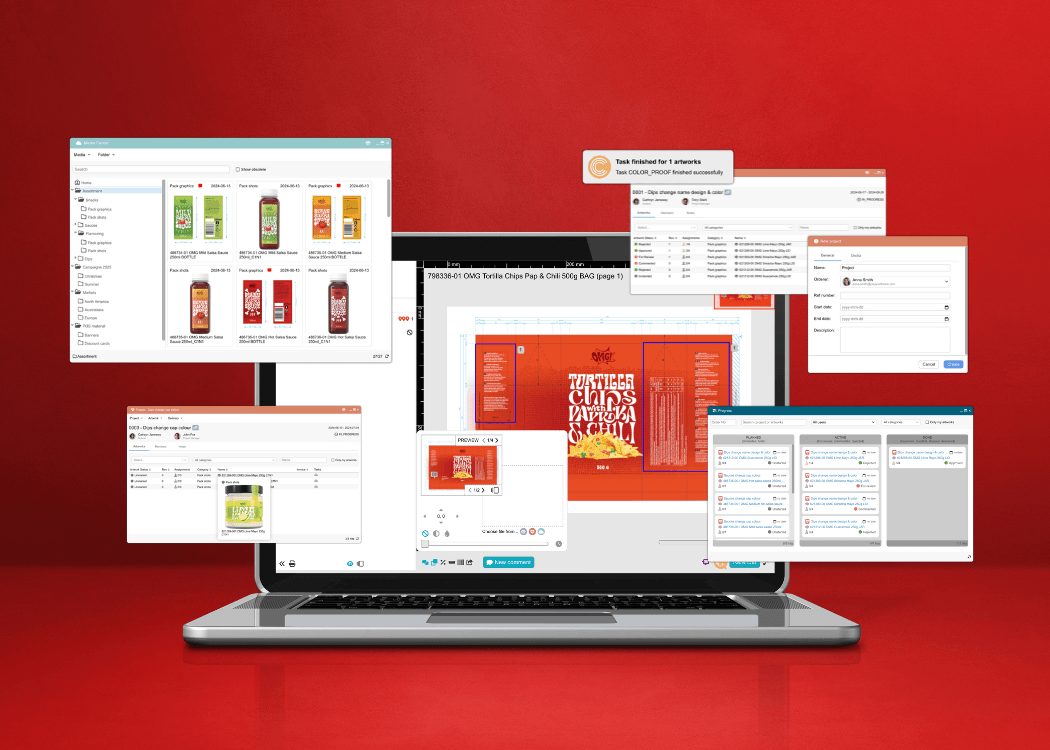
This is where Cway’s packaging-focused workflow structure helps teams centralize reviews, approvals, and packaging visibility in one environment.

Create packaging projects, assign approvers, organize review responsibilities, and define how teams collaborate across packaging development. Instead of relying on scattered email threads and disconnected feedback, stakeholders can review artwork, leave annotations, track tasks, and monitor approval progress within a shared workspace.

Cway helps teams maintain visibility across packaging reviews with version history, approval traceability, and centralized collaboration tools. This makes it easier to coordinate packaging development across marketing, regulatory, suppliers, and external partners while reducing confusion caused by fragmented communication.

By managing packaging reviews, assets, and approvals in one place, teams can improve operational consistency and maintain clearer oversight across packaging projects.

5. Migrate assets and metadata to Cway

With workflows configured, begin the actual asset transfer. Cway supports bulk imports that preserve your metadata structure. Work with your technical team to map source fields to destination fields.

Preserve version history where possible. For active artworks, maintaining the audit trail of who approved what matters for compliance. Cway's version control creates a clear record from day one.

Run validation checks after import. Spot-check a sample of assets to confirm metadata transferred correctly and files open as expected. Fix any issues before proceeding with the full migration.

6. Onboard internal teams and external partners

A platform only works if people use it. Schedule training sessions for internal stakeholders: brand managers, regulatory specialists, packaging coordinators, and anyone who touches the approval workflow.

Cway offers a user-friendly proofing dashboard that makes adoption easier. Show reviewers how to annotate directly on artworks, compare versions side-by-side, and complete approvals from their task list.

For external agencies and printers, set up controlled access. Partners can review, comment, and approve through secure links. This keeps everyone in one system rather than falling back to separate portals.

7. Run parallel operations and validate

Don't switch everything overnight. Run your first few projects through Cway while maintaining access to your old system. This parallel period lets you catch workflow gaps and refine configurations.

Track key metrics during this phase: approval cycle time, number of revision rounds, and stakeholder response times. Compare these against your baseline from step one. Cway's built-in analytics help you measure improvement.

Once you're confident in the new workflows, set a cutoff date for the old system. Communicate the switch clearly to all stakeholders so everyone knows where to find current projects going forward.

What packaging features does Cway have that Bynder or Widen lack?

General-purpose DAM platforms like Bynder and Widen store files well. They were built for marketing teams managing campaign assets, brand guidelines, and creative libraries. Packaging operations need more.

Cway includes purpose-built capabilities for packaging complexity:

These features matter when you're managing hundreds of SKUs across multiple markets with different regulatory requirements. A general DAM requires workarounds for these scenarios. Cway handles them natively.

How long does a typical DAM migration take for packaging teams?

Migration timelines depend on your asset volume, workflow complexity, and team availability. Most mid-market packaging teams complete the transition in 8-12 weeks.

The planning phase—auditing current usage, defining requirements, and configuring workflows—typically takes 3-4 weeks. Asset migration itself can run 2-4 weeks depending on volume. Onboarding and parallel operations add another 2-4 weeks.

Larger enterprises with multiple brands and regions may need longer. The key is phased rollout: start with one brand or region, validate the approach, then expand. This approach reduces risk and builds internal confidence before full deployment.

How Cway helps you automate multi-market packaging compliance

Cway unifies artwork workflows, asset management, product data, approvals, and insights into one platform built specifically for packaging operations. If you're moving from a general DAM like Bynder or Widen, you'll notice the difference immediately.

Your approval workflows become structured and trackable. Instead of chasing approvals through email, Cway automatically routes artworks to the right reviewer at the right stage. 

Version control becomes reliable. Every artwork change creates a timestamped record showing who made what change and when. This audit trail matters for regulated categories and multi-market operations where proving compliance is mandatory.

External collaboration gets simpler. Agencies, printers, and regulatory consultants work from the same system through controlled access. No more separate portals or email attachments that create version confusion.

Ready to see how Cway handles your packaging workflows? 


FAQ


Speed up creative work with smart design approval software

Speed up creative work with smart design approval software

Streamline design approvals, enhance feedback loops, and get to market faster with Cway®—your all-in-one platform for artwork approval process.

View Full Article
How to streamline your artwork workflow from start to finish

How to streamline your artwork workflow from start to finish

In this article, we’ll explore how to improve your artwork workflow—from managing assets to approving designs faster. Discover how Cway® platform can...

View Full Article
ManageArtworks vs Cway: which software suits your packaging needs?

ManageArtworks vs Cway: which software suits your packaging needs?

When it comes to managing packaging artwork, businesses in the food, consumer packaged goods (CPG), and pharmaceutical industries face the challenge...

View Full Article