Managing 3,000 artworks a year: how FMCG brands stay in control
Three thousand packaging artworks a year. That's not an edge case — it's a realistic volume for any mid-to-large FMCG brand managing multiple product...

As FMCG organizations manage growing product portfolios, faster launch cycles, and increasing regulatory complexity, artwork management platforms have become critical operational infrastructure. But choosing the right platform is no longer just about file storage or approval routing — it’s about finding a solution that fits your organization’s processes, teams, governance model, and long-term scalability needs. In this article, we explore 10 strategic-fit criteria that global FMCG companies should evaluate when selecting an artwork platform in 2026.
If you're shortlisting packaging artwork management systems, you've probably noticed that most vendor comparisons focus heavily on total cost of ownership (TCO). That's important, of course. But for FMCG packaging and artwork operations leaders, TCO is only one piece of the puzzle.
Real-world platform decisions come down to strategic fit—how well the tool aligns with your workflow requirements, compliance gates, and collaboration needs. This article gives you a structured scorecard approach to compare platforms on 10 criteria that matter beyond cost.
Cway unifies artwork workflows, asset management, and approvals into one platform built specifically for packaging operations. To help you evaluate options more objectively, we've developed this framework based on actual FMCG packaging challenges.
We selected these criteria based on:
Cway gives you a purpose-built environment for managing packaging artwork from brief to print-ready file. Unlike general-purpose DAM or creative review tools, Cway is designed around the specific realities of FMCG packaging—multilingual variants, regulatory checkpoints, high SKU volumes, and tight launch windows.
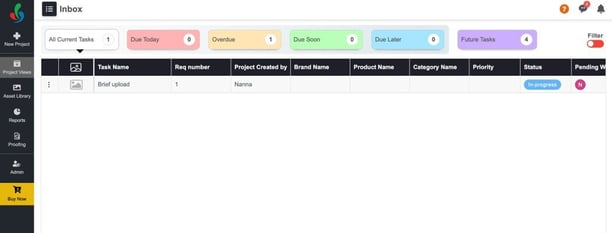
What sets Cway apart is how it consolidates project management, asset storage, proofing, and approvals into a single workspace. You won't need to jump between systems to track status, collect feedback, or locate the latest version. Everything connects in one place, so your packaging, marketing, and compliance functions can stay aligned.
Cway reduces artwork approval cycles by up to 40% compared to email-based coordination, according to Cway's Packaging Artwork Approval Benchmark 2026. That same research found that structured workflows cut revision rounds nearly in half. For packaging operations handling hundreds of SKUs, that difference adds up fast.
Pros:
Cons:
Esko WebCenter is an enterprise-grade platform built for organizations with complex, multi-market packaging operations. It covers a broad range of packaging functions, from structural CAD to prepress automation and 3D visualization. For global brands managing thousands of SKUs across regional supply chains, Esko offers end-to-end production control.
The platform integrates tightly with Esko's printing and prepress ecosystem, making it a natural fit if your workflow already includes ArtPro+ or other Esko tools. That said, implementation timelines are longer, and the learning curve is steeper than lighter-weight alternatives.

Pros:
Cons:
ManageArtworks focuses heavily on compliance, traceability, and regulatory control. The platform is developed by Karomi Technology and caters to pharmaceutical and highly regulated CPG environments where audit trails, validation requirements, and formal sign-offs are non-negotiable.
The system supports automated approval paths, role-based task routing, and vendor access controls. It also offers plugins for Adobe tools, allowing designers to work in familiar environments while syncing to the central system.

Pros:
Cons:
Kallik is built specifically for life sciences and focuses on ensuring that labels and packaging meet industry regulatory requirements. The platform supports controlled workflows and traceability, making it a fit for organizations in pharmaceutical, medical device, and highly regulated consumer health sectors.
Kallik's Veraciti platform combines labeling and artwork management in a single cloud-native solution. It includes features for compliance management, global language handling, and automated change requests with "where used" functionality.

Pros:
Cons:
Artwork Flow is designed for mid-sized brand and packaging teams looking to move beyond unstructured coordination. The platform focuses on proofing, version management, and approval checklists, making it a fit for consumer brands with growing SKU counts and expanding review cycles.
The AI-powered features include text verification, barcode checks, and compliance scanning. For teams that primarily need to speed up review cycles without complex regulatory workflows, Artwork Flow offers a lighter-weight entry point.

Pros:
Cons:
| Platform | Packaging-Specific Workflows | Visual Version Compare | Combined DAM + Approvals |
|---|---|---|---|
| Cway | ✓ | ✓ | ✓ |
| Esko WebCenter | ✓ | ✗ | ✗ |
| ManageArtworks | ✓ | ✗ | ✗ |
| Kallik | ✗ | ✗ | ✗ |
| Artwork Flow | ✗ | ✓ | ✗ |
Start by mapping your current workflow end-to-end—from brief creation to print handoff. Identify the stages where delays, rework, or version confusion occur most often. These friction points should guide your evaluation priorities, not a generic feature checklist.
For most FMCG packaging operations, the highest-impact criteria are:
Run a pilot with real artwork—ideally including a regulatory update scenario—and measure cycle time, revision rounds, and stakeholder coordination effort. If one platform consistently surfaces issues earlier and reduces back-and-forth, you'll notice the difference in daily workload.
The most frequent mistake is evaluating platforms based on feature count rather than workflow fit. A tool with hundreds of capabilities won't help if your packaging, marketing, and regulatory functions can't adopt it without constant IT support.
Other pitfalls to watch for:
Cway helps you avoid these traps by offering a platform that business teams can own, with workflows that match how packaging operations actually run.
Most artwork management platforms started as general-purpose tools and added packaging features later. Cway took the opposite approach—building from the ground up for the specific realities of FMCG packaging: high SKU counts, multilingual variants, regulatory checkpoints, and tight launch windows.
Cway connects your artwork, assets, and approvals in one environment. You get visual version comparison, structured approval routes, and a centralized media center—all designed to reduce the coordination overhead that slows down packaging launches. According to Cway's 2026 benchmark data, structured workflows like those in Cway cut average approval cycles by 40% compared to email-based coordination.
For FMCG packaging operations leaders evaluating platforms beyond TCO, Cway delivers the strategic fit that matters: faster time-to-market, fewer revision rounds, and audit-ready compliance documentation. Book a demo to see how Cway handles your actual packaging workflow.
Strategic fit means how well a platform aligns with your specific workflow requirements, compliance needs, and collaboration patterns—not just its feature list or price. Cway delivers strong strategic fit for FMCG packaging because it's built around the approval stages, version control, and stakeholder coordination that packaging operations require.
Total cost of ownership is important, but it doesn't capture the cost of delayed launches, excessive revision rounds, or compliance failures. A platform with the right strategic fit—like Cway—can reduce approval cycles by 40%, which often outweighs differences in licensing cost
According to Cway's 2026 Packaging Artwork Approval Benchmark, the average project involves 6.8 stakeholders—spanning brand, regulatory, legal, marketing, and external agencies. Cway helps you manage this complexity with structured approval routes and clear ownership at each stage.
The top delay drivers are late stakeholder feedback, version confusion, and unclear approval ownership. Email-based coordination doubles average revision rounds. Cway addresses these issues by centralizing feedback, enforcing version control, and making approval status visible in real time.
Use real artwork from your portfolio, including at least one regulatory update scenario. Measure cycle time, revision rounds, and how much effort goes into coordination. Cway offers hands-on trials so you can test against your actual workflow before committing.
Three thousand packaging artworks a year. That's not an edge case — it's a realistic volume for any mid-to-large FMCG brand managing multiple product...
Packaging artwork approval should be straightforward, but if you've ever watched a product launch slip because someone's feedback got lost in an...
If you work in a fast-moving consumer goods company, you already know that packaging is not a side project. It's a compliance requirement, a brand...