Annotation and markup tools can make or break your packaging artwork approval process. When you're reviewing files that contain allergens, legal copy, and barcode placement, vague feedback creates confusion—and confusion creates delays. Cway gives you packaging-specific annotation capabilities that reduce revision cycles and improve traceability for regulated FMCG workflows.
In this article, you'll discover the 10 annotation and markup capabilities you need to evaluate when choosing packaging artwork approval software. Each feature maps directly to outcomes like fewer revision rounds, stronger version control, and audit-ready documentation.
Quick guide: 10 annotation features for packaging approval software
- Side-by-side version comparison: Visually compare artwork versions to catch every change
- Pixel-accurate zoom: Zoom in 800–3200% without losing clarity on small print
- Contextual commenting: Attach feedback directly to specific artwork regions
- Layer preservation: View and annotate technical layers without flattening files
- Automated comment capture: Log all feedback with timestamps and user attribution
- Audit-ready markup logs: Maintain a complete history of who changed what and when
- Multi-format support: Annotate PDF/X, AI, EPS, TIFF, and other print-ready files
- Role-based review routing: Route annotations to the right stakeholders automatically
- Revision tracking: Track which comments were addressed across versions
- Cloud-based access: Enable global teams and external partners to collaborate in real time
How we chose the annotation features that matter for packaging
Packaging artwork approval isn't like reviewing a social media graphic. Your files contain regulated information—allergen declarations, nutrition panels, legal disclaimers—where a single missed character can trigger a recall. We focused on capabilities that directly reduce risk and speed up time-to-market.
- Precision matters: You need tools that let you zoom into 6-point type and compare pixel-by-pixel changes between versions
- Traceability is required: In regulated industries, you must prove who approved what and when—annotations need to create an audit trail
- Collaboration is complex: Your approval workflow involves marketing, regulatory, legal, QA, and external printers—all needing to see the same feedback
- Speed affects revenue: According to Cway's 2026 Packaging Artwork Approval Benchmark, the average approval cycle takes 24 days with 6.2 revision rounds
- File complexity is real: Packaging files include dielines, layers, barcodes, and technical specs that generic annotation tools can't handle properly
The 10 annotation features for packaging artwork approvals
1. Side-by-side version comparison: The best way to catch every change
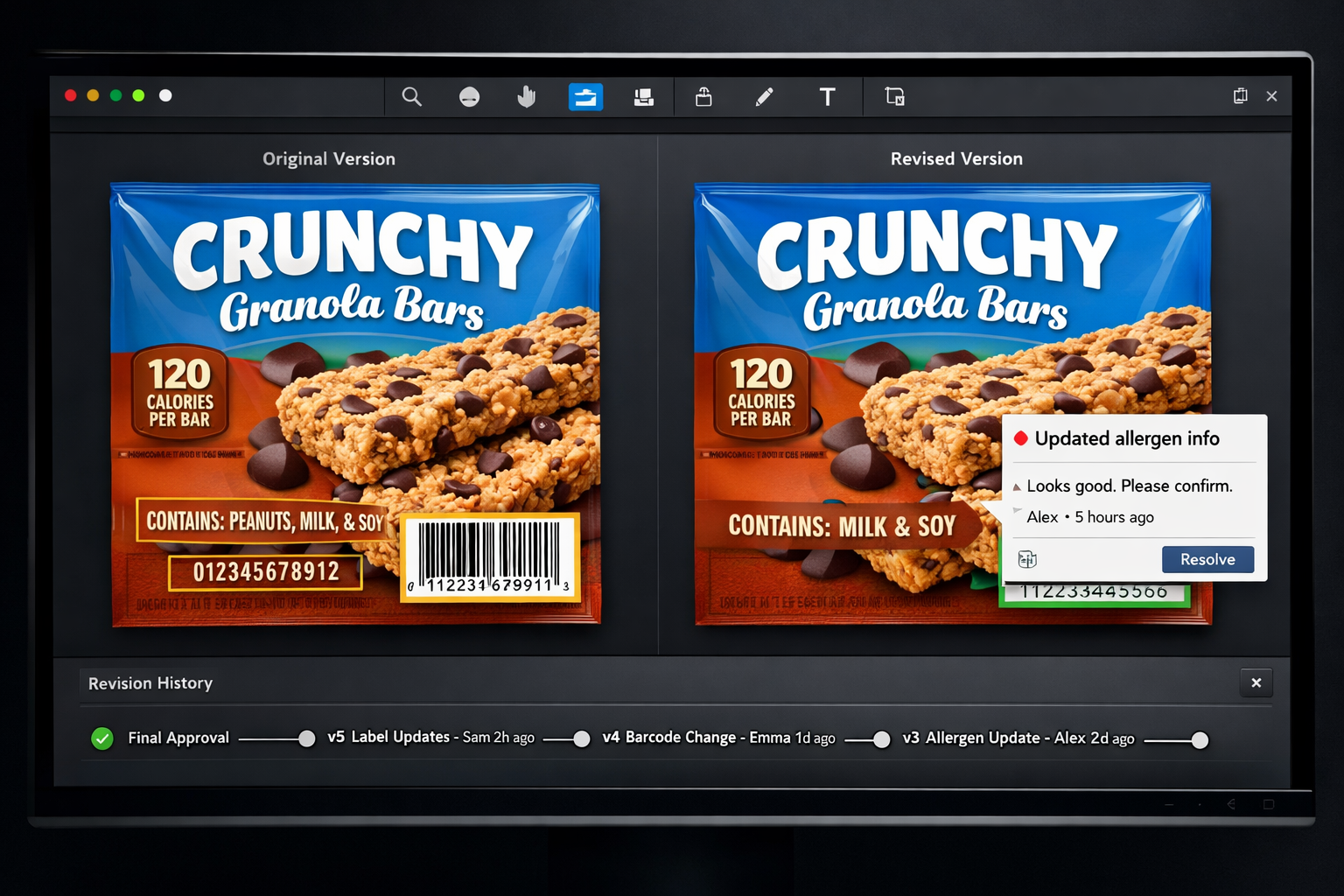
When you're comparing artwork versions, you need to see exactly what changed—not guess based on memory. Side-by-side comparison shows two versions simultaneously, letting you spot differences in text, colors, icons, and layout. Cway's best-in-class compare tool highlights even subtle pixel-level changes that manual review would miss.
This feature matters because packaging revisions often involve small but critical updates: a new allergen statement, an adjusted barcode position, or a regulatory symbol change. Without visual comparison, these changes slip through.
Cway displays differences through multiple comparison modes including overlay and flicker views. You can toggle between versions instantly, making it easy to confirm that requested changes were implemented correctly.
Side-by-side comparison features
- Pixel-level change detection: Automatically highlights visual differences between versions so you never miss a modified ingredient or shifted element
- Multiple comparison modes: Switch between side-by-side, overlay, and flicker views depending on what you're checking
- Version history access: Compare any two versions from your complete revision history, not just the most recent pair
- Color shift detection: Spot color changes that could affect brand consistency or print accuracy
- Text change highlighting: Identify modified copy instantly without reading every line manually
Side-by-side comparison pros and cons
Pros:
- Reduces review time by making changes immediately visible
- Catches errors that manual comparison would miss
- Creates confidence that revisions were implemented correctly
Cons:
- Requires uploading files in compatible formats—though Cway supports all major packaging file types
- Works on visual differences only, not structural file changes—but pairs well with layer preservation features
- Learning the comparison modes takes a short onboarding session—though most reviewers find them intuitive
2. Pixel-accurate zoom: See small print without distortion
Packaging artwork includes fine print that can be as small as 6 points. Nutrition panels, ingredient lists, and regulatory disclaimers all demand precise review. Pixel-accurate zoom lets you magnify artwork 800–3200% while maintaining clarity, so you can verify every character.
Generic proofing tools often blur at high zoom levels, making it difficult to distinguish between similar characters or confirm font consistency. Packaging-specific platforms render files at print resolution.
Pixel-accurate zoom features
- High-resolution rendering: View files at print-quality resolution even when zoomed in significantly
- Pan and navigate: Move around large artwork files smoothly while maintaining zoom level
- Measurement tools: Check distances and sizes directly on the zoomed view
Pixel-accurate zoom pros and cons
Pros:
- Verify small print without squinting or guessing
- Confirm barcode readability at actual size
- Check regulatory symbols meet minimum size requirements
Cons:
- Large files may load more slowly at extreme zoom levels—though modern cloud platforms handle this efficiently
- Requires a stable internet connection for cloud-based viewing—but enables access from anywhere
- Screen size affects how much you can view at once—though pan controls make navigation simple
3. Contextual commenting: Attach feedback to specific regions
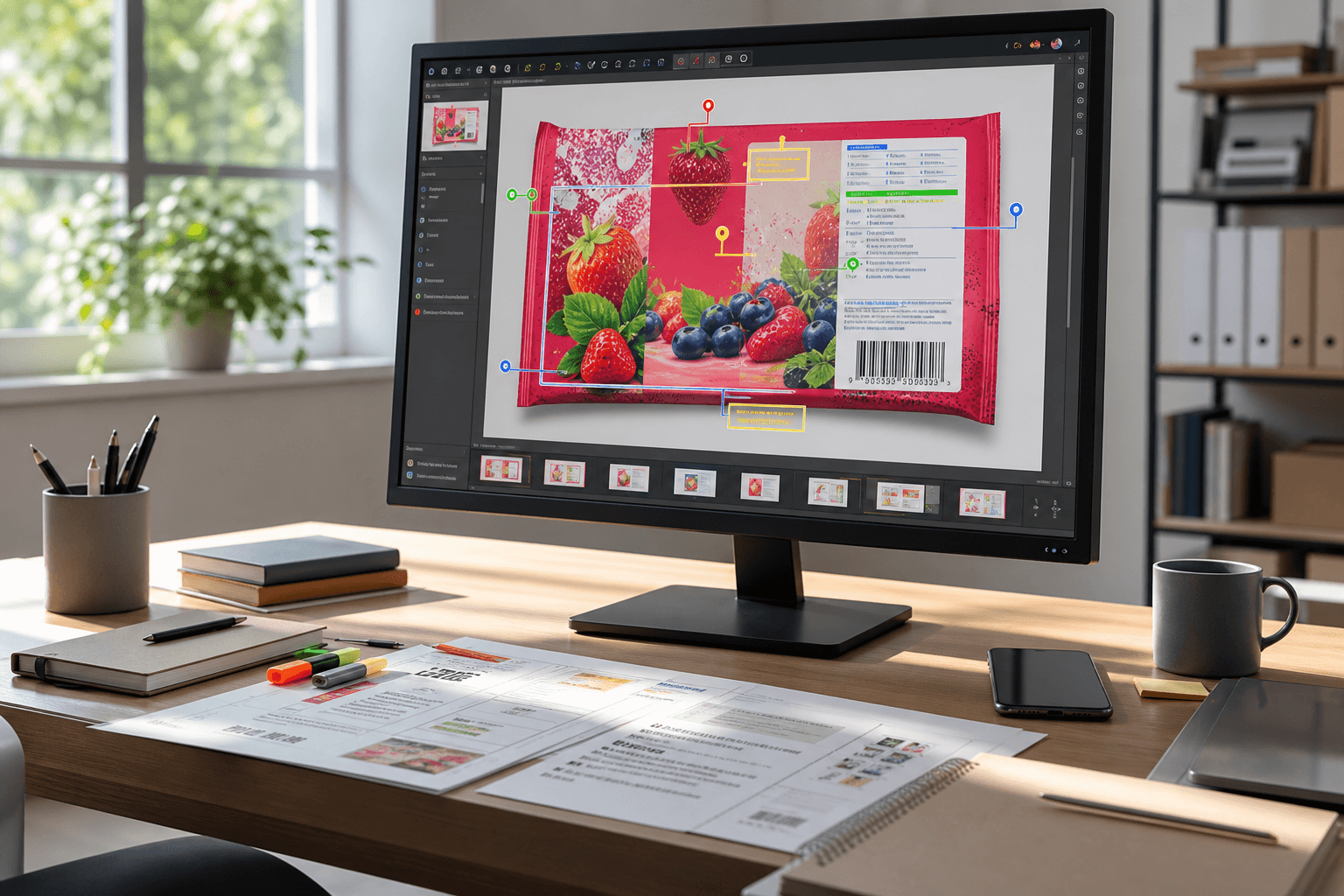
Comments that say "fix the text" create confusion. Contextual commenting lets you place feedback directly on the exact region of the artwork where you see an issue. Your annotation stays attached to that spot across versions.
This capability reduces back-and-forth questions about which text or which icon needs attention. Every comment has precise context.
Contextual commenting features
- Pin-drop annotations: Click anywhere on the artwork to attach your comment to that exact location
- Drawing tools: Circle, highlight, or draw attention to specific areas
- Comment threads: Reply to annotations and keep discussions organized
Contextual commenting pros and cons
Pros:
- Eliminates ambiguity about which element needs changes
- Keeps related feedback grouped together
- Makes it easy for designers to address each point systematically
Cons:
- Requires reviewers to click on the artwork rather than typing in a general text box—though this takes only seconds
- Comments may need repositioning if layout changes significantly—but good platforms handle this automatically
- External reviewers need platform access to leave contextual comments—though Cway offers simple guest access
4. Layer preservation: Review technical artwork without flattening
Packaging artwork files contain multiple layers: dielines, varnish areas, technical specs, and design elements. Layer preservation lets you view and annotate each layer independently without flattening the file.
This matters because issues can hide in specific layers. A missing dieline or an incorrect varnish spec won't show up in a flattened preview but will cause problems at print.
Layer preservation features
- Layer toggle: Turn individual layers on and off to review specific elements
- Layer-specific comments: Attach annotations to the correct layer for clarity
- Dieline awareness: View structural elements separately from design elements
Layer preservation pros and cons
Pros:
- Catch technical errors that flattened previews hide
- Give prepress-specific feedback without confusion
- Verify that all required production layers are present
Cons:
- Only available for file formats that support layers—though standard packaging formats do
- Adds complexity for reviewers unfamiliar with layers—but clear labeling helps
- Some platforms may not preserve all layer types—Cway supports packaging-specific layer structures
5. Automated comment capture: Log feedback with attribution
Every comment on your artwork should include who said it, when they said it, and what version they were reviewing. Automated comment capture logs this information without requiring manual entry.
For regulated FMCG products, this attribution trail can be critical during audits. You can prove that regulatory reviewed the allergen panel and legal approved the claims.
Automated comment capture features
- User attribution: Every comment tags the reviewer automatically
- Timestamp logging: Record the exact date and time of each annotation
- Version association: Comments link to the specific file version being reviewed
Automated comment capture pros and cons
Pros:
- Creates accountability without extra effort
- Supports audit requirements for regulated industries
- Helps resolve disputes about what was requested when
Cons:
- Requires all reviewers to have individual accounts—though this also improves security
- Historical comments may accumulate over many versions—but filtering tools keep views clean
- Integrating external feedback requires bringing reviewers into the platform—which Cway simplifies with guest access
6. Audit-ready markup logs: Document the complete approval history
When a regulatory body asks for proof that your packaging artwork went through proper review, you need a complete record. Audit-ready markup logs compile every annotation, decision, and approval into documentation you can export.
Cway captures this history automatically as part of the workflow. You don't need to create separate audit documentation—it's built into how the platform works.
Audit-ready markup logs features
- Complete comment history: Access every annotation from every version in one view
- Approval records: See who approved each version and when
- Export capability: Generate audit-ready reports for external review
Audit-ready markup logs pros and cons
Pros:
- Meets regulatory documentation requirements
- Reduces audit preparation time significantly
- Creates a defensible record of your approval process
Cons:
- Requires consistent platform use to capture all activity—but this also improves process discipline
- Reports may include more detail than needed for some audits—though you can filter exports
- Historical data storage adds to platform costs—but the compliance value far exceeds this
7. Multi-format support: Annotate any packaging file type
Packaging artwork arrives in various formats: PDF/X for print-ready files, AI and EPS from designers, TIFF for high-resolution images. Your annotation platform needs to handle all of these natively.
Generic proofing tools often convert files or reduce quality for preview. Packaging-specific platforms render files accurately without modification.
Multi-format support features
- Native rendering: View files without conversion that could introduce errors
- Format flexibility: Accept uploads in any standard packaging format
- Quality preservation: Maintain print-resolution quality in previews
Multi-format support pros and cons
Pros:
- Review any file your designers or printers send
- Avoid quality loss from format conversion
- Streamline workflows by accepting files as-is
Cons:
- Some proprietary formats may require plugins—though standard formats cover most use cases
- Very large files may need compression for upload—but this rarely affects review quality
- Older legacy formats may need updating—which improves long-term workflow anyway
8. Role-based review routing: Direct annotations to the right stakeholders
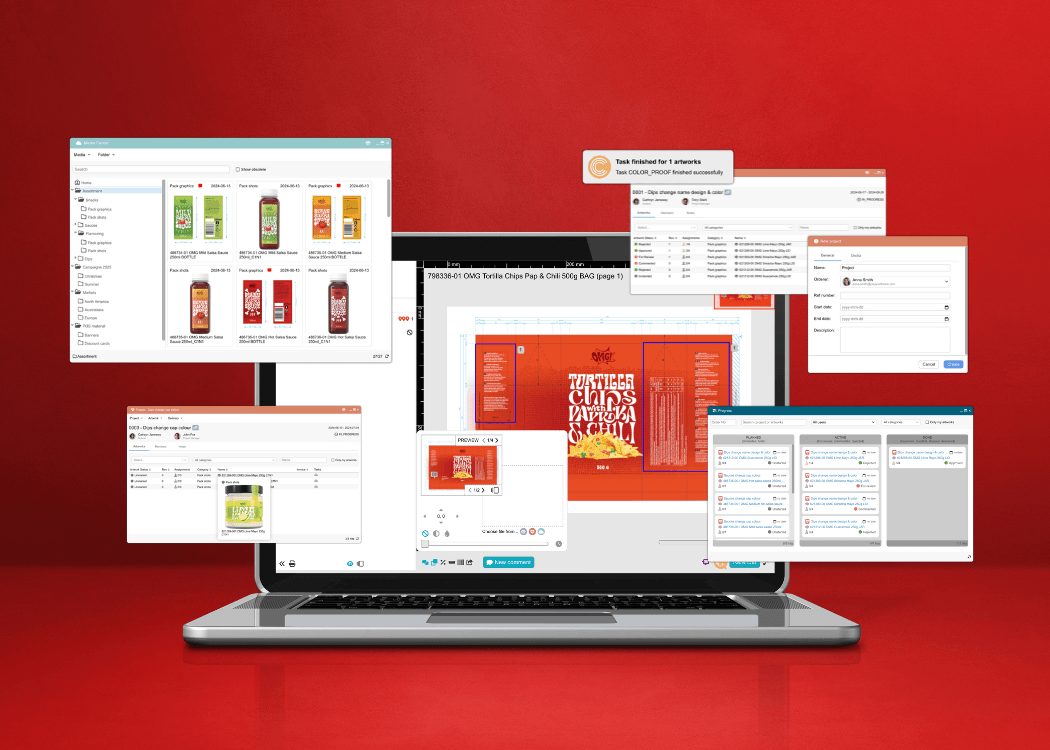
Packaging approval involves multiple stakeholders: brand, regulatory, legal, quality, and production. Role-based review routing ensures each group sees relevant annotations and reviews at the right stage.
This prevents bottlenecks where one department waits unnecessarily for another. It also keeps reviewers focused on their areas of responsibility.
Role-based review routing features
- Sequential staging: Move artwork through defined approval stages
- Parallel review: Enable multiple stakeholders to review simultaneously when appropriate
- Notification triggers: Alert the right people when their review is needed
Role-based review routing pros and cons
Pros:
- Shortens overall approval cycle by running parallel reviews
- Ensures regulatory sees compliance-critical elements before production
- Reduces noise by showing reviewers only what they need to see
Cons:
- Requires workflow setup upfront—though this investment saves time on every project
- Changes to approval structure need configuration updates—but flexible platforms make this easy
- Complex routing can create confusion if not well documented—clear naming conventions solve this
9. Revision tracking: Monitor which comments were addressed
When a new artwork version arrives, you need to verify that previous feedback was addressed. Revision tracking connects comments to their resolution status across versions.
This feature closes the loop on feedback. Instead of re-reading all comments to check if they were implemented, you can see at a glance which items are resolved.
Revision tracking features
- Status indicators: Mark comments as resolved, pending, or needs discussion
- Cross-version linking: See how comments carry through version history
- Summary views: Get an overview of open vs. resolved items
Revision tracking pros and cons
Pros:
- Prevents the same feedback from being repeated across rounds
- Shows progress through the revision cycle clearly
- Helps project managers identify stuck items
Cons:
- Requires reviewers to update comment status—though this becomes habit quickly
- Some subjective comments may not have clear resolution—but threading discussions helps
- Integration with external design tools varies—Cway bridges this with upload workflows
10. Cloud-based access: Collaborate with global teams and external partners
Packaging workflows typically involve internal teams across locations plus external agencies, printers, and regulatory consultants. Cloud-based access lets everyone collaborate on the same files without shipping versions back and forth.
Real-time collaboration means everyone sees the latest version and current comments. There's no confusion about which file is current.
Cloud-based access features
- Anywhere access: Review and annotate from any location with internet
- Guest access: Bring external partners into specific projects without full accounts
- Real-time sync: See updates as they happen without refreshing
Cloud-based access pros and cons
Pros:
- Eliminates version confusion from emailing files
- Enables global teams to work across time zones
- Brings printers and agencies into your workflow directly
Cons:
- Requires internet connectivity—though offline viewing modes can help
- Security configurations need attention for sensitive products—Cway has enterprise-grade controls
- Training external partners on the platform takes some time—but reduces long-term friction
Comparison table: Annotation features for packaging approval software
| Feature | Cway | Generic Proofing Tools | Enterprise Packaging Platforms |
|---|---|---|---|
| Side-by-side version comparison | ✓ Multiple modes | ✗ | ✓ Basic |
| Pixel-accurate zoom (3200%+) | ✓ | ✗ | ✓ |
| Dieline-aware commenting | ✓ | ✗ | ✓ |
| Audit trail with user attribution | ✓ Automatic | ✗ | ✓ Manual setup |
How do annotation tools reduce packaging revision cycles?
Annotation tools reduce revision cycles by making feedback precise and actionable. When reviewers can point directly to an issue rather than describe it vaguely, designers understand exactly what needs changing. This eliminates the back-and-forth clarification that extends timelines.
Cway's annotation capabilities connect feedback to specific artwork regions. A comment about the ingredient panel attaches to that panel. A note about the barcode position points to the barcode. There's no interpretation required.
This precision compounds across multiple reviewers. When regulatory, legal, and brand all leave contextual feedback on the same version, the designer receives one clear set of instructions. Cway tracks all these comments in a single view, organized by location and reviewer.
Why does approval traceability matter for regulated FMCG products?
Approval traceability creates a documented record that can withstand regulatory scrutiny. For FMCG products—especially in food, pharma, and cosmetics—you may need to prove that qualified personnel reviewed compliance-critical elements before printing.
Without traceability, you're relying on email archives and individual memories. These sources are incomplete and difficult to search when an auditor asks questions months later.
Cway builds traceability into every workflow automatically. Every annotation captures who made it, when, and on which version. Every approval records the approver and timestamp. This data exports into audit-ready reports without manual compilation.
Why Cway is the best choice for packaging artwork annotation
Cway delivers annotation capabilities built specifically for packaging workflows. Where generic proofing tools treat every file the same, Cway understands that packaging artwork contains regulated content, technical layers, and precision requirements that demand specialized handling.
The platform reduces revision cycles by making feedback actionable. Side-by-side comparison catches changes that manual review misses. Contextual commenting eliminates ambiguity. Cway automates audit trail creation so you meet compliance requirements without extra documentation work.
Cway connects your entire approval workflow—marketing, regulatory, legal, QA, and external partners—in one platform. Everyone sees the same version with the same comments. No files get lost in email. No feedback gets missed between versions.
Ready to see how Cway handles annotation for packaging artwork? Request a demo and explore the platform with your own files.
FAQ
-
What annotation features are most important for packaging artwork?
Side-by-side version comparison, contextual commenting, and audit trails are the most critical features. These capabilities ensure you catch every change, communicate feedback clearly, and document approvals for compliance. Cway delivers all three with packaging-specific enhancements.
-
How does side-by-side comparison speed up packaging reviews?
Side-by-side comparison shows exactly what changed between versions, eliminating the need to review entire files manually. Cway's comparison tool highlights pixel-level differences, so you can verify that revisions were implemented correctly in seconds rather than minutes.
-
Can annotation tools help with regulatory compliance?
Yes. Annotation tools with automatic user attribution and timestamp logging create audit trails that meet regulatory documentation requirements. Cway captures every comment and approval decision, generating audit-ready reports that prove your review process.
-
What file formats should packaging annotation tools support?
Your annotation platform should support PDF/X, AI, EPS, and TIFF at minimum—these are standard packaging formats. Cway renders all major packaging file types natively, maintaining print-quality resolution in previews.
-
How do contextual comments improve feedback quality?
Contextual comments attach directly to the artwork region they reference, eliminating ambiguity. Instead of describing where an issue is, you point to it. Cway's annotation tools let reviewers pin comments, draw highlights, and maintain discussion threads attached to specific elements.
William Janeway