1 min read
Top 7 artwork management software for packaging teams (2026)
If you're part of a team that creates packaging—whether it’s for yoghurt tubs, medicine boxes, or shampoo bottles—you know how tricky it can be to...
4 min read
Ekaterina Skalatskaia
:
September 25, 2026
Every rejected artwork costs more than it looks. A rejection means another design round, another review cycle, another wait for the right stakeholder, and often a delayed print slot. Multiply that across a product range with dozens of SKUs, language variants, and regulatory updates, and rejections become one of the biggest hidden drivers of slow time-to-market.
The good news: most rejections are predictable. They come from the same few causes, and they can be reduced with the right combination of tools, process, and data. In this guide, we look at why packaging artwork gets rejected, how to catch problems earlier, and how to measure whether your approval workflow is really getting better.
Before you can reduce rejections, you need to understand where they come from. In most packaging teams, the causes fall into four groups.
When comments arrive through email, chat, and marked-up PDFs, designers work from incomplete information. The next version fixes some issues, misses others, and gets rejected again.
A reviewer checks the new version but doesn't notice that a legal claim moved, a barcode changed, or an allergen line disappeared. The error is caught late, or not at all.
If regulatory, marketing, and brand stakeholders review in the wrong order, or someone who should have approved is missing from the workflow, artwork gets sent back late in the process.
Without data, teams treat every rejection as a one-off. They don't see that one category, one market, or one supplier accounts for most of the rework.
Each of these causes has a practical fix.
The first step is getting all review activity into one place. Generic file-sharing or design tools rarely handle the specific needs of packaging: fine print, dielines, color specifications, multi-stakeholder approvals, and a full audit trail.
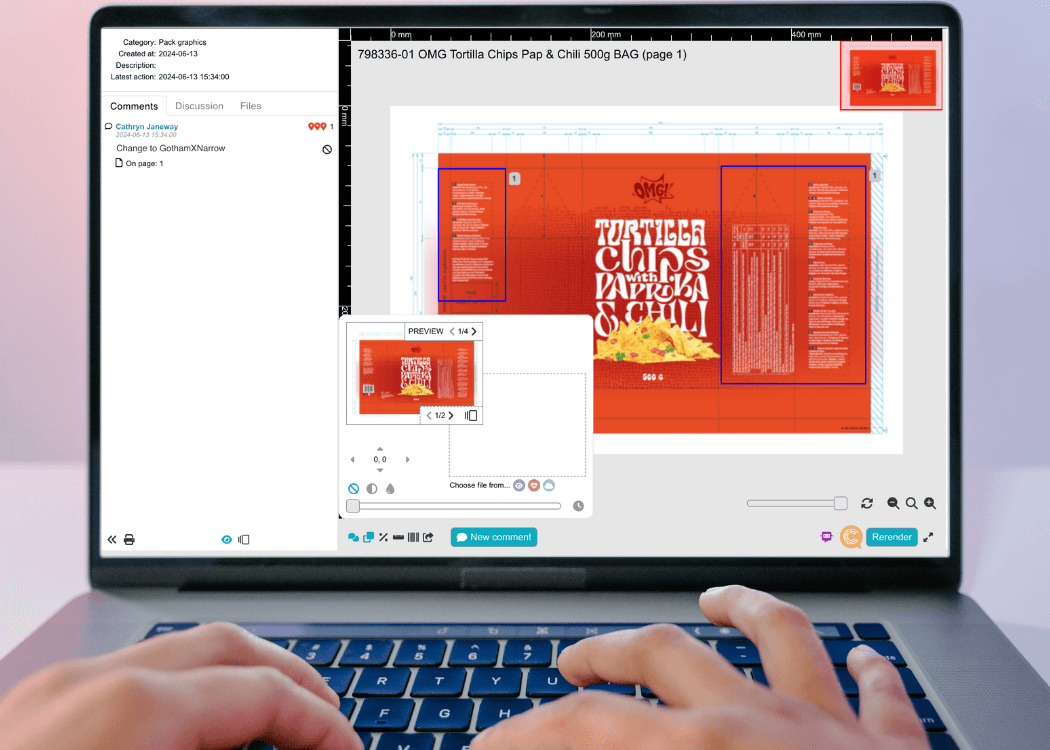
A packaging-focused online proofing platform gives every reviewer the same high-resolution file, lets them annotate directly on the artwork, and records who approved what and when. That alone removes a large share of rejections caused by lost or contradictory feedback.
If you're still evaluating options, our comparison of the top 5 online proofing software for packaging visuals breaks down how leading platforms differ on artwork review, asset libraries, version control, and approval tracking.
When comparing tools, pay particular attention to:
Many rejections happen because a reviewer approves version 3 without fully understanding how it differs from version 2. A missed change in a nutrition table or ingredient list can lead to compliance issues and, in the worst case, a reprint.
Visual comparison is the most reliable way to prevent this. Instead of opening two files side by side and scanning them manually, reviewers overlay the versions and see exactly what moved, changed, or disappeared.
In Cway, the Viewer's comparison tool lets you adjust the transparency of the secondary file so both versions appear in a single view, with comments staying aligned to the artwork. You can read more about how this works, along with the new User app for managing reviewer access at scale, in our post on recent artwork comparison and user management improvements.
A few habits make comparison even more effective:
A clear approval sequence reduces late-stage surprises. As a rule of thumb:
When regulatory feedback arrives after brand approval, designers are forced to rework artwork that everyone thought was finished. Structured artwork approval workflows with defined stages and automated notifications make sure each reviewer sees the artwork at the right moment.
Access management matters here too. In larger organizations, outdated user roles are a common reason why the wrong person is assigned to a review, or the right person never gets notified. Regularly auditing who has access, and in which role, keeps workflows clean.
You can't improve what you don't measure. Once proofing, comparison, and approval stages are in place, data shows whether the changes are working.
The most useful artwork approval KPIs for packaging teams are:
Looking at these metrics together tells a story. A rising rejection rate in one category might point to unclear brand guidelines. A drop in on-time deliveries during peak months might mean you need to plan reviewer capacity earlier.
Cway's analytics hub, Pulse, tracks exactly these areas: delivered artworks, rejections with category breakdowns and ratios, on-time deliveries, and open projects, with trend charts and year-over-year comparisons. See what's new in the latest Pulse update for artwork management analytics.
Metrics are only valuable if they lead to action. Review your approval KPIs on a regular basis (monthly works well for most teams) and ask:
Small, targeted changes based on real data usually have a bigger impact than a complete process overhaul.
Reducing artwork rejections isn't about asking reviewers to try harder. It's about building a workflow where errors are hard to miss and easy to learn from:
Cway brings all of these steps into one packaging artwork management platform, from proofing and comparison to analytics.
Want to see how your team could cut rework and approve artwork faster?
1 min read
If you're part of a team that creates packaging—whether it’s for yoghurt tubs, medicine boxes, or shampoo bottles—you know how tricky it can be to...
1 min read
When it comes to managing packaging design, standard document systems simply don’t keep up. In today’s global, fast-moving markets, teams need ...
1 min read
Your Guide to the Artwork Workflow Behind Great Packaging When you pick up a product in a store — from a yogurt cup in Colombia to a shampoo bottle...